Email is part of daily business. Teams use it for campaigns, product updates, invoices, alerts, and support. That makes it easy to treat email sending as routine. But routine systems often hide serious risks. One exposed login, one wrong recipient, or one unsafe workflow can leak customer data fast.
This matters more than ever. IBM’s 2024 Cost of a Data Breach Report found the average global breach cost reached $4.88 million, the highest level reported so far. In email operations, the damage can include lost trust, legal pressure, and broken customer relationships. Strong data breach prevention is not about one security trick. It comes from better controls across access, encryption, data handling, and monitoring.
What Is an Email Data Breach and Why Does It Matter?
An email data breach happens when sensitive information is exposed through your email workflow. That can happen during sending, storage, access, syncing, or reporting. It may involve outside attackers, but many breaches start with weak controls inside normal business processes.
Email deserves extra attention because it touches customer data so often. Marketing, product, support, and billing teams all rely on it. When one system handles so much communication, even a small mistake can create a large problem.
Clear Definition
In email sending, a breach means private data is viewed, shared, or stored in a way that should not happen. That can include personal data, account details, internal business data, or regulated customer information.
This is broader than a classic cyberattack. A breach can be as simple as a team member sending a file to the wrong audience or leaving sensitive fields visible in logs.
Common Leaks
These are some of the most common forms of email data leakage:
- Sending a campaign or file to the wrong segment
- Using CC instead of BCC
- Allowing too many users to export recipient data
- Leaving former employees with active access
- Showing sensitive values in plain text inside templates or logs
Most of these are preventable. The problem is that many teams do not notice the risk until after something goes wrong.
Business Impact
The impact is rarely limited to one bad email. A leak can trigger customer complaints, internal reviews, legal checks, and revenue loss. Cisco’s 2024 Data Privacy Benchmark Study found that 95% of organizations said privacy investments deliver benefits that outweigh their costs. That is a strong sign that security and business value are closely linked.
When customers stop trusting your systems, email performance can suffer too. Complaints rise. Engagement falls. Teams become slower because every send feels risky.
Legal Risk
If leaked data includes personal information, legal exposure grows quickly. GDPR and similar laws expect companies to protect personal data and limit unnecessary access. Fines under GDPR can reach €20 million or 4% of annual global turnover, depending on the case.
That does not mean every email mistake leads to a penalty. But it does mean your sending process needs real data protection controls, not just good intentions.
Why Do Email Data Breaches Happen?
Most email breaches happen because several small weaknesses exist at the same time. A weak login policy by itself may not cause a leak. A poor role setup by itself may not cause one either. But together, these gaps increase risk fast.
The good news is that the main causes are well known. That makes them easier to fix if your team treats email security as an ongoing system.
Weak Access
Too many teams give broad access to users who do not need it. That means more people can view, export, or change sensitive data. Verizon’s 2024 Data Breach Investigations Report found the human element was involved in 68% of breaches. In email tools, that often includes errors, misuse, or stolen credentials.
A strong access model should separate content work from high-risk account actions.
No Encryption
When data moves without proper encryption, it is easier to intercept or expose. SSL encryption and TLS help protect data in transit between users, platforms, and connected systems.
Encryption will not stop every type of breach. But without it, you leave a basic gap open in your email security setup.
Plaintext Data
Plaintext handling creates avoidable exposure. If full customer details appear in dashboards, logs, or templates, more people may see them than necessary.
This is where data masking matters. Masking reduces visibility without stopping work. It lets teams use the data they need while lowering the chance of full exposure.
Bad Configs
Misconfiguration is one of the easiest ways to create hidden risk. A platform may offer strong protections, but poor setup weakens them.
Common examples include:
- API keys with broad access
- Unrestricted admin logins
- No IP restrictions for sensitive actions
- Unneeded customer fields synced into email tools
- Exports left open to too many users
These are operational issues, which means they can be fixed with process and review.
Human Error
Fast-moving teams make mistakes. Someone selects the wrong list. Someone copies the wrong field. Someone skips a review step before launch. Human error is normal. What matters is whether your system makes those errors easy or hard to recover from.
Good systems lower the damage from one mistake. Poor systems turn a small slip into a full incident.
Third-Party Risk
Email programs often connect with CRMs, analytics tools, support platforms, and billing systems. Every extra connection increases the number of places where data can move or leak.
That is why vendor choice matters. A secure setup depends not only on your team, but also on the security standards of the platforms in your stack.
How Does a Strong Email Security Checklist Look Like?
A strong checklist helps teams make security repeatable. It turns email safety from a vague goal into a clear operating standard. That matters because secure email sending depends on habits, not one-time fixes.
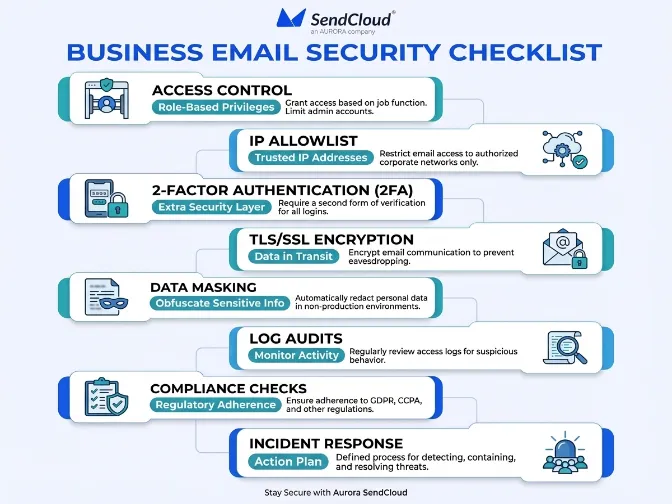
The best checklist is practical. It should cover access, transmission, storage, monitoring, and response without becoming hard to use.
Access Rules
Start by tightening who can do what. Not every user should have the same level of access.
Use simple rules like these:
- Give each team member a unique login
- Limit admin access to a small group
- Review user permissions on a regular schedule
- Remove access fast when roles change
This reduces both accidental leaks and account misuse.
IP Allowlist
An IP allowlist limits access to approved IP addresses. This is useful for admin areas and sensitive settings. Even if someone gets valid login credentials, they may still be blocked if they try to log in from an unapproved location.
This works well for teams that use office networks or fixed VPN endpoints.
2FA Setup
Two-factor authentication is one of the simplest ways to reduce account takeover risk. Microsoft has reported that MFA can block more than 99.2% of account compromise attacks in many common scenarios.
For best results, 2FA should be required for all users, not just admins. Optional security controls are often the first ones ignored.
TLS/SSL Use
Encryption should protect data while it moves through the platform and connected systems. That includes user sessions, APIs, and message transfer flows.
Teams should check whether encryption is enforced or only attempted. “Available” is not the same as “required.”
Data Masking
Sensitive values should not be fully visible unless there is a real need. Data masking helps reduce exposure across daily operations.
Good places to apply masking include:
- User dashboards
- Activity logs
- Recipient data views
- Support and admin screens
This is a simple way to improve secure email sending without slowing teams down.
Log Audits
Logs help you see what happened and when. That is critical for both prevention and response. If you cannot track account activity, you will struggle to detect unusual behavior early.
Logs should show access events, exports, setting changes, and suspicious login patterns.
Compliance Checks
Security and compliance support each other. If your platform and process align with privacy requirements, you are less likely to expose data carelessly.
For GDPR compliance, teams should know what data enters the system, who can access it, and how long it stays there. Clear data handling rules reduce both legal and operational risk.
Response Plan
Even strong systems need a response plan. If a leak is suspected, your team should know who owns the issue, how to contain it, and how to investigate it.
A written plan saves time. It also helps teams avoid panic during the first critical hours.
How Do You Strengthen Access Control and Authentication?
Access control is one of the fastest ways to improve data breach prevention. If too many users can see or change sensitive data, the chance of a leak rises. The goal is simple: give people only the access they need, and make high-risk actions harder to abuse.
This is not just about security teams. Marketing and growth teams benefit too because fewer access problems mean fewer campaign delays and fewer internal risks.
Role Limits
Roles should match real work. A campaign editor does not need the same permissions as a system admin. A reporting user does not need export rights by default.
When roles are clear, it becomes easier to audit access and reduce exposure.
Least Privilege
Least privilege means the minimum level of access needed for a job. It is one of the most effective ways to limit damage when an account is misused.
A good least-privilege setup often improves operations too. Teams know who owns what. Changes are easier to review. Sensitive actions become easier to track.
Login Security
Login protection should include more than passwords. Stolen credentials remain a major risk in cloud software and business platforms.
A stronger setup includes unique user accounts, 2FA, session monitoring, and alerts for unusual login behavior. If possible, combine this with network-based restrictions for high-risk users.
Team Reviews
Access is never “set and done.” Teams change, contractors leave, and responsibilities shift. That is why access reviews should happen on a regular schedule.
At minimum, review admin access every quarter. In faster-moving teams, monthly reviews for sensitive roles may be better.
How Should You Protect Data in Transit and at Rest?
Email data needs protection while it moves and while it sits inside systems. If one part is weak, the whole workflow becomes less secure. That is why teams should think beyond the send itself.
A good approach combines encrypted transmission, limited storage, masked visibility, and sensible retention practices.
TLS/SSL
TLS helps secure data in transit. It supports safer communication between users, platforms, and connected services. This is a basic but essential layer of email security.
Teams should confirm that HTTPS is enforced and that secure transport is used across APIs and related platform activity.
Secure Storage
Storing less data is often safer than trying to protect too much data forever. Teams should only keep the fields they truly need for sending and reporting.
This lowers exposure and makes compliance easier. It also reduces the impact if an account or system is compromised.
Mask Sensitive Data
If full values are not needed for daily work, they should not be fully visible. Masking is especially useful in logs, support views, and reporting screens.
It supports privacy by design. It also helps limit accidental exposure inside the company.
Retention Rules
Retention discipline is often overlooked. Old exports, old logs, and old recipient details can sit in systems for years without a clear reason.
Set retention rules for message logs, exported data, and user activity records. The less unnecessary data you keep, the less data can leak.
Why Do Monitoring, Audits, and Compliance Matter?
Prevention is only one side of security. Detection matters too. Monitoring helps you spot unusual behavior early. Audits help you find weak points before they turn into incidents. Compliance helps make your process more disciplined.
Together, these three areas create accountability. They show whether your email system is actually secure in practice, not just in policy.
Log Visibility
Good visibility means you can answer simple but important questions. Who logged in? Who exported data? What changed? When did it happen?
If your platform cannot give clear answers, incident response becomes much harder.
Audit Routine
A regular audit routine helps reduce drift. Settings change. New users get added. Integrations expand. Without review, risk grows quietly.
A simple monthly or quarterly process is enough for many teams, as long as it is consistent and documented.
GDPR Fit
Privacy compliance is not just legal paperwork. It shapes how data is collected, stored, and used. Cisco’s 2024 privacy benchmark found that 80% of organizations reported major business benefits from privacy spending, including stronger customer trust and operational gains.
That makes sense. Better privacy process usually leads to stronger data protection.
Incident Steps
When a suspected leak happens, the first priority is containment.
A basic incident flow looks like this:
- Stop the risky send or access path
- Preserve logs and evidence
- Identify what data may be exposed
- Notify internal owners quickly
- Fix the root cause before normal operations resume
Fast, clear action can reduce both customer harm and internal confusion.
How Aurora SendCloud Helps Prevent Email Data Leaks
Platform choice matters because security depends on more than team behavior. Aurora SendCloud helps businesses build safer sending workflows by adding practical controls around access, transmission, and data visibility.
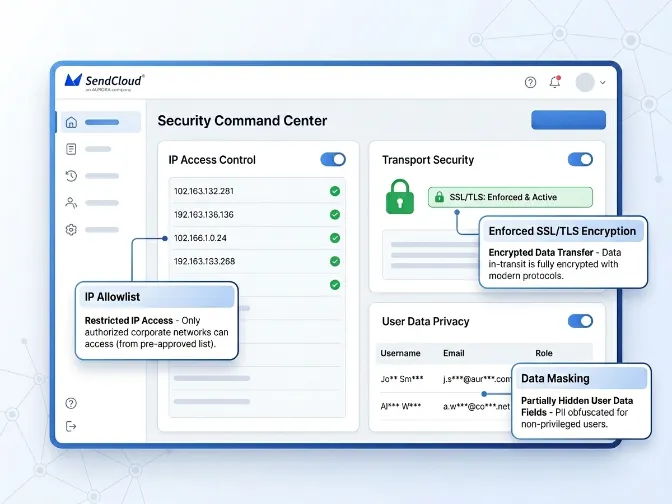
That is useful for companies that send at scale and need a more reliable security baseline.
Security Focus
Aurora SendCloud supports secure email operations through infrastructure and account-level controls designed to reduce risk in daily sending workflows.
IP Allowlist
IP allowlisting helps restrict access to trusted locations. This lowers the chance of unauthorized access from unknown networks, especially for sensitive account areas.
TLS Protection
Enforced SSL/TLS encryption helps secure data in transit. This supports safer communication across the platform and reduces exposure during transmission.
Data Masking
Data masking helps limit plain-text exposure of sensitive values. Teams can still work with the data they need, but without showing full details everywhere.
Practical Value
Together, these protections help improve email security, support stronger data breach prevention, and reduce the risk of email data leakage in everyday operations.
FAQs
Q1:How exactly do I configure an IP allowlist?
Add the trusted public IP addresses used by your office or VPN to your platform’s allowlist settings. This restricts access to approved locations only. Test it first so your team does not get locked out by mistake.
Q2:Does SSL/TLS encryption guarantee 100% email security?
No, SSL/TLS only protects data in transit. It does not prevent wrong-recipient sends, weak access control, or internal misuse. You still need layered email security controls.
Q3: When evaluating a platform like Aurora SendCloud?
Look for role-based access, login security, audit logs, secure API controls, and clear privacy documentation. You should also check whether the platform supports compliance needs such as GDPR-related data handling. A strong platform should help reduce risk across the full sending workflow.
Q4: If a suspected email data leak has already occurred?
Contain the issue immediately to stop further exposure. Then identify what data was affected and preserve logs or evidence. After that, follow your incident response and compliance process.
Why Is Security the Foundation of Email Sending?
Email security works best when it is built into the system. Strong access control, enforced encryption, careful data handling, regular audits, and clear response steps all matter. That is what makes data breach prevention real. Not one feature. Not one policy. A reliable process.
You can manage this more easily with Aurora SendCloud.