Most website visitors do not purchase during their first visit. This opportunity loss results in a decrease in revenue and a waste of marketing efforts for companies. Many companies are spending heavily on traffic acquisition, but are not able to capture users who have already expressed interest. Email automation provides a practical solution. Track user behavior, identify potential buyers, and automatically send messages to encourage them to visit again. With the right settings, you can systematically regain lost opportunities without manual work.
This playbook provides a step-by-step framework for remarketing through email automation. Learn how to identify key user withdrawal points, how to create automatic mail flow, and effective visitor recovery methods. By following this guide, the website can convert more visitors to paid customers.
Re-marketing Basics – Why You Need It and When to Act
Many website visitors leave without conversion while in contact with the brand. Such missed chances cause huge losses in revenues to companies. Remarketing assists in advertising to users who have not acted and remembered. Use automated email processes to get in touch with users when it is the most successful time and remind them about products and services they offer and get them to make purchases and dealings. The reason behind remarketing and whether to remarket or not is the key to effective recovery strategy development.
Why Re-marketing is Needed
Remarketing helps potential customers recover and increase conversion rates. The main advantages are:
- Fill the gaps in the conversion funnel: Target users who leave before the primary action is completed
- Improved marketing ROI: Maximize existing traffic
- Loyalty building: maintaining engagement with interested users
- Data-driven personalization: Email delivery based on user behavior and preferences
Combined with these benefits, remarketing efficiently recovers lost opportunities and improves overall campaign performance.
Key User Loss Journeys & Automation Triggers
Email remarketing focuses on the small disengagement of micromotor, a user who does not act while showing interest. Key trigger examples:
- EC site: cart waiver, item/category page withdrawal, inactive state after first purchase
- SaaS/Services: Inactive status before onboarding, reduced frequency, subscription renewal
- General: Lack of follow-up after download, no event participation, high value page browsing
Automated triggers respond immediately to these actions and send relevant emails that encourage users to revisit and complete their intended actions.
Core Strategies for Automated Email Re-marketing
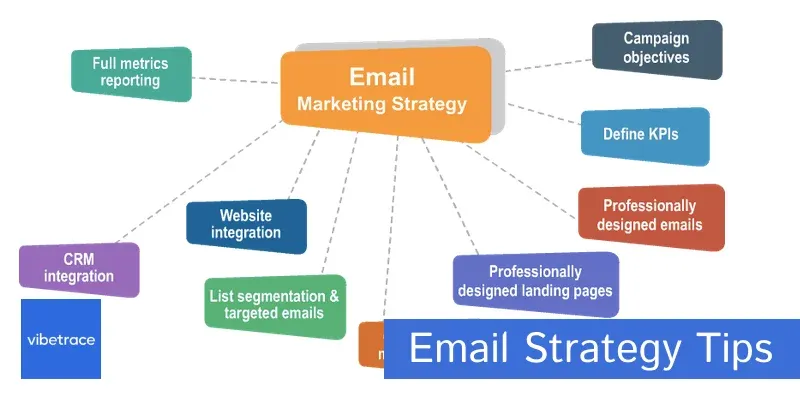
Automatic email workflow recovers disengaged visitors and leads them to purchase and complete actions. Use triggers and sequences to engage users at the right time without manual work. The three main strategies are:
- Cart waiver recovery flow
- Disclaimer re-engagement flow
- Dormant user reactivation flow
1 Automated Cart Abandonment Recovery Flow
Cart waiver is one of the most common reasons why EC sites lose revenue. Many users add items to their cart, but leave without completing the purchase. Automated cart recovery emails remind these users at the right time to complete the checkout. By utilizing structured sequences, you can recover sales without manual work, reduce cart waiver rate, and maintain engagement. This strategy covers users who are already interested in purchasing products.
Email Sequence Design:
- Email 1 (1 hour after triggering): A calm reminder with product images, direct links and inventory-only notes.
- Email 2 (24 hours after triggering): Free shipping, small discounts, customer reviews and other value incentives.
- Email 3 (72 hours after triggering): Last chance email with urgency, substitute and final offer.
This flow reminds the user of the merchandise left behind, encourages purchase decisions, and promotes sales recovery without manual follow-up.
2 Automated Browse Abandonment Re-Engagement Flow
There are users who have visited the site and viewed the product deeply, but leave without taking any action. The waiver email reconnects with these users, reminds them of what they have viewed, and highlights the relevant content. This strategy is effective for both the EC and SaaS businesses, turning a mere viewer into a keen user. Automated workflow ensures timely follow-up, maintaining user interest and leading to conversion without the need for manual response.
Automation Steps:
- User Segmentation: User identification based on visiting pages and products
- Content Automation: Email recommended products and tutorials related to viewing content
- Value re-presents: Emphasize merit, review, case study and encourage re-visit
This technique re-engages visitors with content that has already shown interest and gently evokes brands and products.
3 Automated Dormant User Reactivation Flow
Over time, some users will deactivate and forget about brands and products. Dormant user reactivation emails are intended to recall these users by reminding them of value. This strategy is effective for e-commerce, SaaS, and service-based businesses. You can automatically send personalized messages, offers, and updates that reactivate dormant users by setting inactive triggers. Regular reactivation of inactive users reduces customer withdrawal rates and enhances long-term engagement with audiences.
If there is no activity from the user for a period of time (30/60/90 days).
Email Sequence:
- Phase 1 (Confirmation and Care): Confirmation of safety, request feedback, and send support e-mail.
- Phase 2: Product updates, utilization techniques, and content to evoke value.
- Phase 3 (strong incentive or list organization): Offer discounts, limited content, or unsubscribe options for list organizing.
This flow enables long-term engagement maintenance, reduction of withdrawal rate, and return of inactive users to sales funnels.
Technical Steps – Building Automated Re-marketing Workflows
Effective email remarketing requires a robust technical foundation. This includes capturing user behavior, linking to contacts, and building automated workflows that operate at the right time. The right implementation delivers relevant messages to the right users and improves conversion and engagement. To create automatic remarketing emails, first build a robust foundation.
Data Foundation Setup
- Introduction of website tracking code: Install a tracking script to record user behavior such as page visits, clicks, downloads, and cart activities.
- User identification and data linking: Leverage registration, login, cookies, etc. to link user behavior to specific contacts and enable personalized targeting emails.
Marketing Automation Platform – Hands-On
- Trigger Settings: Define actions to launch automatic emails, such as abandoning carts, browsing pages, and inactivity.
- Workflow construction: Create email sequences with timing, conditions, and branch logic to guide users to conversions.
- Implementation of personalization: Use user-specific information (names, products viewed recently, and behavioral history) to design an attractive and relevant email.
A workflow should be carefully tested to enable the right users to receive emails at the appropriate time. Keep on optimization on opening rate, click rate and conversion. Formalized processes enable you to recover lost sales systematically without having to use manual assistance.
Conclusion
Automated email re-marketing of disengaged visitors of the site converts them into potential shoppers. Follow the behavior of users and deliver timely and personalized emails to enhance the conversion rate, retain customers and boost revenues. This is a practical roadmap of a playbook strategy (between cart abandonment and a dormant user flow).
Next step: Select a dedicated automation platform like Aurora SendCloud and start workflow building now. Start on a small scale, test each sequence, and scale it step by step to recover all lost opportunities. Through continuous efforts, automated email re-marketing can be the core tool driving long-term business growth.