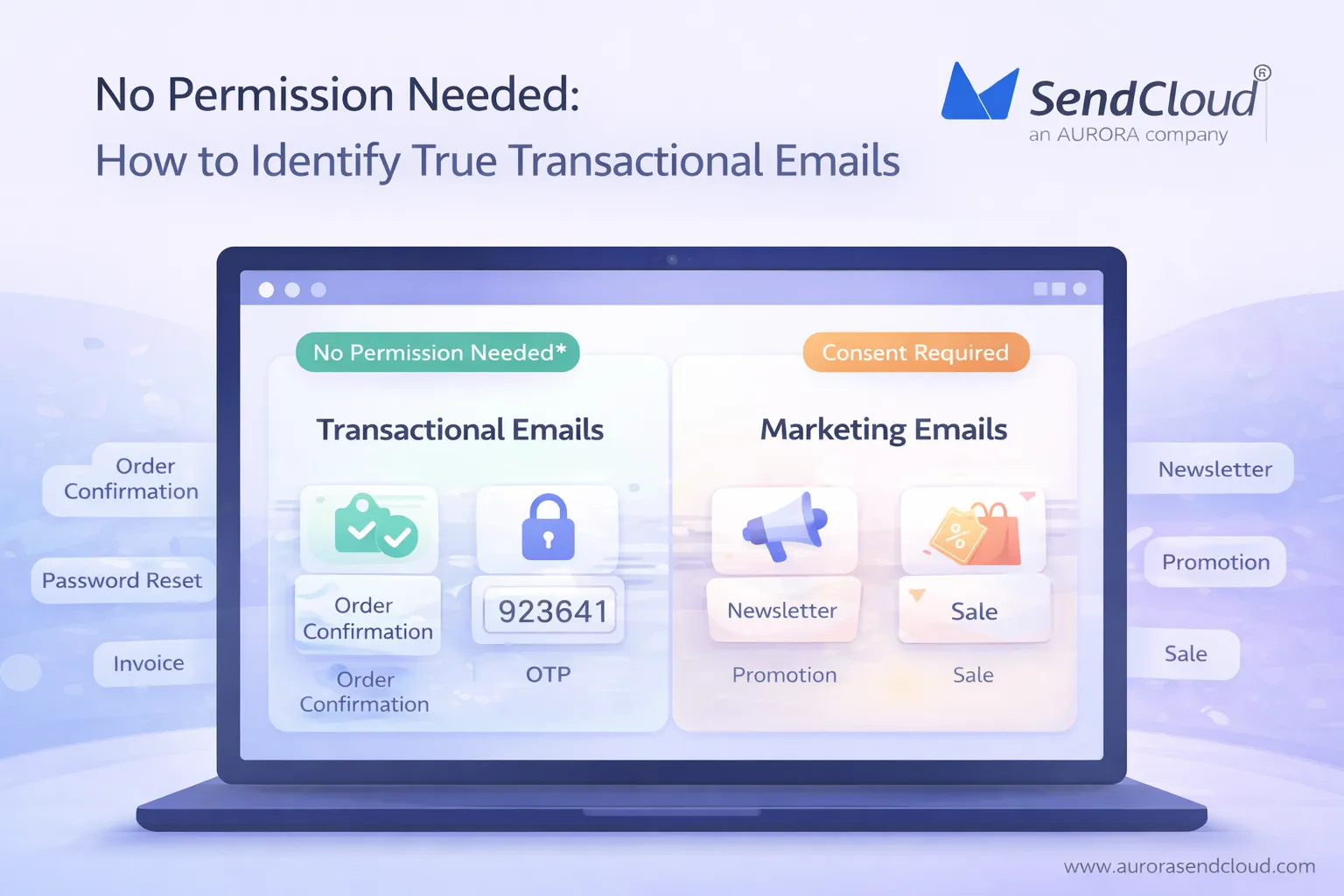
About 370 billion emails go out every day. Roughly half of them are spam or unwanted. Inbox providers have to judge fast which messages are safe, which are ads, and which are essential. In that mix, transactional emails do quiet but critical work.
You use them for order confirmations, password resets, one‑time passcodes, invoices, and shipping updates. If these emails fail, people cannot log in, finish a purchase or trust a payment. They are not meant to sell. Their job is to deliver the service that a user has already asked for.
Most email laws recognise this difference. Under GDPR, ePrivacy and CAN‑SPAM, truly transactional emails are usually allowed without prior marketing consent, because they serve a contract or a clear service need. The trouble starts when a “service” email also tries to act like a promotion. A big discount banner or strong sales copy can flip how that message is classified. Clear rules for what counts as transactional make it easier to stay legal, avoid spam filters, and still keep users fully informed.
What Are Transactional Emails in Email Marketing?
Email volume is huge now. In 2025, about 376.4 billion emails are sent every day. Roughly 22% of that traffic is transactional and about 17% is marketing. transactional emails also get far better engagement: recent market data puts average open rates around 70–75% for transactional emails, compared with only 15–20% for marketing campaigns.
This gap exists because transactional emails do a different job. They are tied to a user’s action and carry information needed to use a product, finish a purchase or keep an account secure. Marketing emails, on the other hand, exist to promote, upsell or bring users back. Keeping that line clear is important for both compliance and deliverability.
Core Definition of a Transactional Email
A transactional email is an automated, user‑triggered message with a functional, non‑promotional main purpose.
It is sent because the user did something specific, such as placing an order, asking for a password reset, confirming an email address, or creating a support ticket. The content focuses on that action and gives the details needed to complete it: confirmation, codes, links, receipts, or status updates. The email may include a small secondary note, but the core of the message is service, not sales.
How Transactional Emails Differ from Marketing Emails
The clearest way to see the difference is to look at purpose, timing and expectations.
Transactional emails exist to deliver a service that already started. The user acts first, the email follows. A purchase, login attempt, or account change happens, and the email confirms or supports that step. The timing is immediate and tied to that trigger. The user expects this email and often cannot continue without it.
Marketing emails exist to promote or persuade. They go out on a schedule or as part of a campaign, not as a direct response to a single action. The goal is to generate new activity: a click, a visit, a purchase or an upgrade. Users may have opted in for these messages, but they do not need them in order to log in or see what they just bought.
Because of this, laws and filters treat the two types differently. A password reset or invoice is usually allowed without prior marketing consent if it stays purely functional. A newsletter or discount blast is not
Common Examples of Transactional Emails
In practice, most teams work with the same core set of transactional emails. Typical examples include:
- Order and billing messages such as order confirmations, invoices, payment success or failure notices, and refund confirmations. These make up a large share of transactional volume and are used by more than 90% of e‑commerce platforms through dedicated APIs.
- Account and security messages such as password reset links, one‑time passcodes (OTP), login alerts and new device notifications. Adoption of two‑factor and OTP flows keeps rising; about 67% of email users now use some form of two‑factor authentication.
- Service and subscription notifications like subscription activations, plan changes, renewal notices and scheduled maintenance alerts, where users need to know what will happen to their access or billing.
- Support and system messages such as ticket creation notices, status updates and system alerts that track an issue through to resolution.
All of these share the same pattern: the user’s action or account status comes first, the email follows, and the main goal is to inform, confirm or protect—not to sell.
Why Do Transactional Emails Not Need Prior Permission?
A large share of global email is still junk. In 2024, about 45–47% of all email traffic was classified as spam. Because of this volume, inbox providers and regulators look closely at what each message is for. They treat pure marketing emails and true transactional emails very differently.
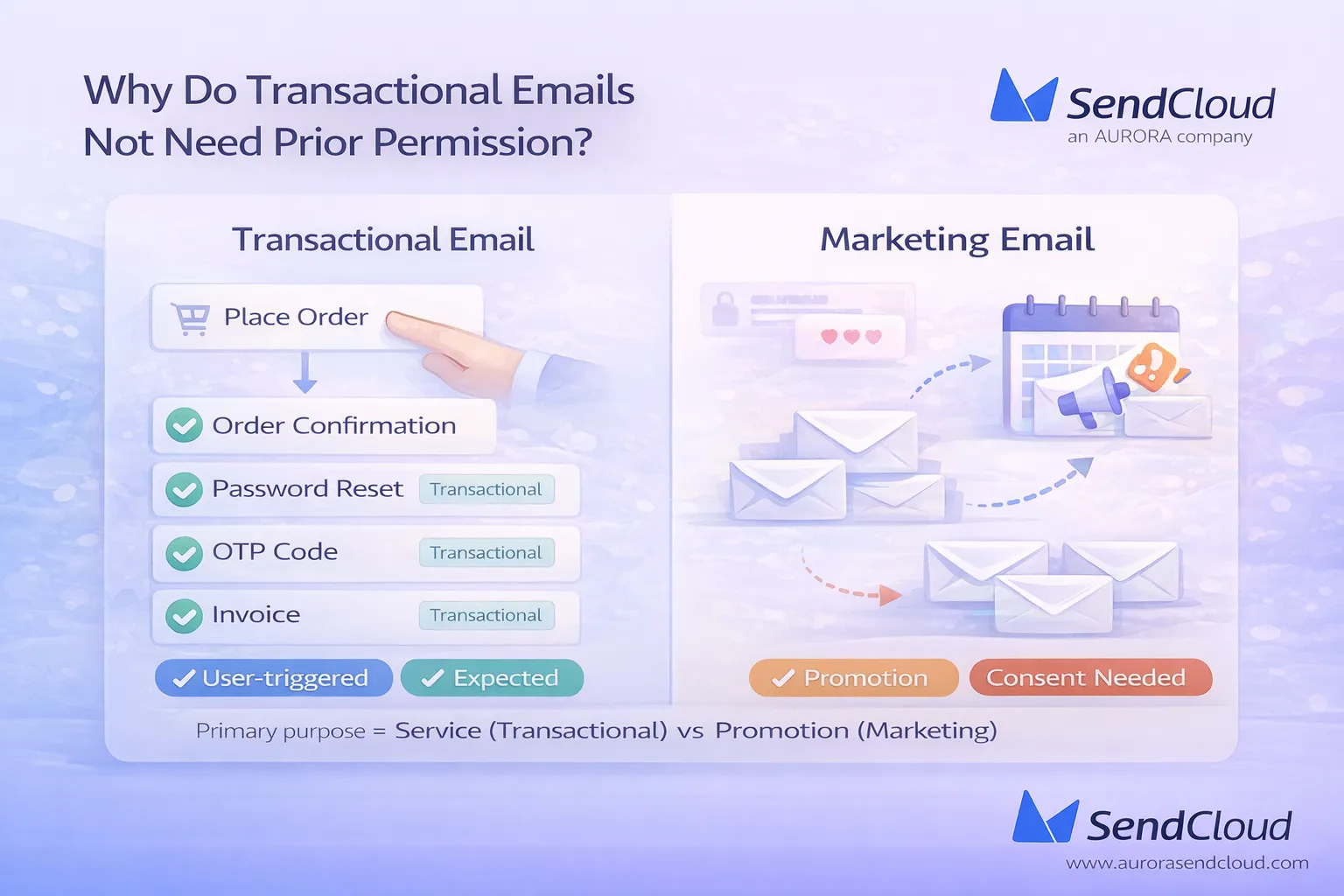
Transactional emails exist to deliver something the user already asked for: an order update, a login code, a bill. That role is why most legal frameworks do not require prior marketing consent for them, as long as the primary purpose is functional, not promotional.
“Expected” and User‑Triggered by Design
A transactional email is sent because of a user action. Someone signs up, places an order, requests a password reset, or turns on two‑factor login. The email follows that action and helps to finish or confirm it.
People also watch for these messages. Benchmarks show transactional emails can reach 50–80% open rates, far higher than typical marketing campaigns. That gap exists because users expect these emails and often cannot move forward without them. From a legal and filtering point of view, that “expected and needed” status is a key reason they are not treated like bulk advertising
Contractual, Service and Security Purposes
Most data protection laws focus on why you process personal data. For transactional emails, the reasons are usually clear and narrow.
For example, under the GDPR you can send many transactional messages under contractual necessity (Article 6(1)(b)) when the email is needed to perform a contract, such as delivering order details or invoices. In some cases, a carefully balanced legitimate interest (Article 6(1)(f)) can also apply, for things like important service notices or security alerts, provided users would reasonably expect them and their rights are respected.
Security‑driven emails, like login alerts or password resets, also fit here. They exist to protect accounts and payment data, not to drive sales. As long as the content stays focused on that purpose, regulators usually treat them as part of providing the service a person already uses.
How GDPR and CAN‑SPAM Treat Transactional Emails
GDPR and the ePrivacy rules in the EU separate service messages from direct marketing. Direct marketing by email normally needs prior consent in many EU countries. Transactional emails that are strictly about delivering a contract or service are not classed as marketing, so they do not need that same opt‑in, although all general GDPR duties (like transparency and security) still apply
In the U.S., the CAN‑SPAM Act draws a similar line. It defines “transactional or relationship” messages as emails whose primary purpose is to complete a transaction, provide warranty or safety information, give account or billing updates, deliver goods or services already agreed to, or provide employment and benefit information. These messages are exempt from most CAN‑SPAM requirements like including an ad label or opt‑out link, as long as they are not misleading.
Once an email’s primary purpose shifts to advertising or promotion, CAN‑SPAM treats it as a commercial message instead. At that point, marketing rules apply: clear identification, opt‑out, physical address, and so on. That is why keeping transactional content clearly functional and non‑promotional is so important for permissionless sending.
How Can You Check If an Email Is Really Transactional?
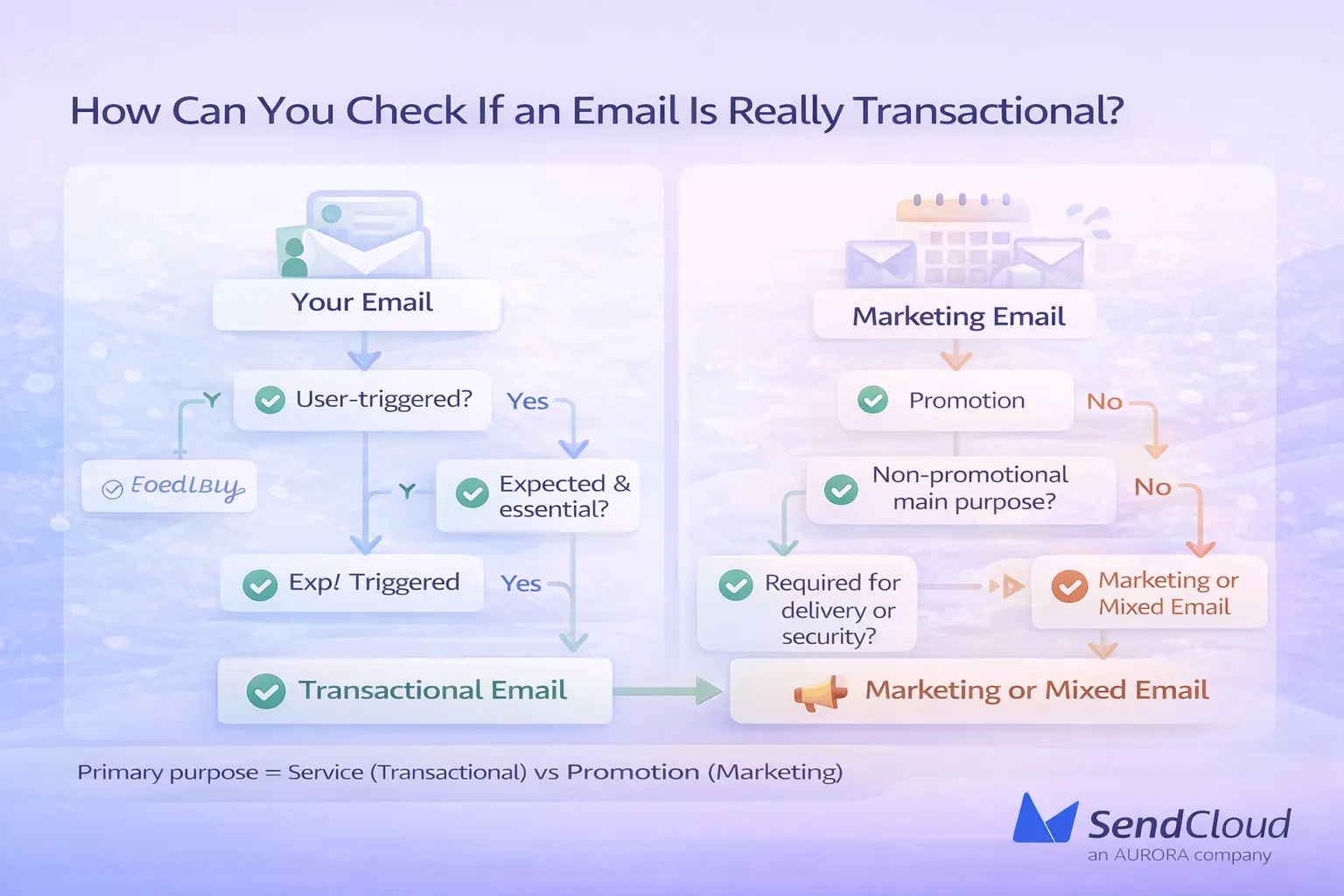
Most confusion comes from emails that sit between service and sales. One part of the message helps the user complete an action. Another part tries to promote something new. Filters and laws care about which part is primary. If the main job is to sell, it is marketing. If the main job is to inform or secure, it is transactional. A simple check before you hit send prevents a lot of compliance and deliverability trouble.
A Simple Four-Question Test
You can classify most emails by asking four short questions:
- Was this email triggered by a user action such as signup, purchase, password reset or support request?
- Would the user expect and need this email to complete that action or stay informed?
- Is the main purpose non‑promotional, with no subject line or hero area focused on a sale or discount?
- Is the message required for product or service delivery, billing or security, not just “nice to have” marketing?
If the honest answer to all four is “yes”, you are almost always in transactional territory. If one or more answers are “no”, you are closer to a marketing or mixed‑purpose email.
Borderline and Mixed-Purpose Examples
Borderline emails usually follow the same pattern: a functional shell with a sales core. Common cases include:
- A “thank‑you for your order” email where the main content is a big upsell banner and product grid.
- An invoice or payment receipt that devotes most of the layout to discounts, cross‑sells and time‑limited offers.
- A renewal reminder where the headline and primary button focus on a promo (“Get 40% off if you upgrade now”), not on explaining the renewal itself.
In each case, there is a transactional element, but the overall feel and layout push the message toward promotion. That is what regulators and inbox providers look at.
How to Classify Mixed Emails Safely
For mixed emails, it helps to decide which part you would remove last. If you stripped out the promo content, would the email still make sense and still be needed for the user? If yes, the message can often stay transactional, with a very small and clearly secondary marketing element at the bottom.
If removing the promotional block would leave the email almost empty, treat it as marketing. That means applying full consent rules, clearer unsubscribe options and more careful frequency control. This approach is conservative, but it reduces legal risk and keeps the truly transactional stream clean, which also supports better deliverability for login, billing and security messages over time.
What Are the Main Types of Transactional Emails?
Most platforms send the same core types of transactional emails, no matter which industry they’re in. These messages usually show much higher engagement than campaigns. Benchmarks often put transactional open rates in the 50–80% range, while bulk marketing emails sit closer to 15–25%. That gap reflects how people treat them: they are looking for this information and often cannot move forward without it.
Account and Security Emails
Account and security emails protect access to a user’s data and login. They include one‑time passcodes, login alerts, password reset links and new device notifications. Two‑factor and OTP flows keep growing each year, so these messages are now some of the most opened emails any product sends. If they are delayed or filtered, users can’t sign in and support teams get flooded. Keeping these emails fast, clear and obviously non‑promotional is critical for both trust and compliance.
Order, Billing and Payment Emails
Order and billing emails cover the money and goods side of the relationship. Typical examples are order confirmations, receipts, invoices, payment success or failure notices and refund confirmations. E‑commerce and SaaS tools rely heavily on this stream; many stores send several order‑related transactional emails for each purchase. These messages form part of the legal record of a transaction, so they need accurate details, stable delivery and very little distraction from the main information.
Service and Subscription Notifications
Service notifications explain changes around access and usage. They include subscription activations, plan changes, renewal reminders and maintenance alerts. When a plan renews, limits change or downtime is planned, users expect a clear notice in their inbox. In many regions, not sending these updates can create both support problems and regulatory risk, especially if billing or access is affected. As long as these emails stick to explaining the service, they remain transactional even if they mention prices or dates.
Support and Case Management Emails
Support emails follow a specific issue from start to finish. They cover ticket creation, status updates, requests for extra details and final resolution summaries. For many users, these messages are the only record of what was agreed with support. They are almost always triggered by a user request and their purpose is narrow: keep the person informed about that one case. Trying to add cross‑sells or broad offers here can confuse people and weaken the clear transactional nature of the message.
Why You Should Not Mix Marketing Content into Transactional Emails
transactional emails sit in a safer legal and deliverability zone because their main job is service, not sales. The moment the sales part takes over, laws and filters stop treating them as neutral messages. At that point, they fall under marketing rules: consent, clear opt‑out and stricter spam checks. With global spam levels close to 45–50% of all email traffic, inbox providers are quick to downgrade anything that looks like a hidden ad. Keeping transactional content clean protects both compliance and inbox placement.
How Too Much Promotion Changes Legal Classification
Regulators look at the primary purpose of an email, not just the label you give it.
Under CAN‑SPAM in the US, a message is “transactional or relationship” only if its main aim is to complete or update a transaction, provide account or warranty info, or deliver a service already agreed. Once advertising becomes the main focus, it is treated as a commercial email instead, even if you include an order ID somewhere.
GDPR and ePrivacy rules in Europe draw a similar line between service messages and direct marketing. A password reset or invoice that stays factual usually fits under contractual necessity or legitimate interest. The same template, rewritten around a big discount, edges into marketing and may require prior consent. So a heavy promo banner can change how the whole email is classified, not just how it looks.
Safe vs Risky Promotional Elements
Not every small mention of your product turns a transactional email into an ad. The risk depends on how strong and how visible the sales content is.
Safe examples are short, secondary suggestions. A single text line in the footer like “View more orders in your account” or a small link to a help article or pricing page usually keeps the focus on the main service task. The subject line and top of the email still talk about the action the user took: “Your order is confirmed” or “Password reset link inside”.
Risky patterns look very different. A full‑width banner, multiple product blocks, discount codes in bold, or subject lines built around urgency and offers (“Flash sale inside”, “Save 40% now”) move attention away from the functional content. In those cases, it becomes hard to argue that the primary purpose is still transactional, and both regulators and inbox filters are likely to treat the email as marketing.
Impact on Consent, Unsubscribe and Spam Filtering
Once an email counts as marketing, three things change.
First, consent expectations shift. In many EU countries, direct marketing by email usually needs prior opt‑in. If you send a “transactional” message that is mostly an ad to someone who never agreed to marketing, you increase legal risk.
Second, unsubscribe handling becomes more important. CAN‑SPAM requires a clear opt‑out for commercial email and a working way to stop future messages of that type. Purely transactional emails have more flexibility, but once promotion is central, people must be able to opt out of the marketing part.
Third, spam filters tighten. Inbox providers watch spam complaint rates closely; Gmail, for example, has advised bulk senders to keep user‑reported spam well below 0.3%, ideally under 0.1%. Heavily promotional content in messages that users thought would be purely functional is more likely to trigger “Report spam” clicks. Over time, that hurts sender reputation and can push even clean transactional emails into junk. Keeping a strict line between service content and sales content protects both your legal footing and your long‑term deliverability.
What Are Best Practices for High-Deliverability Transactional Emails?
Transactional emails tend to perform far better than campaigns, but only when they arrive fast, look clear and pass basic technical checks.
Recent benchmark data shows triggered emails have open rates around 45%, while general campaigns sit closer to 25–40% depending on industry. Transactional messages also drive very strong engagement after the open, with click‑to‑open rates often above 30%, compared with 10–25% for standard marketing emails. That advantage disappears quickly if delivery is slow, domains are not authenticated or the email looks like an ad.
Speed, Clarity and Focused Content
Transactional emails work best when they feel simple and “to the point”.
- Send quickly: People wait on password resets, OTPs and order confirmations in real time. Delays push them to retry actions or contact support, which also increases the chance they mark later messages as spam.
- Use clear, factual subject lines: Like “Your order is confirmed”, “Password reset link”, “Your invoice is ready”. Triggered emails with straightforward subjects already show higher open rates than generic newsletters.
- Put the main action first: Code, link or key details should sit at the top of the email, not buried under branding or copy.
- Keep the tone neutral: Explain what happened, what the user needs to do next, and where to get help. Avoid hype, urgency tricks and sales language in the main body.
This style matches what the user expects from a service message and reinforces the transactional nature of the email.
Technical and Domain Best Practices
Strong technical setup is now a core part of deliverability, even for transactional flows.
- Use a dedicated transactional subdomain: Addresses like notify.example.com or billing.example.com help separate transactional reputation from bulk marketing.
- Authenticate with SPF, DKIM and DMARC: Case studies show senders who enforce DMARC on top of SPF and DKIM can move inbox placement from about 75% to over 90%, and fully authenticated domains are roughly 2–3× more likely to reach the inbox than unauthenticated ones. DKIM alone has been linked to 10–15% higher open rates and fewer spam complaints.
- Respect spam‑rate thresholds: Google’s 2024 bulk‑sender rules expect spam complaint rates to stay below 0.3%, with many deliverability experts recommending under 0.1% for stable inbox placement.
- Monitor bounces and complaints: High hard‑bounce rates usually signal bad data. Rising complaints often mean users did not expect that type of email, or the content has drifted toward promotion.
When these basics are in place, transactional streams can achieve very high, stable inbox placement, even as mailbox providers tighten filters.
Helpful Links Without Turning into an Ad
Good transactional emails do more than dump raw data; they also guide the user to the next logical step, without drifting into sales.
Useful, non‑promotional elements include:
- Support links: contact page, help center, or direct reply address.
- Tracking and status: order tracking links, ticket status pages, account activity logs.
- Account controls: links to change password, update billing info, manage devices or view invoices.
- Short FAQs or safety tips: for example, how long an OTP is valid, or how to spot a real security email from your domain.
These links stay close to the original trigger and help the user complete their task. Combined with the naturally high engagement of transactional messages—often 30%+ CTOR—they support a smoother product experience without changing the email into marketing.
How Can Aurora SendCloud Help You Manage Transactional Emails Safely?
Aurora SendCloud is built for fast, reliable transactional email. The platform reports a 97.73% transactional email delivery rate, an average 99.61% delivery rate in 2024, and over 3.5 billion emails sent each month, backed by a global infrastructure focused on high inbox placement and low spam rates.
Key ways it supports safe transactional sending:
Reliable API-based delivery
- Email API and SMTP options for one‑to‑one messages like order confirmations, OTPs and alerts.
- SDKs for major languages (Python, Java, PHP, Ruby, Go, Node.js, C#) and clear docs for fast integration.
- ○Infrastructure tuned for speed and stability, with delivery times measured in seconds across major providers.
Separate streams for transactional vs marketing traffic
- Support for up to five sending domains per account, each with its own SPF, DKIM, MX and DMARC configuration.
- Best‑practice guidance to use different subdomains for trigger mail and bulk mail, so marketing issues don’t slow down critical system emails.
Templates, tracking and logs for compliance
- Template system and testing tools to keep transactional layouts consistent and easy to review.
- Detailed statistics and delivery‑response APIs to track requests, deliveries, bounces, opens, clicks and spam reports for any email or API user.
- Tracking domains and webhooks for real‑time event data, useful for both deliverability tuning and internal compliance records.
Conclusion: Use Transactional Emails Confidently and Legally
Transactional emails sit on the safe side of both law and deliverability when they stay functional. Their job is to confirm orders, send login codes, deliver invoices, share shipping updates or report ticket changes, not to push a sale. As long as the main purpose is service‑related and non‑promotional, most frameworks, including GDPR, ePrivacy and CAN‑SPAM, allow these emails without prior marketing consent, because they are part of performing a contract or protecting an account.
The real risk starts when “transactional” layouts turn into hidden ads, with subject lines, hero areas and calls‑to‑action built around offers instead of information. Keeping a clear internal line between transactional and marketing emails, using separate templates and domains where possible, reduces legal exposure and keeps sender reputation strong.
For teams that want to run this kind of traffic with high speed, tracking and domain control, Aurora SendCloud provides an API‑based transactional email infrastructure.