In 2025, around 4.6 billion people use email, and roughly 376 billion messages go out every single day. For small businesses, it is not just busy noise; it's money. Recent benchmarks put average email marketing ROI in the range of $36--$42 for every $1 spent, and about 64% of small businesses already rely on email to reach and retain customers. In the middle of that scale, an Email Service Provider (ESP) is the system that carries your commercial and transactional messages, instead of a lone Gmail or Outlook account trying to behave like a bulk sender.
That technical layer has become non‑negotiable. Google and Yahoo now classify large‑volume senders separately and expect authenticated domains using SPF, DKIM, and DMARC, a one‑click unsubscribe in every marketing email, and spam complaint rates under about 0.3%. At the same time, privacy laws like the EU's GDPR allow fines of up to €20 million or 4% of global annual revenue when consent and data‑handling rules are ignored.
Let's discuss further!
1. What Is an Email Service Provider (ESP)?
An Email Service Provider (ESP) is a platform that is used to send, track, and manage bulk email for businesses. To put it simply, it is the system that does your newsletter, promotions, and automated messages. In addition, it is made to be capable of sending to thousands while remaining compliant with legal and technical rules. An ESP focuses on reliable delivery at scale, list management, and compliance for commercial and transactional email, whereas a personal inbox like Gmail or Outlook focuses on one person's daily mail.
Unlike personal inbox services (Gmail, Outlook, Yahoo, etc.), an ESP is built specifically for:
-
Sending to large lists (hundreds, thousands or millions of recipients)
-
Managing email lists, subscriptions, and consent
-
Handling bounces, spam complaints, and unsubscribes automatically
-
Optimizing email deliverability so your messages land in the inbox, not spam
ESPs typically support both:
-
Commercial (marketing) email -- promotional newsletters, offers, product announcements, cart recovery, etc.
-
Transactional email -- password resets, order confirmations, shipping updates, invoices, and other one‑to‑one system messages.
Why ESPs Matter More Than Ever
Deliverability and compliance are getting stricter every year :
-
Major providers like Google and Yahoo now require authenticated sending (SPF, DKIM, DMARC) for bulk email, and unauthenticated messages are more likely to land in spam.
-
Litmus deliverability experts note that about 70% of emails show at least one spam‑related issue that can hurt inbox placement.
For a small business, that means using a serious email marketing platform---rather than a personal inbox---is no longer optional if you want your commercial emails to be legal, trusted, and actually seen .
2. Core Functions of a Modern Email Service Provider
A modern Email Service Provider does three core jobs at once: it runs a stable sending infrastructure, proves to inbox providers that messages are genuine and compliant, and gives teams the tools to plan, automate, and measure campaigns. Inbox providers like Gmail and Yahoo treat bulk traffic very differently from personal messages. So these three layers sit tightly together rather than as separate extras.
2.1 Email Infrastructure Built for High-Volume Sending
An ESP runs its own mail servers and routing logic, tuned for constant, high‑volume sending. It manages queues, connection limits, and retries so large campaigns and transactional flows reach major inbox providers without hitting hidden caps or random blocks.
Reputation data sits on top of this plumbing. The ESP tracks bounces, spam complaints, and engagement for each domain or IP and adjusts sending patterns when numbers start to slip. Over time, that steady behavior tells providers that this traffic is predictable and safe, in a way a single business mailbox or ad‑hoc SMTP server cannot match.
2.2 Authentication, Security & Email Compliance
The second function is proof of identity and basic legal hygiene. An ESP guides senders through SPF and DKIM setup and DMARC alignment so that the domain in the "From" line matches the technical sending identity. Since February 2024, Google and Yahoo have required bulk senders to authenticate with both SPF and DKIM, publish DMARC, keep spam complaints under about 0.3%, and include one‑click unsubscribe in commercial mail. At the same time, industry scans show that more than half of domains still have no DMARC at all, and only a small minority use strict enforcement, which leaves many brands open to spoofing.
Compliance runs in parallel. The ESP enforces unsubscribe handling, stores consent records for opt‑ins, and supports legal details such as a physical address in commercial messages, which are required by laws like CAN‑SPAM and strongly linked to consent rules under GDPR. Instead of scattered spreadsheets and manual checks, the platform treats these rules as part of the send pipeline.
2.3 Marketing Tools, Automation & Analytics
Once delivery and trust are stable, the ESP acts as an email marketing platform. It offers editors for branded templates, segmentation based on behavior or attributes, and automation for flows such as welcomes, post‑purchase follow‑ups and cart recovery. These flows are where much of the channel's performance now sits.
3. Why You Must Use an ESP to Send Commercial Emails Legally
Commercial email now runs through a tight mix of law and platform rules. In the U.S., CAN‑SPAM treats every promotional email as regulated advertising, not casual communication. In Europe, GDPR treats an email address as personal data with strict consent and record‑keeping rules. At the same time, Gmail and other providers classify bulk senders separately and apply hard thresholds on spam complaints, authentication and unsubscribe behavior. In that environment, a dedicated Email Service Provider is the only realistic way to run regular campaigns without constant legal and deliverability risk.
3.1 Staying Compliant with CAN‑SPAM, GDPR and Other Laws
Under CAN‑SPAM, each commercial email must carry a working unsubscribe mechanism, a clear opt‑out process, and a valid physical postal address, and opt‑out requests must be honored within 10 business days. GDPR goes much further: regulators can impose fines up to €20 million or 4% of global annual turnover for serious violations, including unlawful processing or missing consent.
For a small team, tracking who consented, who withdrew, which country's rules apply, and whether each template includes the right legal elements becomes fragile work if everything runs from a personal inbox or basic SMTP service. An ESP folds these duties into the sending pipeline. It records subscription events, keeps suppression lists when people opt out, enforces unsubscribe links on marketing templates, and adds the required sender details, so commercial email behaves more like a regulated system and less like a manual side job. That structure does not remove legal responsibility, but it closes off many of the easy ways to break the rules.
3.2 Email Deliverability & Sender Reputation
Global email volume is projected at about 376 billion messages per day in 2025, and close to half of all traffic is classified as spam. Inbox providers respond by assuming bulk email is guilty until proven otherwise. Google's bulk‑sender rules now expect domains that send large volumes to authenticate with SPF, DKIM and DMARC, keep user‑reported spam rates below about 0.3%, and include one‑click unsubscribe in promotional messages, or risk having traffic pushed to spam or rejected.
An ESP sits between this environment and the business. It enforces authentication for the sending domain, monitors bounce and complaint rates, and adjusts sending patterns when reputation begins to slip. It also separates transactional traffic from bulk promotions, so order confirmations and password resets do not suffer because a campaign performed badly. Without that layer, commercial email from a small business tends to share the same technical profile as spam: no DMARC, no clear opt‑out, inconsistent headers, and uneven volume spikes. Over time, that profile damages the domain's reputation, and every future message, even legitimate one‑to‑one notes, becomes harder to deliver.
3.3 Scale Email Marketing Safely as You Grow
Email marketing remains one of the highest‑ROI channels available, with recent benchmarks placing average returns around $36--$42 in revenue for every $1 spent across many industries. For e‑commerce brands, automated flows such as welcome series and abandoned‑cart reminders now account for a disproportionate share of revenue: in some datasets, they make up about 2% of sends but drive roughly 37% of email‑attributed sales, and can generate up to 30 times more revenue per recipient than standard campaigns.
Those results only appear when the channel can scale without technical or legal breakdowns. Growth means larger lists, more segments, more automation, and more regional rules to respect. An ESP provides the infrastructure for that growth: throttling and routing that can handle volume spikes, compliance settings that adapt to different jurisdictions, and analytics that show when engagement or reputation starts to slip. Instead of hitting invisible rate limits in a personal inbox or watching a domain slowly lose trust, the business runs commercial email on a platform designed for high volume, long‑term reputation, and regulated data handling.
4. Types of Emails You Can Send with an ESP
Most business email falls into two broad categories: commercial marketing messages and transactional or operational messages. Both travel through the same technical pipes, but inbox providers and regulators treat them differently. In 2024, global estimates put transactional emails at about 22% of all email volume and marketing emails at about 17%, with transactional messages showing far stronger engagement.
An ESP brings both types under one authenticated, compliant setup. The platform can tag each send correctly, route it with the right priority, and apply different rules for promotions and system messages. That separation matters because the same domain reputation influences every message coming from your brand, whether it is a sale announcement or a password reset.
4.1 Commercial & Marketing Emails
Commercial or marketing emails are sent mainly to promote products, services or content. They include sales campaigns, product launches and regular newsletters that try to drive clicks and revenue rather than complete an existing transaction. Open rates for this kind of email typically sit in the 15--25% range across many benchmarks, with click‑through rates around 2--3%, and often lower in crowded sectors like retail.
Because these messages are promotional, they face stricter legal and filtering rules. Under CAN‑SPAM and GDPR, they usually require prior consent, clear identification and an easy unsubscribe, and they are more likely to hit spam filters if lists are old or engagement is weak. Transactional benchmarks highlight the gap: studies consistently show transactional open rates around 44--75% versus roughly 20--25% for marketing campaigns, and click‑through rates for transactional traffic running four times higher. This difference explains why ESPs treat marketing email as its own class with dedicated controls for consent, frequency and segmentation.
4.2 Transactional & Operational Emails
Transactional or operational emails are triggered by a user's action or a system event. They confirm orders, deliver receipts, reset passwords or report account activity. Recipients expect these messages and often wait for them in real time, which shows up clearly in the data. Multiple studies report transactional open rates around 44--80%, with conversion rates far above those of standard promotions; one 2025 report measured average transactional conversion at 8.6%, comfortably ahead of bulk marketing campaigns.
5. How to Send Your First Commercial Email with an ESP (Aurora SendCloud)
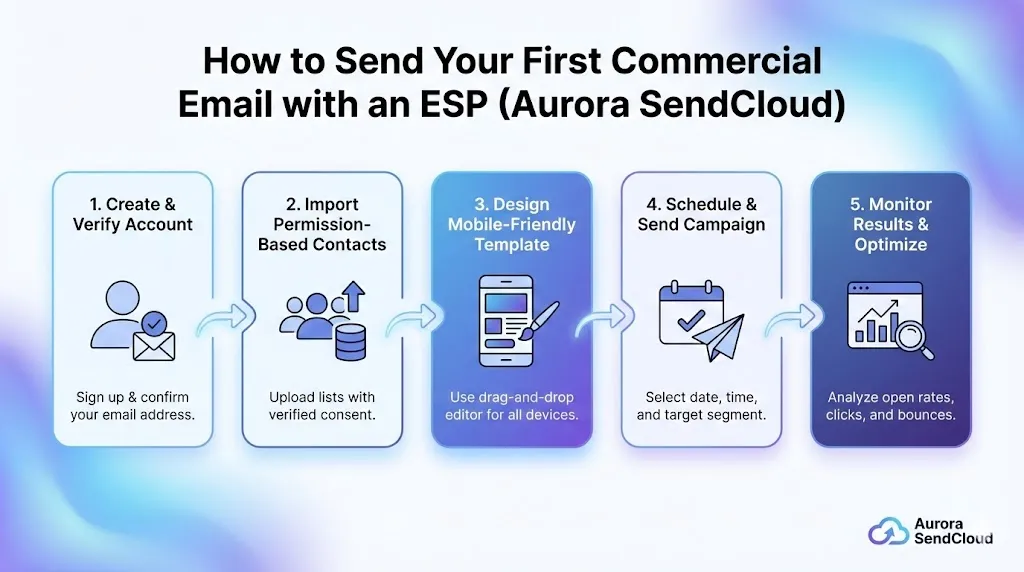
A first commercial send in Aurora SendCloud follows a clear path: verify a sending domain, load a permission‑based audience, build a template, set up a campaign, then turn on tracking and read the results. The platform's docs already assume this order for production use, so treating it as a checklist keeps both deliverability and compliance in line from day one.
-
1
Create and Verify Your Aurora SendCloud Account
After you open an Aurora SendCloud account, the real work starts with the sending domain , not with a test send.
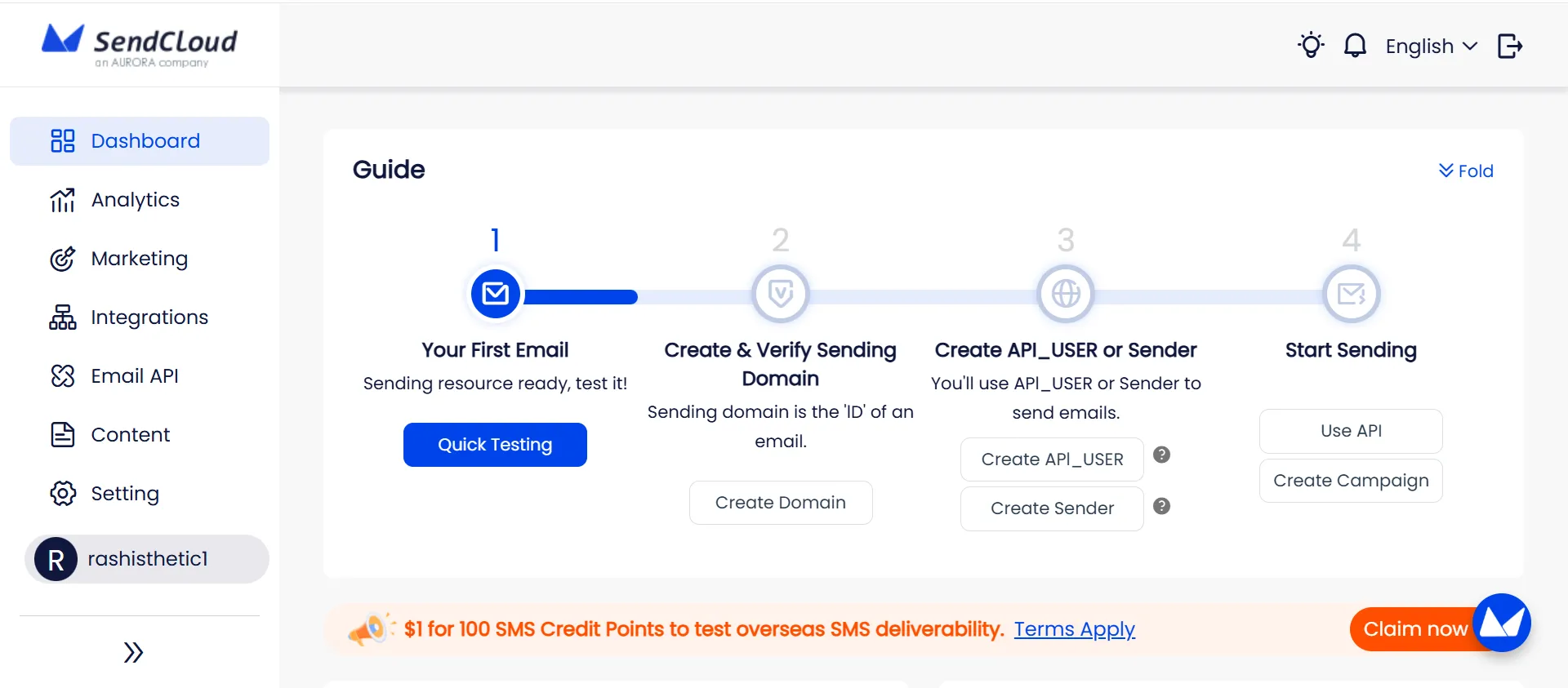
Set up your business domain
-
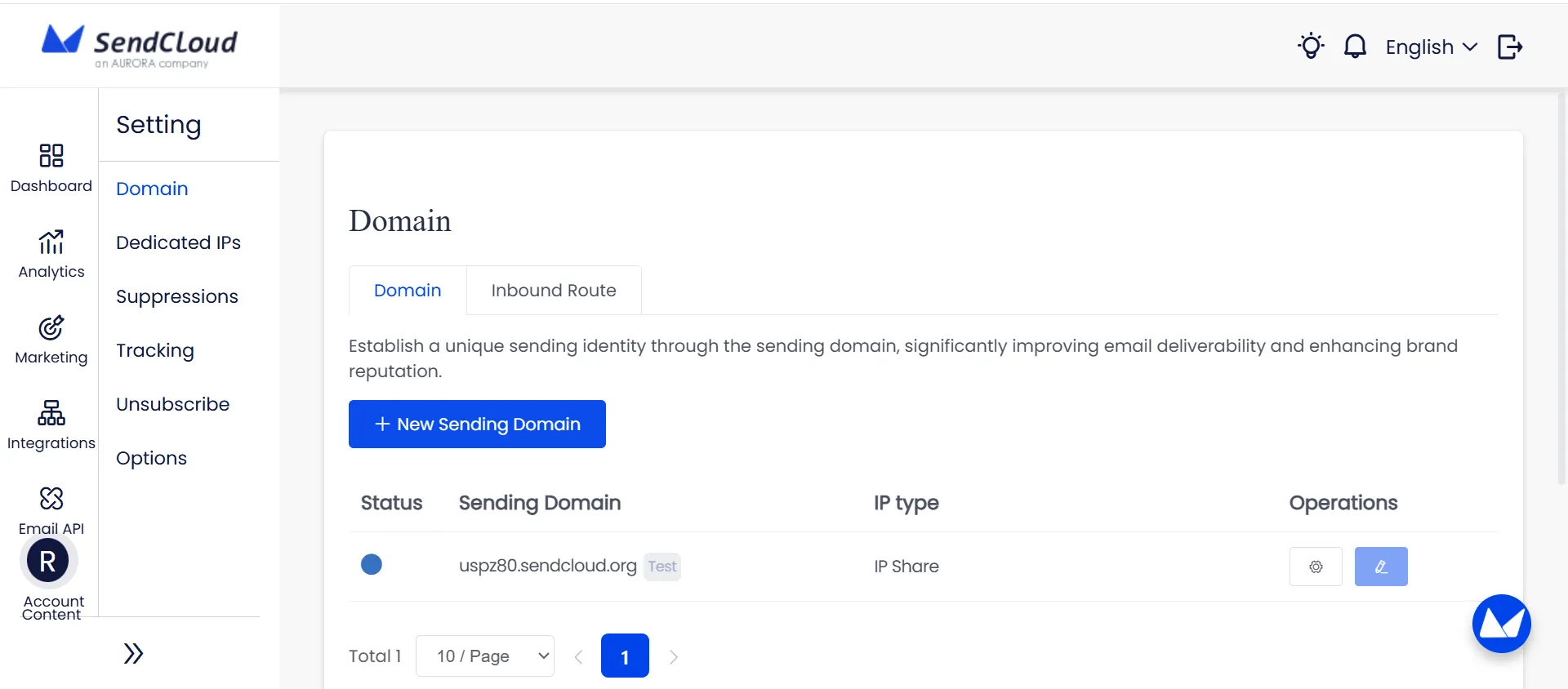
Go to Settings → Domain and add your own domain (for example, marketing.yourbrand.com). Aurora SendCloud automatically assigns a test domain, but the docs are clear: do not use that test domain for real traffic.
-
Click the domain name in the list to view the DNS records required for:
-
SPF (TXT)
-
DKIM (TXT)
-
MX
-
DMARC (TXT, optional but recommended)
-
Copy each value into your DNS provider exactly as shown. SPF, DKIM and MX are mandatory; DMARC completes the configuration for best inbox placement.
Verify domain status
-
Wait for DNS to propagate. Aurora SendCloud's docs estimate 10--30 minutes , sometimes up to 24 hours.
-
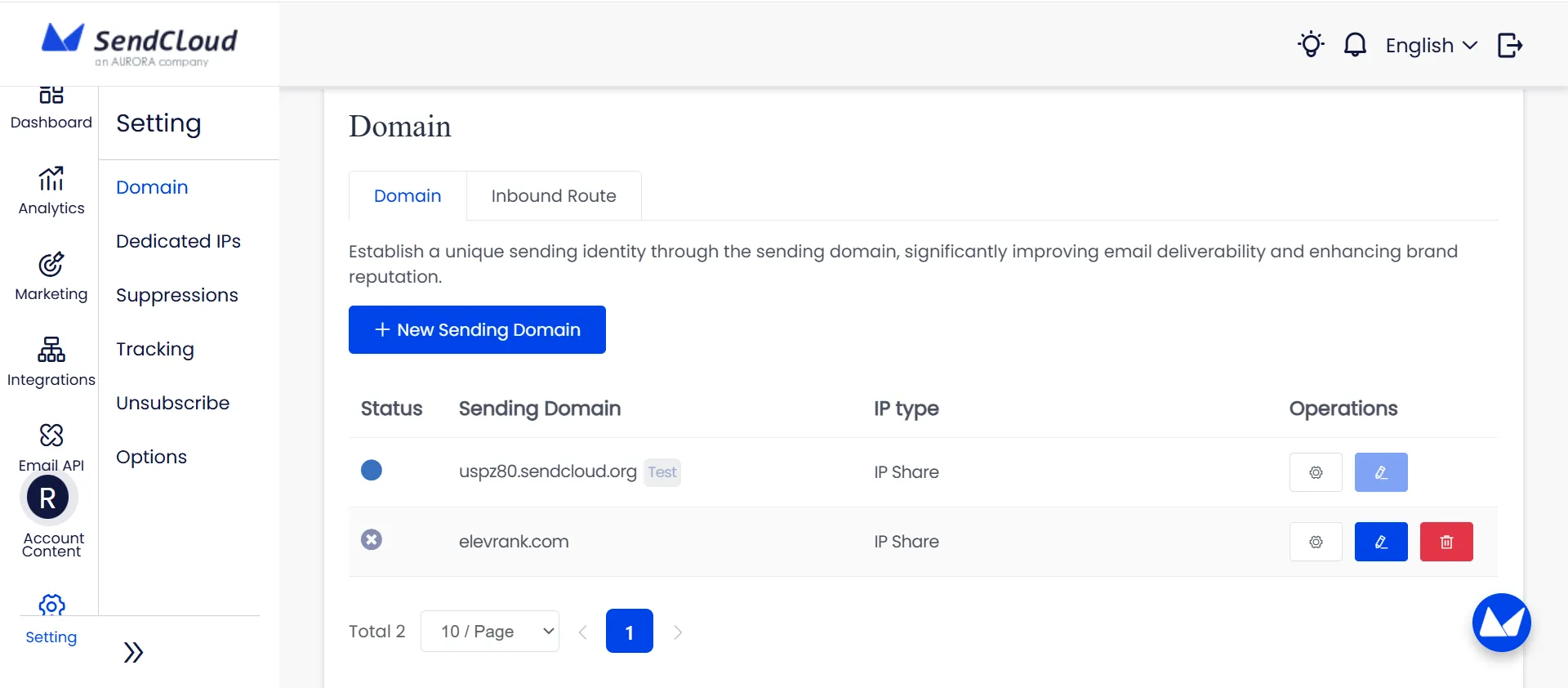
Return to Settings → Domain and click Verify . Aim for:
-
Unverified -- one or more of SPF, DKIM, and MX are missing/incorrect (cannot send)
-
Usable -- SPF, DKIM, and MX valid (can send)
-
Verified -- SPF, DKIM, MX and DMARC all valid (recommended for production)
For long‑term programs, Aurora SendCloud advises using different domains for transactional and marketing email (for example, notifications.yourbrand.com and marketing.yourbrand.com) so reputation issues in one stream do not slow down the other.
-
-
2
Import or Build a Permission‑Based Contact List
Aurora SendCloud's Audience and List features are built around consent. Their docs open with a reminder to only add contacts collected legally under GDPR, CAN‑SPAM and similar rules.
Add contacts safely
-
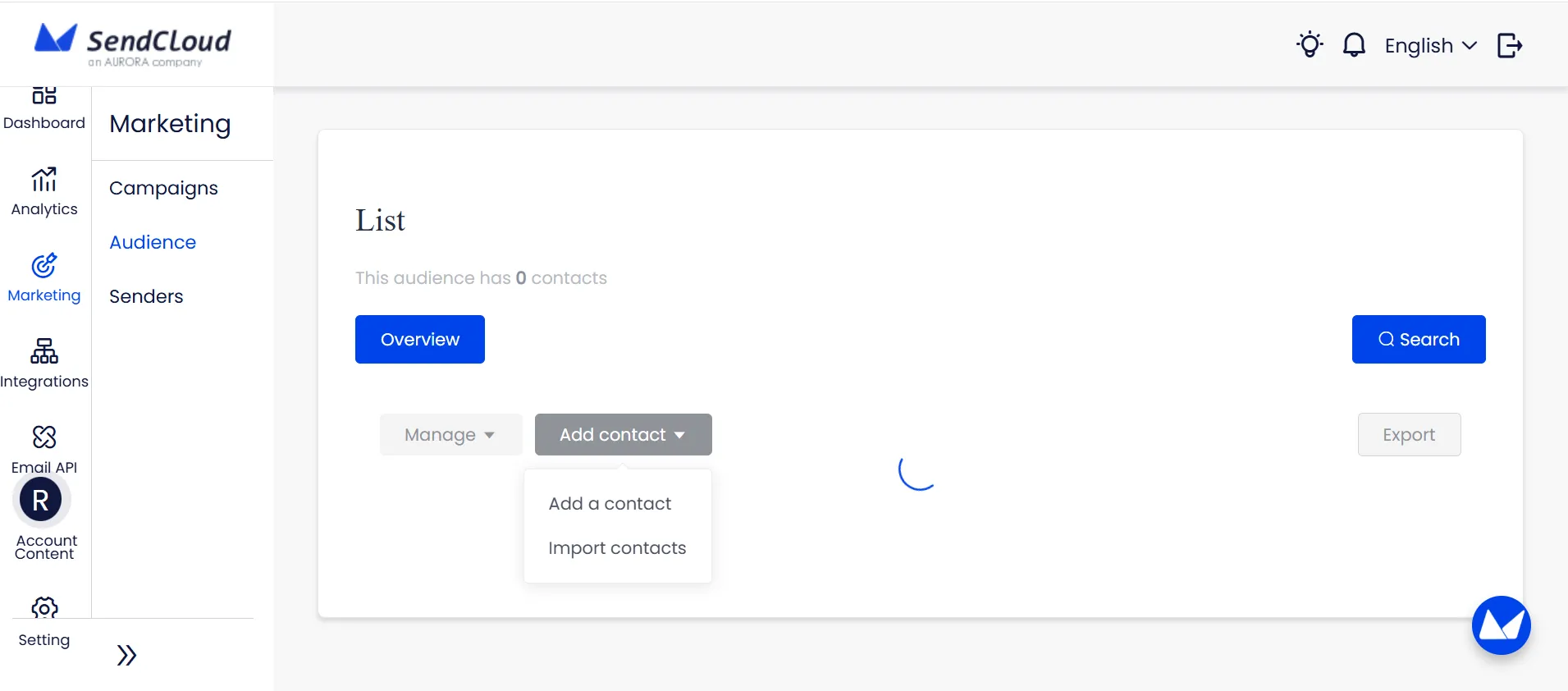
Go to Audience (or Marketing → List , depending on your navigation).
For single addresses:
-
Click Add Contact , fill in the form, and save. Email is required; fields like Name, Phone, Gender, Birthday and Age are optional and can be customized.
For bulk imports:
-
Use Upload CSV or Copy & Paste :
Email column is mandatory.
-
Each additional column maps to a field (Name, Phone, etc.).
During import, Aurora SendCloud walks through:
-
Duplicate handling -- Update existing data or Skip duplicates.
-
Tag assignment -- Replace , Add or Skip tags for the new batch.
Structure your audience
-
Use default fields or add up to 50 custom fields per audience list (text, number, date, birthday, dropdown) to support segmentation and personalization.
-
Organize contacts with tags and segments so early campaigns go to engaged, relevant groups rather than the entire database at once.
-
-
3
Choose or Create a Mobile‑Friendly Email Template
Templates in Aurora SendCloud are reusable frameworks for both marketing and transactional traffic.
Open the template editor
-
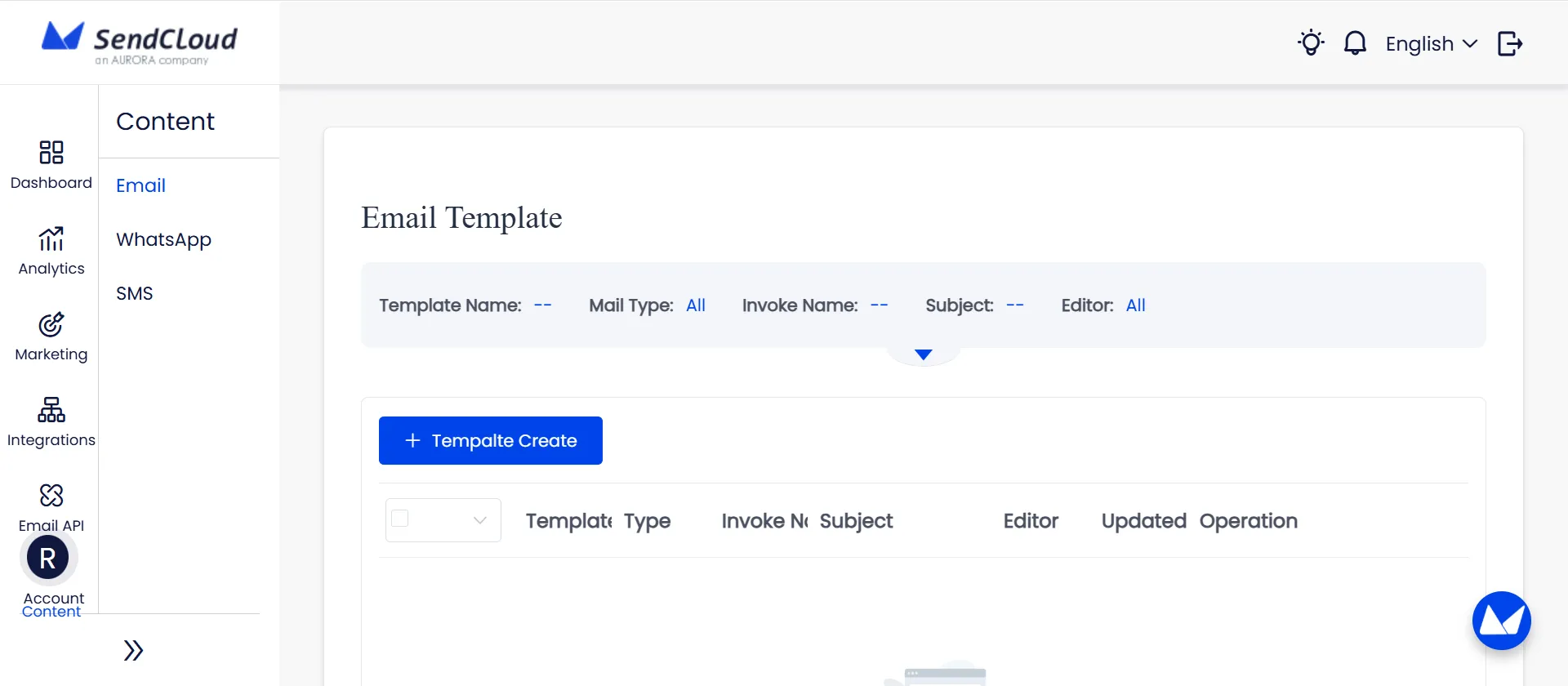
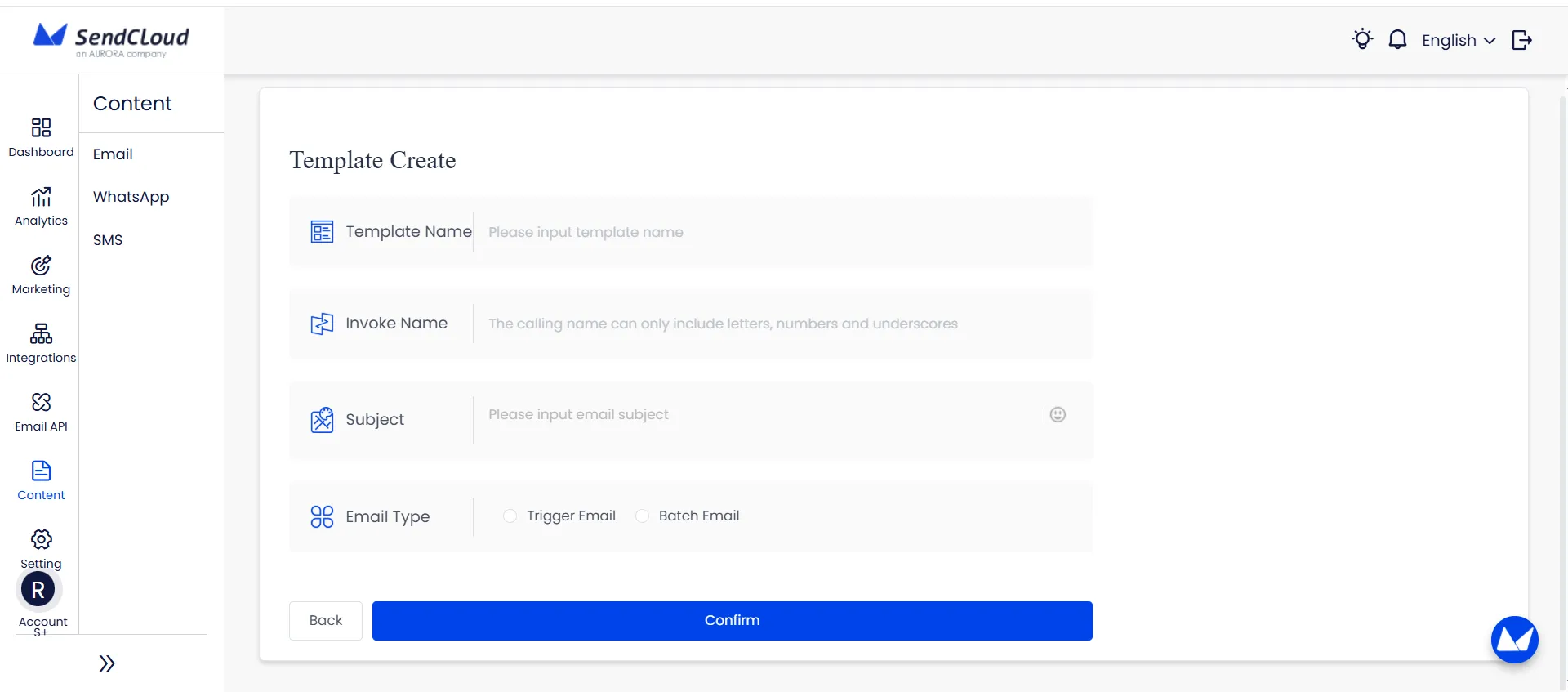
Go to Content → Email Template . The Template List shows:
Template Name
Type
Invoke Name (for API calls)
Email Subject (up to 256 characters)
Last update time
Build your first commercial template
-
Click Create Template and pick an editor:
-
Drag‑and‑drop editor for visual building
-
HTML editor , if you prefer custom code
Either:
-
Start from Aurora SendCloud's template library (100+ free marketing templates for faster setup), or
-
Build from scratch by dragging in blocks (images, text, buttons, product grids).
Add:
A clear subject and preview text
Brand elements (logo, colors, type)
One primary call‑to‑action button
-
For personalization, wrap variables in %% (for example %%name%%) so Aurora SendCloud can replace them per contact.
-
Use the preview to check mobile display, then Save the template.
-
-
4
Schedule or Send Your Campaign at the Right Time
Campaigns are controlled sends based on a list, tag or segment.
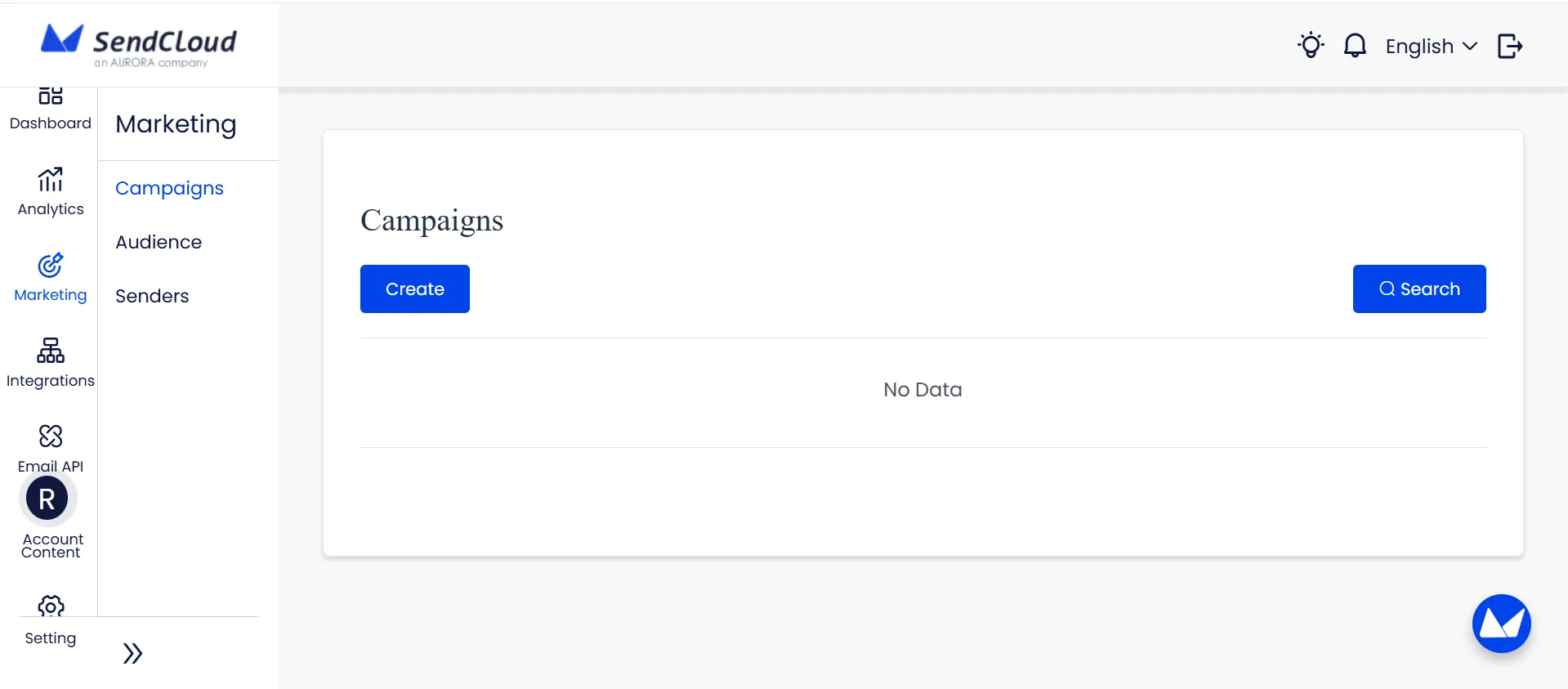
Create a campaign
-
Go to Marketing → Campaigns → Create Campaign .
Follow the sequence from the docs
-
1
Recipients
-- choose List , Tag or Segment .
-
2
Sending domain and API_USER
-- pick the verified marketing domain and the correct API_USER; provide the API_KEY.
-
3
Sender identity
-- set:
-
From Name that people recognize (brand or brand + team)
-
From Address on your verified domain (Aurora SendCloud requires the sender address to end with that domain)
-
-
4
Content
-- select the email template you created in Step 3.
-
5
Analytics / Google Analytics Tracking
-- if landing pages support GA, enable this and fill:
Campaign Name → utm_campaign
Campaign Source → utm_source
-
Campaign Medium → utm_medium (and utm_term if needed)
-
6
Execution time
-- set send time and confirm the time zone so messages reach inboxes at the intended local hour.
Once everything looks right (domain status, sender, audience, content), confirm the campaign to place it in the send queue.
-
-
5
Monitor Performance and Optimize Future Campaigns
The last step is turning data into decisions.
Enable tracking first
-
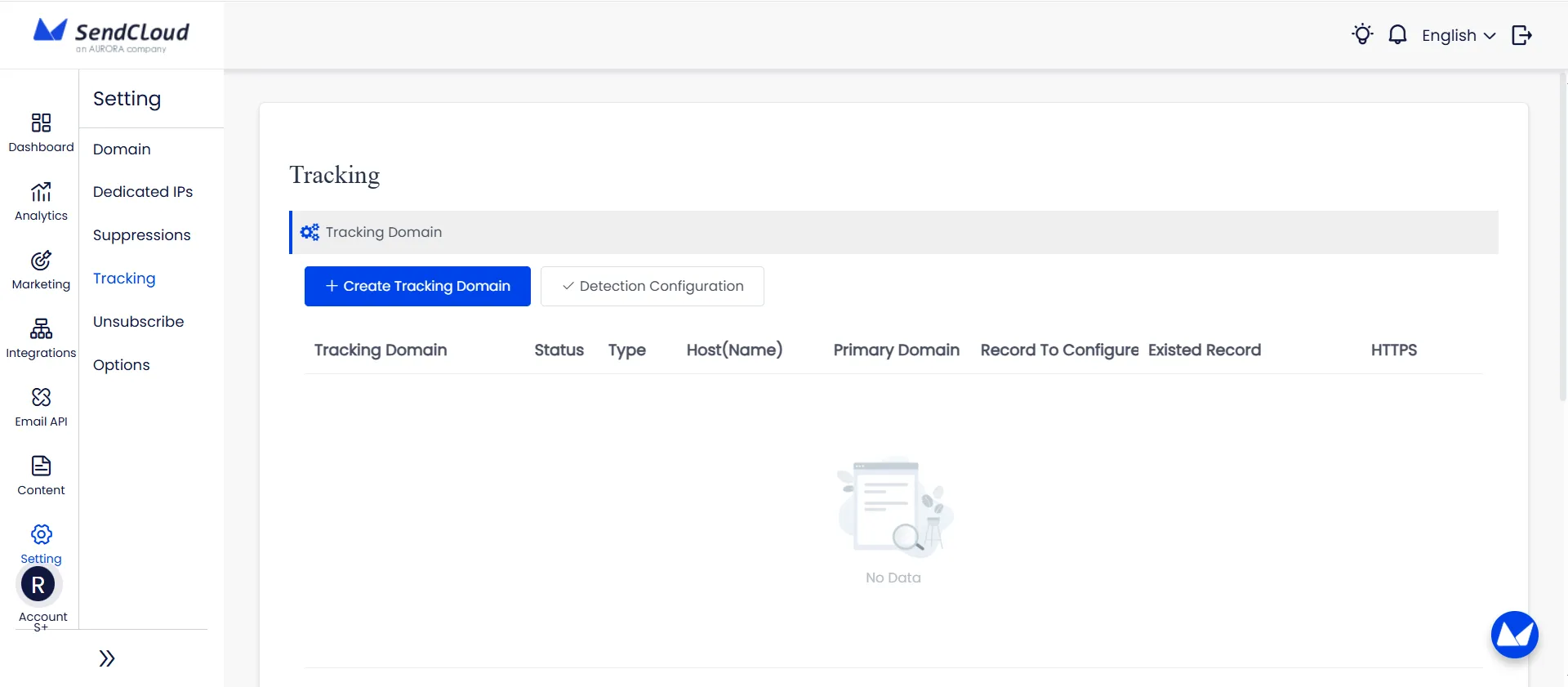
Go to Settings → Tracking .
-
Select the relevant API_USER and switch on:
-
Open Tracking
-
Click Tracking
-
Unsubscribe Tracking
For accurate data and brand consistency:
-
Configure a custom tracking domain (CNAME to Aurora SendCloud's tracking host).
-
Upload an SSL certificate so tracking runs over HTTPS; Aurora SendCloud flags this as important for modern browsers and data accuracy.
Read the numbers
Use the Statistics and reporting views to review:
-
Delivered
-
Opens / Unique Opens
-
Clicks / Unique Clicks
-
Spam Reports
-
Unsubscribes
Cross‑check engagement by:
Segment (who responds)
Inbox provider (where delays or soft bounces appear)
Campaign type (newsletter vs promotion vs automation)
From there, adjust subject lines, sending windows, segments and list hygiene based on the real behavior Aurora SendCloud records, instead of guessing after each send.
-
Conclusion: Why Every Business Needs an ESP for Commercial Email
Commercial email now lives under strict rules: CAN‑SPAM and GDPR govern how you collect and use addresses, while providers like Gmail and Yahoo expect authenticated domains, low spam complaints and working one‑click unsubscribes. At the same time, email still delivers standout results, with benchmarks often placing average returns around $36--$42 for every $1 spent. In that environment, ad‑hoc sending from a personal inbox is hard to defend.
An Email Service Provider (ESP) turns this into a system: it authenticates your domain, manages reputation, records consent, and powers templates, automation and reporting. Aurora SendCloud bundles these pieces into one platform, with verified domains, audience tools and detailed tracking designed for commercial volume.
Set up Aurora SendCloud , connect your sending domain and run your next campaign on infrastructure built for legal, reliable email.