Do you know what 64% of consumers would quit a brand if their experiences aren’t personalized? That is the real pressure behind AI email personalization. People do not want to be addressed as “Hi, First Name.” They want emails that align with their current activities
The problem is that most email “personalization” is still built on old habits. You pick a few segments. You write one version per group. You schedule a batch send. It can appear polished, but it often misses the intended meaning. If someone browsed running shoes yesterday, a generic newsletter feels out of place.
AI changes how personalization works. Instead of fixed rules, it uses live behavior signals to predict what each person is likely to do next. That makes it easier to tailor timing, content, and offers in a way that feels truly 1:1—without needing a 1:1 team.
Why Doesn’t Traditional Email Personalization Work Anymore?
Old-school personalization was built for a simpler inbox. You made a few segments, added a name token, and hit send. Now inboxes are stricter, and people are quicker to ignore (or report) emails that feel generic. In Validity’s 2025 Email Deliverability Benchmark reporting, only 83.5% of marketing emails reached the inbox in 2024 (about 1 in 6 didn’t).
Name tokens
“Hi Sarah” is not bad. It’s just not special anymore. People know it is a merge tag. So it does not prove you understand them.
It can also backfire when the email feels too “sure of itself.” A 2023 study in Digital Business found that higher levels of personalization can trigger reactance (a “this feels creepy” pushback) and may reduce outcomes, such as purchases, in some cases.
What works better than a first name:
- Use recent intent (such as browsing, cart, and category clicks), not just profile data.
- Reference context, not identity (example: “Back in stock: your size” beats “Sarah, back in stock”).
- Keep it helpful, not overly specific (avoid “We saw you looked at X at 11:03 PM”)
Static segments
Static segmentation is still useful, but it has a ceiling. Most segments are built on fixed traits (location, gender, “VIP”), or slow-moving labels (“new,” “active,” “inactive”). That means your emails can lag behind what the person wants today.
Segmentation groups people. Personalization should shape the email around the individual’s signals. Litmus makes this distinction clearly: segmentation is grouping by shared traits, while personalization uses data (like behavior) to tailor the experience more directly.
Where static segments fall short:
- Timing drift: someone can change intent in hours, but your segment updates weekly
- Mixed intent: one person can be “VIP” and price-sensitive and shopping for gifts.
- Message mismatch: the segment says “runner,” but the last session says “yoga mats.”
Higher expectations
Customers have seen what “good” looks like from top brands. So the bar moved. They expect the message to match their actions, not just their name.
And they are also more sensitive to bad personalization. Gartner research (surveyed Nov–Dec 2024) found personalized marketing created negative experiences for 53% of customers.
In practice, “better personalization” often means:
- Fewer emails that are “for everyone”
- More emails tied to a clear reason (“you did X, so here’s Y”)
- Less “we know you,” more “we can help you”
Batch limits
Batch campaigns are built around your calendar, not your customer’s moment. You decide the send. Everyone gets it at once. Then you wait for results.
That model struggles today because inbox placement and engagement are tightly linked. When a batch email misses the mark, you do not just lose clicks. You can also lose inbox reach. The 2024 inbox placement number from Validity is a good reminder that “hit send and hope” is no longer safe.
What Is Ai Email Personalization?
AI email personalization means your emails adjust to each person’s behavior. Not just their name. Not just their “segment.” The goal is simple: the message matches what the person needs right now.
When personalization happens in real time, buying intent goes up fast. One large global survey found 88% of consumers are more likely to buy when engagement is personalized in real time.
Real-time signals
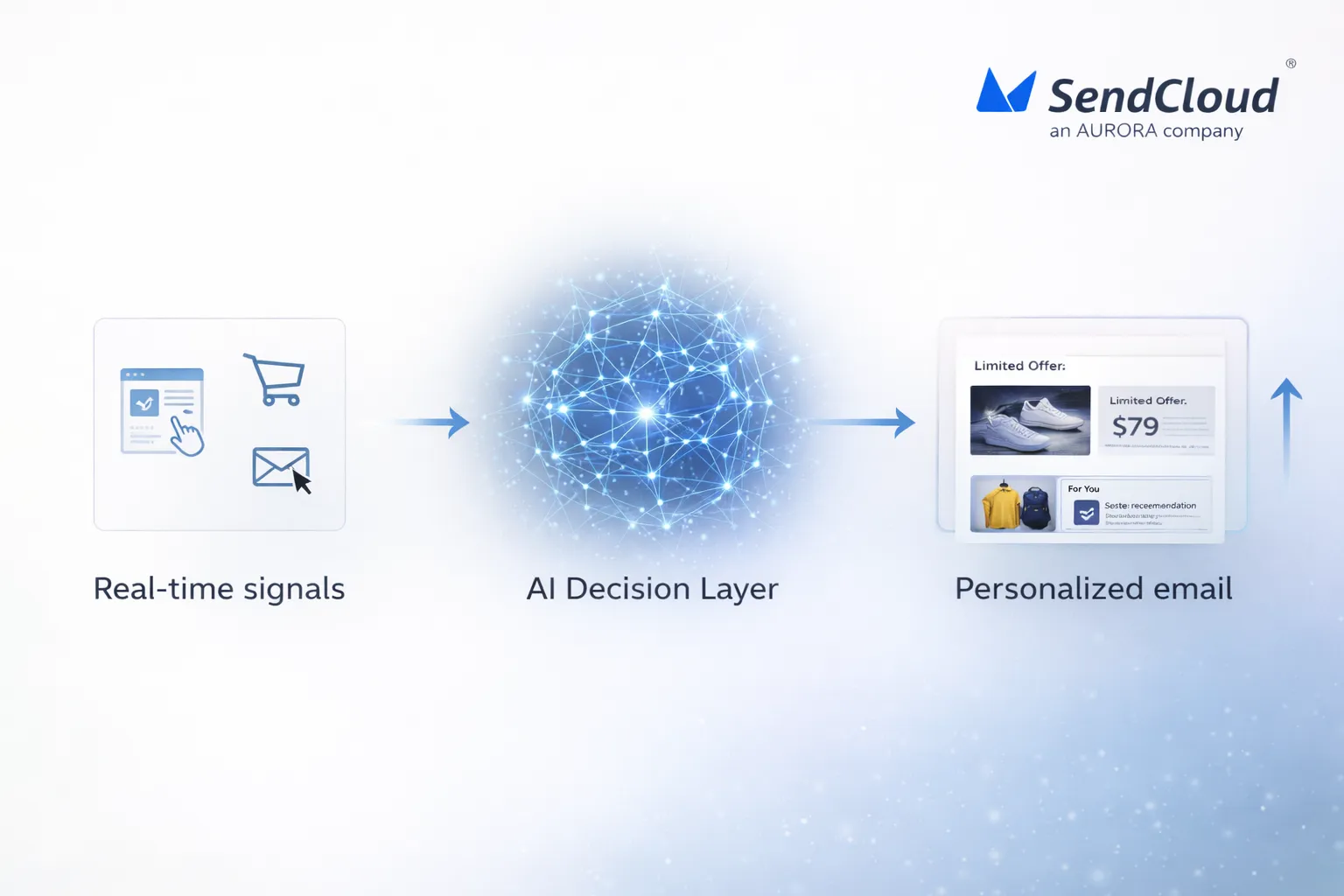
Real-time signals are actions that show intent. They change hour by hour, not quarter by quarter.
Common signals include:
- What they viewed (category, product, pricing page)
- What they searched on your site
- Cart adds, removes, and abandons
- Email clicks (which topics/products they chose)
- Time since last visit or purchase
These signals help you send emails that feel “well-timed,” not random.
Next-best email
“Next-best email” refers to the next message that is most relevant for a particular person.
It usually means picking the best:
- Goal (buy, come back, finish setup, renew)
- Message type (education, proof, offer, reminder)
- Offer (no discount, small perk, bigger incentive)
- Timing (today, tomorrow, next week)
- Cadence (send or pause to avoid fatigue)
This is how you get closer to 1:1 messaging without writing 1,000 different campaigns.
Rules vs models
Rules are fixed logic. Models learn from patterns.
- Rules: “If cart abandoned, send reminder in 2 hours.”
- Models: “This person is likely to buy in 3–5 days, so don’t rush them with a discount yet.”
Most teams do best with both. Rules keep things predictable. Models add accuracy when behavior gets messy.
Which Ai Capabilities Power Personalized Email Marketing Today?
AI isn’t one thing. It’s a toolbox. The best programs utilize AI to predict intent, select timing, craft content, and determine who should receive what.
The stakes are high because relevance is fragile. In a 2025 survey, 71% of consumers reported abandoning a purchase when the experience fell flat.
Predictive intent
Predictive intent is a probability. Not a guess.
It can help you predict things like
- Who is likely to buy soon
- Who is likely to churn
- Who needs education vs an offer
- Which category they are moving toward
When you use predictions, you send fewer “maybe” emails and more “this makes sense” emails.
Send-time AI
Send-time AI learns when each person tends to engage. Then it schedules delivery around that pattern.
A common approach is choosing an optimal send time inside a short window (like the next 24 hours), instead of blasting everyone at 9 a.m.
Dynamic content
Dynamic content means parts of your email change per person. The layout can stay the same, but key blocks swap based on signals.
Typical blocks to personalize:
- Hero product or category
- Recommended items
- Proof (reviews for the items they viewed)
- CTA text (shop vs learn vs finish)
This is often the fastest way to scale “personalized” without creating 20 different templates.
Micro-segments
Micro-segments are small groups built from behavior patterns. They update as people change.
Examples:
- “Browsed twice, no cart”
- “Repeat buyer, likely to reorder”
- “Clicks content, ignores promos”
- “Discount-driven, waits for sales”
This helps because one person can be in multiple “modes,” depending on where they are in the journey.
Cross-channel
Cross-channel AI helps choose the best channel for the message.
A simple pattern looks like this:
- Email for deeper content and product stories
- SMS for urgency (back in stock, delivery updates)
- Push for app users and fast reminders
- Messaging apps where they are a normal daily channel
The point is not “more channels.” It’s fewer wasted touches.
Which Metrics Show Ai-Driven Personalization Is Working?
AI personalization is only “smart” if it moves the numbers that matter. Track results against a clear baseline, and always compare to a control group when you can. Clicks and conversions are usually more reliable than opens, since open tracking can be noisy.
A useful baseline: across millions of campaigns, the average email click rate is about 2.09%, and results can range from roughly 0.83% to 4.90% depending on industry and content.
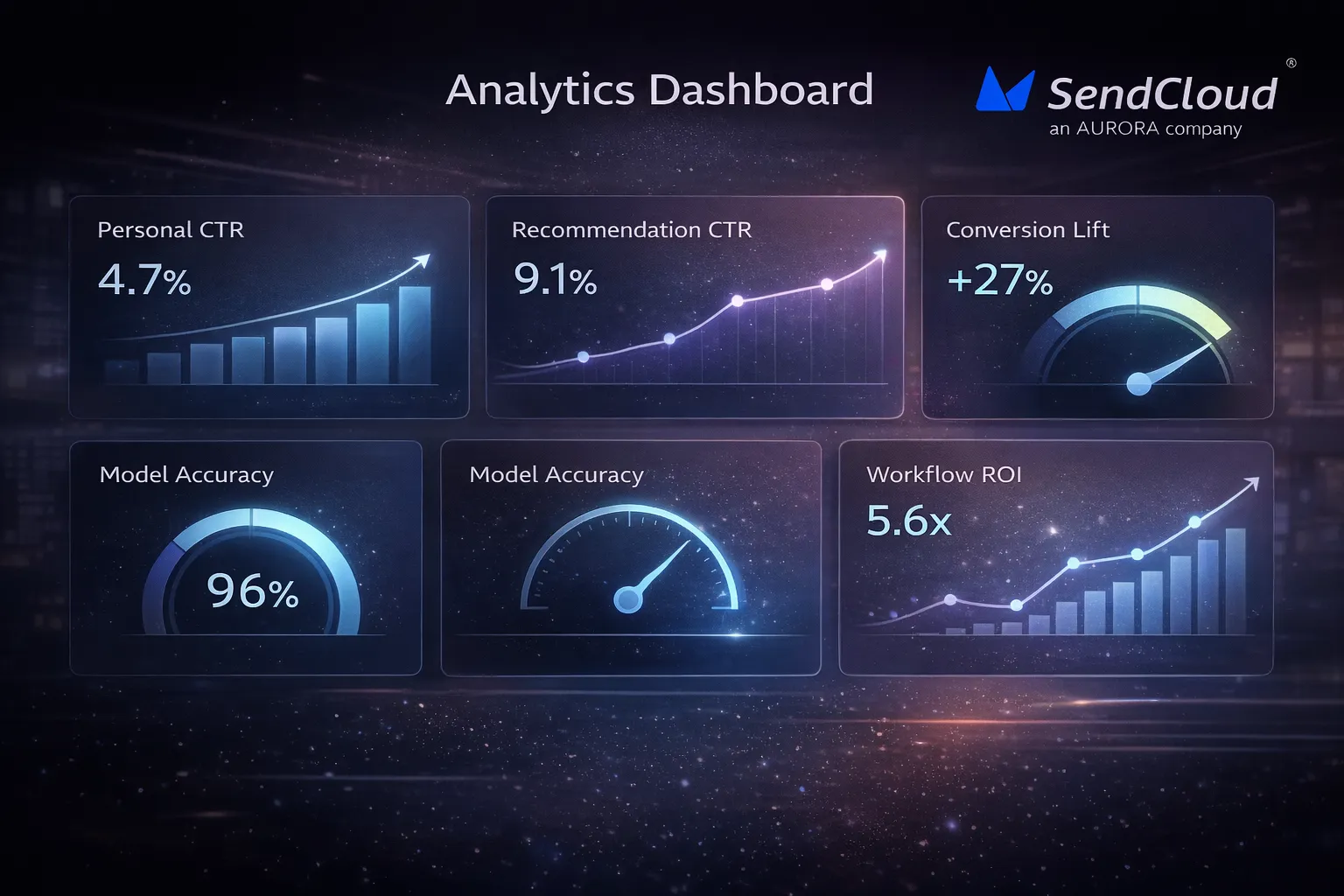
Personal CTR
Personal CTR is your click-through rate for personalized emails (or personalized blocks) compared to a non- personalized version.
How to track it (simple):
- Control CTR: standard email or standard block
- Personal CTR: AI-personalized email or block
- Lift % = (Personal CTR − Control CTR) ÷ Control CTR
What “good” looks like:
- You don’t need a massive lift right away.
- If you raise CTR without raising unsubscribes and spam complaints, that’s a strong sign you’re getting relevance right.
Rec CTR
Rec CTR (recommendation CTR) tells you if your recommended products or content are doing real work, or just taking up space.
Track it in two layers:
- Block CTR: clicks on the recommendation module ÷ emails delivered
- Share of clicks: recommendation clicks ÷ total clicks in the email
Practical tip:
- Also track downstream value, like add-to-cart rate or revenue per click, not just clicks. Otherwise, you may optimize for “curiosity clicks” that never convert.
Conversion lift
Conversion lift is the cleanest “proof” metric. It answers: did personalization create more purchases, signups, upgrades, or renewals?
Keep it simple:
- Pick one primary conversion per flow (purchase, trial start, demo booked).
- Compare personalized vs control on the same audience, same time window.
Why small lifts matter: in many ecommerce categories, conversion rates sit around ~1% to ~4% (and can be lower in some verticals). So even a 0.2-point lift can be meaningful revenue.
Model accuracy
Model accuracy depends on what you’re predicting (buy soon, churn risk, best product, best time). The easiest way to measure it without heavy math is with “top bucket” checks.
A practical approach:
- Take the top 10% of users your model says are most likely to convert.
- Compare their conversion rate to the bottom 90% (or to a random group).
- Re-check weekly or monthly, because behavior drifts.
If the “top bucket” doesn’t beat the baseline, the model may be learning from weak or messy signals.
Workflow ROI
Workflow ROI keeps you honest. It forces you to count costs (tools, time, data work) and measure incremental value.
A simple ROI formula:
- Incremental profit (personalized − control) − program cost
- Divide by program cost
A helpful anchor: email often returns about $36 for every $1 spent on average. Your number may be higher or lower, but it shows why measuring ROI is worth the effort.
How Do You Protect Deliverability While Scaling Personalization?
Personalization can improve inbox placement, but it can also break it if you push volume too fast or target the wrong people. The safest approach is “trust first, personalization second.”
Quick clarity:
- Delivery = the email was accepted by servers
- Deliverability = the email lands in the inbox (not spam).
Permission
Permission is your strongest long-term lever.Do this:
- Use clear opt-in language.
- Set expectations (what you’ll send, how often).
- Send a welcome email fast, so signups remember you.
Avoid this:
- Buying lists
- Emailing scraped addresses
- Tricking” people into staying subscribed (that drives spam complaints).
List quality
AI won’t fix a weak list. It can even make things worse by scaling bad targeting.List hygiene basics:
- Suppress chronic non-engagers (especially for promos).
- Remove hard bounces quickly.
- Keep re-engagement flows separate from your main sending.
This protects your sender reputation by keeping engagement signals clean.
Auth basics
If your authentication is not solid, personalization won’t matter. Your email may never reach the inbox.
Key requirements for bulk senders:
- SPF + DKIM
- DMARC (minimum policy like p=none, and DMARC must pass)
- From-domain alignment
Send patterns
Inbox providers watch your sending behavior. Sudden spikes can look risky, even if your content is “good.”Good patterns:
- Warm up new domains and IPs slowly.
- Keep cadence consistent.
- Segment by engagement so your most interested users get the most mail.
Trust signals
These are the signals that keep complaints low.Two hard numbers to keep in mind
- Aim to keep spam complaint rates below 0.1%, and avoid 0.3% or higher
- For marketing mail, one-click unsubscribe is now expected, and unsubscribes should be honored fast (as short as 2 days in some mailbox rules).
Also: in the U.S., opt-out requests must be honored within 10 business days.
How Can Brands Start With Ai + Email
You don’t need to overhaul everything. You need one clean use case, one clean data path, and one way to measure lift. The fastest path is to upgrade the workflows you already have.
One reality check: 81% of AI practitioners say their company still has significant data quality issues. So “start small” is usually the smart move.
Data prep
Start with first-party signals you already trust:
- Email events (delivered, clicked, unsubscribed)
- Web events (browse, cart, checkout start)
- Purchase events (what, when, value)
- Identity mapping (one person across devices)
Keep it boring and clean. Clean beats complex early on.
Tool choice
Pick tools based on the job you need done first:
- If you need faster experiments: choose strong testing + analytics
- If you need better targeting: choose strong event tracking + segmentation
- If you need smarter timing/content: choose AI features that can plug into your current flows
The goal is fewer moving parts at the start.
Pilot flows
Pilot on flows where intent is obvious. These are easier to improve with AI.Good pilots:
- Browse abandon
- Cart abandon
- Back-in-stock
- Post-purchase cross-sell
- Winback (with careful frequency control)
Pick one flow. Get a win. Then expand.
Build steps
A clean build sequence:
- Define the one metric that matters (CTR, conversion, revenue per recipient)
- Set a control version
- Add one AI layer (timing OR offer OR recommendations)
- Run long enough to beat randomness
- Roll out to a larger audience only after lift is stable
This prevents “AI chaos,” where everything changes at once and you don’t know what worked.
Test plan
Keep testing tight:
- One change per test
- One audience per test
- Same seasonality window when possible
And always watch guardrails:
- unsubscribe rate
- complaint rate
- bounce rate
How Aurora SendCloud supports AI-ready email personalization
AI personalization only works when your data is clean, your sends are stable, and your testing is fast. Aurora SendCloud is built around those basics. It gives you tracking, list tools, testing, warm-up controls, and APIs so you can run personalized email (and SMS) with fewer moving parts.
Tracking data
Personalization starts with signals. You need to know what happened after you sent an email. Aurora SendCloud supports tracking for core events like opens, clicks, unsubscribes, and spam complaints, so you can feed real behavior back into targeting and workflows.
Practical ways to use this data:
- Suppress people who never engage (protects deliverability)
- Trigger follow-ups based on clicks (not just opens)
- Find which topics drive real intent, then send more of those
Audiences & tags
If your audience structure is messy, AI gets noisy fast. Aurora SendCloud supports audiences with segments and tags, plus custom fields, so you can keep personalization logic simple and readable.
Good “AI-ready” tagging examples:
- Last category viewed
- Lifecycle stage (new, active, at-risk)
- Engagement tier (high, medium, low)
A/B testing
AI can create variations, but you still need proof. Aurora SendCloud supports A/B testing across key variables like subject, content, from, and send time. You can also set test ratios and rules for picking a winner.
A simple testing pattern that works:
- Test subject lines first (fast feedback)
- Then test one content block (like the offer or hero)
- Keep one clear success metric per test (CTR or conversion)
Warm-up control
Personalization does not help if you land in spam. Aurora SendCloud includes warm-up tools that ramp volume in steps and adjust send rates based on delivery results. It can control warm-up at the domain level and automate the ramp logic, instead of relying on manual spreadsheets.
Aurora also publishes performance claims like an average 99.61% delivery rate in 2024 and 3.5+ billion emails sent per month on its infrastructure (useful as directional context, not a guarantee).
Marketing API
If you want true 1:1 email, you usually need an API. Aurora SendCloud offers an Email API and also a Marketing API entry point for creating campaigns programmatically. It supports common sending methods like SMTP and HTTP API.
Two practical uses:
- Trigger emails from product events (signup, trial action, purchase)
- Pass dynamic variables into templates so one template can serve many users
Email + SMS
Some moments need email. Some need a fast nudge.Aurora SendCloud supports sending Email + SMS from one place, including behavior-triggered workflows based on actions like sign-ups and purchases. It also highlights global reach for messaging to 200+ countries and regions.
A clean “channel split”:
- Email for education, receipts, long-form offers
- SMS for urgency (back-in-stock, reminders, delivery updates)
Conclusion: AI makes email personal again—if you do it responsibly
AI email personalization works best when you treat it like a system. Start with real signals. Keep your data clean. Test one change at a time. And protect your sender reputation as you scale. The win is not “more personalization.” It is fewer irrelevant sends and more emails that match intent. That is what drives clicks, conversions, and long-term inbox trust. The brands that get the best results usually do the boring parts well: permission, list quality, steady sending, and clear value in every message.
You can manage this more easily with Aurora SendCloud.