Welcome emails set the tone for a strong relationship with new subscribers. They help with onboarding email success, improve email engagement, and boost email conversion rates.
In this guide, you will learn email first impression tips, welcome email best practices, and how to set up a strong welcome series. This guide is for email marketers, small business owners, marketing managers, e-commerce professionals, and startup founders who want clear, useful steps and real examples they can use right away.
Why Welcome Emails Are Crucial
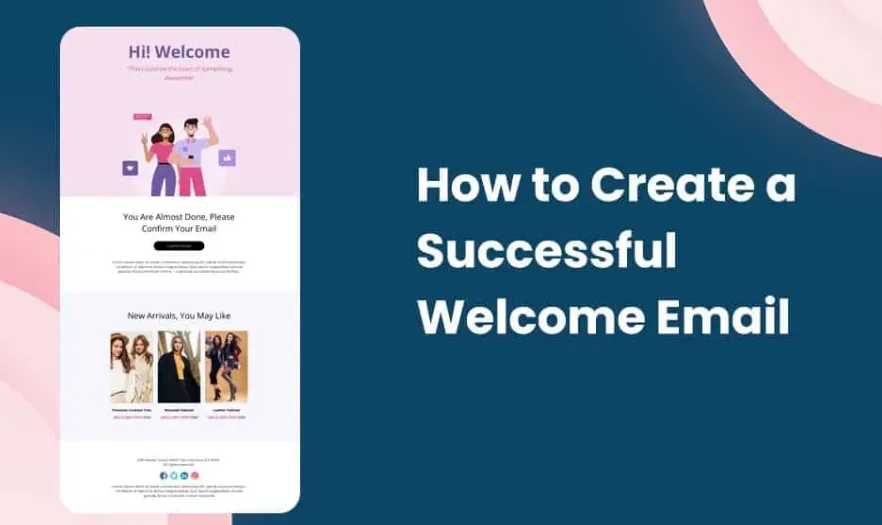
Welcome emails matter more than almost any other email you send. They are the first email a new subscriber sees after signing up. This single email shapes how people see your brand and how they interact with your future email content. Welcome emails also help with subscriber onboarding and set expectations about how you communicate.
1 The Strategic Importance of Welcome Emails
People who sign up expect to hear from you. The first 24 hours after registration show the highest interest and email engagement. If you send the right welcome email, you will keep that interest and make people open your next emails.
Exceptionally High Open Rates
Welcome emails receive much higher open rates than regular marketing emails. When a subscriber opens your email, you gain a chance to make a strong email first impression. Use that chance to show value and set the tone for your brand.
Foundation for Relationship Building
The first email lays the base for how subscribers see your brand. If you show trust, clarity, and value, users will expect good email content from you.
Starting Point for User Onboarding
Your welcome email can guide subscribers to take key actions:
- Confirm their email
- Complete their profile
- Start using your product
- Learn more about your services
These actions drive email conversion and user success.
2 Risks of a Poor Welcome Email
If your welcome email best practices fail, you lose trust early.
User Churn and Negative Brand Impression
If the first email feels confusing or unhelpful, people leave quickly. They form a bad view of your brand and may ignore future emails.
A Missed Opportunity for Conversion
If the welcome email fails to push the next step, you miss out on valuable conversions. Your onboarding email must guide subscribers to take action.
Higher Risk of Being Marked as Spam or Unsubscribes
Boring or unrelated emails make people unsubscribe or mark your email as spam. This hurts your future email delivery and growth.
Core Objectives of a Welcome Email
Before you write your welcome email content, decide what you want subscribers to do next. Clear goals help you write focused content and improve email engagement and email conversion.
1 Primary Objectives
Before writing your welcome email, define its main goals. Focusing on primary objectives ensures your email builds trust, reinforces your brand, and guides subscribers to take action.
Confirmation and Trust
Your first goal is to confirm the subscriber signed up successfully. Show them their email works and assure them they are in the right place.
This step builds trust. Trust leads to higher opens and better engagement with future emails.
Brand Reinforcement
Your welcome email must clearly show who you are and what value you deliver. This helps new subscribers remember your brand and care about future messages.
Drive Action
Every welcome email needs a clear purpose. Decide what action you want your subscriber to take first.
Examples:
- Log in to the dashboard
- Complete profile details
- Visit a resource page
- Start a free trial
- Follow you on social media
A clear goal helps you measure welcome series success.
2 Secondary Objectives
While the main goal guides your focus, secondary goals help you make your email stronger and more useful.
Set Expectations
Tell subscribers what type of emails they will receive and how often. People like clarity. This step reduces unsubscribes and improves email trust.
Example:
“You will receive weekly tips, product updates, and exclusive offers.”
Preference Collection
Let subscribers choose what they want to receive. Showing the preference link in your welcome email improves relevance and long-term engagement.
Social Connection
Encourage new subscribers to connect with you on social channels. This helps build a consistent brand experience beyond email.
Key Content Elements
Your welcome email must contain clear, simple, and useful email content. Each part plays a role in how subscribers act and respond.
1 Clear and Compelling Subject Line
Your subject line must:
- Make people want to open the email
- Set the tone for the email
- Fit with your brand style
Use your subscriber’s first name when possible. Example:
- “Welcome, Sarah! Let’s get started.”
- “Thanks for joining our community, John!”
Tips for subject lines:
- Personalization improves open rates
- Keep it short and direct
- Use words like “Welcome” or “Thanks for joining”
- Avoid spammy words like “Free,” “Discount,” or too many symbols
2 Preheader Text
Preheader text appears next to or under your subject line. Use it to support your subject line message.
Good preheader text makes your email more inviting. Example:
- “Your guide is ready inside.”
- “Let’s show you how it works.”
Core Welcome Email Body Content
The body of your email must deliver value clearly and quickly.
1 A Warm Welcome
Start by thanking the subscriber. Use simple, friendly words. Make them feel valued.
Example:
“Thank you for joining our email list. We are happy to have you!”
This basic step improves your email first impression and shows human tone.
2 Reiterate Your Value Proposition
Tell subscribers how your product or service helps them.
Example:
“Our service helps you save time by managing tasks in one place.”
Avoid long paragraphs. Short, clear sentences work best.
3 Effective and Clear CTA (Call to Action)
Your CTA tells subscribers what you want them to do next.
Examples of strong CTAs:
- “Get Started”
- “Complete Your Profile”
- “Explore Your Dashboard”
- “See How It Works”
Make sure your CTA stands out visually. Place it above the fold so people see it without scrolling.
4 Build Trust
Include support contact details or helpful resources. These elements reassure subscribers and reduce confusion.
Add links such as:
- Help Center
- Customer support email
- Privacy policy
Reassuring subscribers improves trust and boosts email engagement.
5 Personalization and Dynamic Content
Personalization makes subscribers feel seen and valued.
Ways to personalize:
- Greet with the user’s name
- Show content based on interests
- Use dynamic sections based on signup source
Example:
“If you signed up for fitness tips, show workout guides.”
Dynamic content increases relevance, which improves engagement and future opens.
Design and Presentation
People scan emails fast. Your email design must support clarity and ease of use.
1 Responsive Design
Always send emails that look good on phones, tablets, and desktops. Most people open emails on mobile devices. A responsive design ensures your email works on every screen.
2 Brand Consistency
Use your brand logo, colors, and fonts. Consistency helps people recognize your email and trust your message.
Make the email look like your website or app. This supports a unified brand experience.
3 Clean Layout
A clean layout helps people read and act faster.
Tips for clean layout:
- Use headings and short paragraphs
- Break content into sections
- Use bullet points for lists
- Add clear visual breaks with white space
Good layout improves readability and helps subscribers find your CTA and important content quickly.
4 Image and Multimedia Best Practices
Images can make your email more engaging, but use them smartly.
Best practices:
- Use high quality, relevant images
- Add alt text so people still understand if images don’t load
- Keep file sizes small to speed up loading
- Avoid too many images that distract from your message
Example alt text:
“Welcome banner with friendly greeting”
This helps users and improves email delivery.
Welcome Email Templates & Examples
Here are some proven welcome email templates you can use or modify for your business. You can apply these templates inside your email tool or marketing platform.
1 Template 1: The Value First Welcome
Subject: Welcome! Your guide is ready.
Preheader: Let us show you what to expect next.
Body:
Hello {{first_name}},
Thank you for signing up! You are now on our list, and we are glad to have you.
We help you with {{your main benefit}} so you can {{user result}}.
Here is what you get next:
- Easy steps to start
- Helpful resources
- Tips you can use today
Click the button below to begin:
[Get Started Now]
Need help? Contact us at {{support_email}} or visit our Help Center.
Thanks again,
The {{Brand Name}} Team
2 Template 2: The Product-Led Welcome
Subject: Let’s get you started, {{first_name}}
Preheader: Your product tour is ready inside.
Body:
Hi {{first_name}},
Welcome! Your account is ready. Let’s take a quick tour to help you start fast.
With our product, you can:
- Do task 1
- Do task 2
- Save time and effort
Start here:
[Take the Tour]
If you need help, email us anytime at {{support_email}}.
Cheers,
{{Brand Name}}
3 Template 3: The Community Focused Welcome
Subject: Welcome to the community, {{first_name}}
Preheader: Meet others like you and get top tips.
Body:
Hello {{first_name}},
Thank you for joining our community! We connect people like you who want {{main goal}}.
Join these groups to meet other members:
- Facebook: {{link}}
- LinkedIn: {{link}}
- Instagram: {{link}}
Start by introducing yourself here:
[Join the Group]
We look forward to seeing you inside.
Warm Regards,
{{Brand Name}} Team
Get Started with Welcome Emails Today
You now have a clear plan to create welcome emails that work.
You learned:
- Why welcome emails matter
- Primary and secondary goals
- Key email content elements
- How to design effective emails
- Templates you can use today
Welcome emails set expectations, build trust, and push subscribers to take action. Use these steps to boost email engagement, improve email delivery, and drive email conversion over time. Now it’s time to apply these welcome email best practices. Start building your welcome series and watch your subscriber onboarding improve.
If you use the Aurora SendCloud Email Marketing platform, you can add these templates directly and customize them to match your brand style. Try them and measure how your email performance improves.