Email newsletters continue to play a key role in digital marketing in 2026. They give businesses a direct way to communicate with their audience without relying on social media algorithms. When done right, a newsletter email can increase website traffic, support sales, and keep subscribers engaged over time.
This complete guide explains how to create a newsletter email step by step, using simple and practical methods. You will learn how to set clear goals, how to build a newsletter, structure your content, improve delivery, and send emails with confidence. Whether you are a beginner or improving your current strategy, this guide helps you create newsletters that readers want to open and read.
Why Newsletters Remain Essential
In 2026 how to create a newsletter, newsletters continue to play an important role in digital marketing. Companies of all sizes use newsletters to communicate directly with customers, build relationships, and produce measurable results. Unlike social media, where algorithms control viewers of content, emails become a trusted channel for brand communication because they ensure that messages are delivered directly to the subscriber's inbox.
The Enduring Value of Newsletters for Brand Communication
The newsletter is a way for brands to share updates, news and promotions with dedicated customers. Regular e-mail delivery provides a foundation for keeping brands in memory and continuously disseminating products, services and expertise. Subscribers often view newsletters as direct routes to trusted sources, which contribute to strengthening brand identity and authority.
How Newsletters Drive Engagement, Trust, and Long-Term Retention
The elaborate newsletter lets readers open emails, click links, and encourage interaction with content. Build trust with your audience by providing useful information and offers. Long-term subscribers have a high conversion rate to paid customers and tend to keep referrals to others and long-term engagement with brands.
The Shift Toward Personalized, Data-Driven Email Experiences
Modern newsletters leverage data to deliver highly relevant content. Personalization using the subscriber's name, preferences, and past behavior history gives the email an individually adjusted impression rather than a uniform one. Data-based insights enable marketers to segmentation audiences, optimize delivery times, and refine messages based on engagement patterns.
By understanding how to create a newsletter the importance of newsletters, companies can not only provide information, but also create campaigns that build, engage, and maintain connections with audiences.
What Do You Want This Newsletter to Achieve?
Before creating a newsletter, you need to define its purpose. Every email you send requires a clear goal. Understand what you want to achieve to create content that meets both your business goals and your subscriber needs.
Common Newsletter Goals
Ask yourself:
- Do I want more website visits?
- Do I want more product sales?
- Do I want readers to learn about new content?
- Do I want to keep customers engaged?
Each of these goals changes the way you write your newsletter.
Know Your Audience
You have to figure out who you are writing for. The newsletter for beginners and professionals is different.
Ask yourself:
- Who is reading this email
- What challenges do they have
- What do you want to learn or buy
By answering these questions how to create a newsletter, you can write content that the reader feels valuable.
Align Business and Reader Needs
Choose goals that match both business goals and subscriber requests. Example:
- Highlight products if you want to increase sales
- Publish useful lessons if readers want tips
Build a High Quality Subscriber List
Powerful newsletters start with the right readership. Let's prioritize subscribers who want to truly receive your information rather than just sticking to numbers. A quality subscriber list improves opening rates, engagement and the long-term outcomes of all newsletter best practices delivered.
Why Opt-In Lists Matter
Opt-in lists include subscribers who voluntarily allow email reception. These readers engage more positively, open emails more often and trust your brand. Unlike purchasing lists, opt-in lists improve delivery rates, reduce spam complaints, and serve as a foundation for building long-term relationships with readers.
Ways to Get Subscribers
Expanding your email list requires a clear and effective strategy. Focus on methods that encourage voluntary registration and provide value. Leverage website forms, pop-ups, slide-ins, lead magnets, and social promotions to attract genuine subscribers who are interested in content and improve engagement and long-term newsletter best practices performance.
Website Signup Forms
The website form is one of the easiest ways to collect subscribers. Place it on the homepage, blog post, payment page, etc. Make it simple, conspicuous, and easy to understand, allowing visitors to quickly enter their email addresses without any extra steps.
Pop-Ups and Slide-Ins
Pop-ups and slide-ins attract visitors not too much attention. Time-based or scroll-triggered pop-ups encourage you to subscribe by offering benefits such as free guides and discounts. These tools help to efficiently convert temporary visitors to newsletter subscribers.
Lead Magnets
Let's offer free items like the following as registration benefits:
- Simple Guide
- Checklist
- Discount Code
These benefits encourage the provision of email addresses.
Segment Your List Early
Segmentation is about grouping subscribers:
- By Interest
- By purchase history
- By Location
Segmentation allows you to deliver more relevant newsletter content.
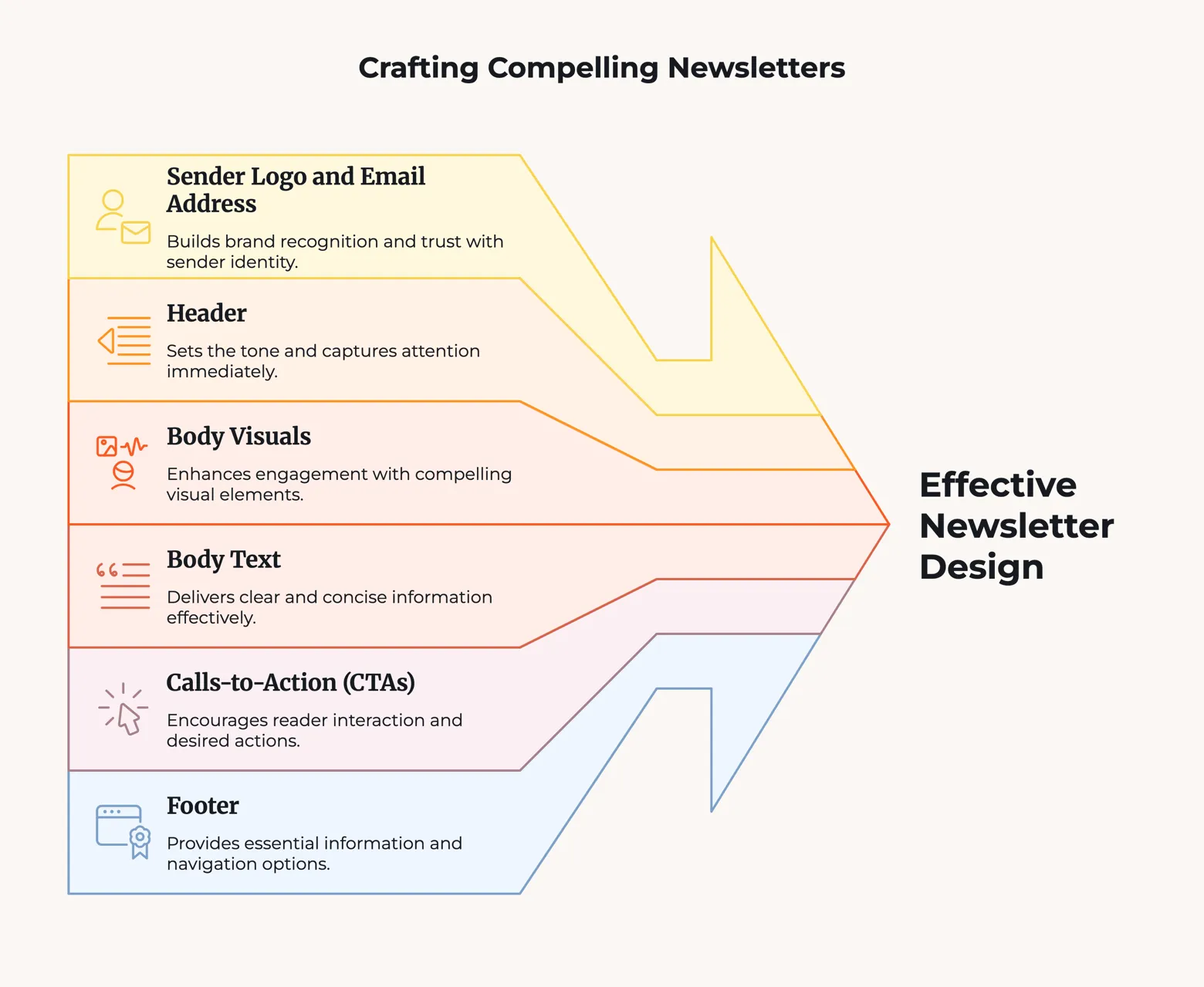
Craft a Compelling Newsletter Structure
A clear newsletter configuration helps readers understand messages quickly and take action. In this section how to create a newsletter, you will learn the exact components required for newsletter emails, from subject to footer, to improve readability, engagement, and overall email performance.
Subject Line & Preheader
Subject and pre-header play a decisive role in the email opening rate. It forms the first impression in the inbox and determines whether the reader clicks on the message to open it or ignore it. Clear, relevant and informative text encourages subscribers to engage with newsletters.
Best Subject Line Practices
- Write clear and relevant sentences
- Stimulate curiosity or add useful information
- Personalize if possible (e.g. name)
- Keep it short and readable in length
Example:
"New Techniques for Improving Email Delivery - March 2026"
Use Preheader Text Well
Pre-header text plays an important role in improving opening rate. In the Inbox preview, it appears horizontally or below the subject and provides additional context. Use it to emphasize value, reinforce subject lines, and clearly communicate why it is worth opening a newsletter.
Example:
"Check today's tips on design, delivery and tools"
Avoid Spam Words
Certain words and formats trigger spam filters and reduce inbox reaches. Avoid expressions such as "free" or "buy now" or overuse of capital letters and symbols. Writing clear and natural subject lines improves email delivery and increases the chances of reaching your subscriber's inbox.
Test for Best Results
Testing helps you understand which methods are most effective for your audience. Perform A/B tests in different subject lines and compare opening rates. A fine-tuning version of the wording, length and personalization will help you improve your newsletter in the future.
Structure the Body Content Clearly
After opening, the text should clearly communicate useful information. Guide readers in short paragraphs, clear headings, and simple formats. The structured body maintains caution, enhances readability, and encourages scrolling continuity and action.
Keep Content Simple
- Use short paragraphs
- Separate text by heading
- Leverage bullets
The reader sees the email quickly. Simple configuration makes it easy to find value instantly.
Give Value Before Promotion
Start with useful content:
- Tips
- Guide
- Useful News
Then add an offer or call to action.
Focus on Important Content First
Place the core message at the beginning. Many readers stop scrolling in a short time.
Use Images Wisely
Added visual elements only when reinforcing the description.
Image Requirements:
- Fast loading
- Good display on mobile
Mention Dynamic Content Blocks
Dynamic blocks can display different sections for each user. Example:
- View welcome offers for new customers
- Repeater displays product recommendations
Add Strong, Actionable CTAs (Call to Action)
Powerful and viable CTAs lead readers to: A clear call to action can help you change your interest to a click, such as a blog post, product page, registration form, etc. Properly placed CTAs improve engagement and help you achieve your newsletter goals.
One Main CTA
Let's set one major action for each newsletter:
- Read the blog post
- Buy products
- Register for a webinar
Too many CTAs confuse readers.
Secondary CTAs (Only If Needed)
Sub-CTAs can support key goals if used carefully. Please add it only if you want to guide you to related actions, such as confirmation of details and browsing information. If there are too many auxiliary links, the reader's attention will become distracted and the concentration will decrease, so let's minimize while clearly showing the relevance.
Buttons vs Text Links
Buttons usually get more attention.
Text links are effective when placed within beneficial content.
Best CTA Placement
- Placed immediately after the first content section
- Add another near the bottom
Clarify your message and focus on action.
Add Footer and Compliance Elements
The Email Act requires certain elements to be listed at the bottom of the newsletter.
Required Footer Items
- Unsubscribe link
- Company Address
Helpful Extra Elements
Add:
- Social Media Links
- Support/Help Link
These increase the usefulness of newsletters and reduce spam complaints.
Preview, Test, and Optimize Before Sending
Please perform the test before delivery to all subscribers.
Check on Desktop and Mobile
Use the preview tool to check the email display on different devices.
Test All Links
Confirmation Items:
- Buttons
- Hyperlinks
- Images
Please fix the link break before sending.
Check Text and Images
Check the spelling and grammar.
Check the following points:
- Fast import of images
- Clear readability of text
Additional Way: Choose Newsletter Software (Aurora SendCloud)
Aurora SendCloud is a powerful newsletter software that simplifies email creation and enhances engagement. Marketers, small business owners and beginners can design professional emails without coding. Aurora SendCloud allows you to create visually attractive layouts, test subject lines to improve opening rates, and deliver personalized content to different audience segments.
Pre-built footer blocks ensure compliance with email regulations and the built-in check function detects spam risk before transmission. Overall, how to create a newsletter, Aurora SendCloud streamlines the creation, testing and delivery of newsletters to help companies save time and improve outcomes in their email campaigns.
Key Features:
- Easy and professional email design with drag and drop editor
- Subject test for opening rate optimization
- Personalized content blocks for different devices and audience segments
- Pre-built footer blocks that meet legal compliance
- Built-in spam risk test to improve delivery rate
Preview and Send Your Newsletter
Please check the checklist below before clicking the send button:
Layout and Readability
- Check margins and fonts
- Check the display status of the image
Mobile Responsiveness
The majority of readers check their emails on their smartphones, so looking good on mobile is essential. Ensuring mobile support improves readability, layout and engagement. Test your design on multiple devices so that images, text and buttons are displayed correctly for all users.
Links and CTAs
The effect of the newsletter is on clickable links and clear action alerts (CTAs). Make sure that all links, buttons and URLs work properly. The functioning link leads the reader to the intended page, improves the user experience and increases the conversion rate from newsletter content.
Timing and Segment
Maximize open rates and engagement by sending newsletters at the right time. Analyze subscriber behavior and identify the most active time zones. Combined with the right segmentation, we deliver relevant content to the right people so that they can receive emails to readers who are most likely to take action. Make sure you are sending to the correct segment.
Conclusion
In 2026, email newsletters continue to be a reliable means of communicating with audiences and maintaining strong long-term relationships. The newsletter allows you to share updates, provide value, and maintain a presence in your subscriber's inbox.
By following the instructions in this guide how to create a newsletter, I learned the whole process of creating a newsletter, from setting clear goals, building quality lists, to designing, testing and distributing emails. Periodic testing and improvements enable readers to understand their preferences. Use tools like Aurora SendCloud to streamline design, testing and delivery. Start your newsletter now, share useful content and foster steady engagement.