

In 2024, the global inbox placement rate was 83.5%. That means about 1 in 6 marketing emails never reach the inbox. If your list is full of wrong, fake, or low-intent addresses, that “missing” share gets worse fast. One of the simplest ways to protect email list quality at the door is double opt-in. It forces every new subscriber to confirm they really want your emails.
Low-quality signups do more than waste sends. They drive bounces, spam complaints, and low clicks. Over time, mailbox providers learn that people do not want your messages. Even your most loyal subscribers may stop seeing your emails in their inbox.
Double opt-in addresses the issue at its root. It turns “anyone can enter an email” into “only real, interested people join.” That one small step helps you build a list that stays healthier for longer.
What Is Email List Quality?
Email list quality is a straightforward concept: how many people on your list are genuine, reachable, and genuinely interested in your emails. When quality drops, mailbox providers see more negative signals. Then your messages start landing in spam—or getting blocked.
Delivery vs deliverability
Delivery means your email was accepted by the receiving mail server. It does not mean it hit the inbox. Deliverability refers to where it lands after delivery: in the inbox, spam, or a tab that is never opened. Google recommends using Postmaster Tools because it shows spam rates, auth results, and delivery errors that help explain inbox placement.
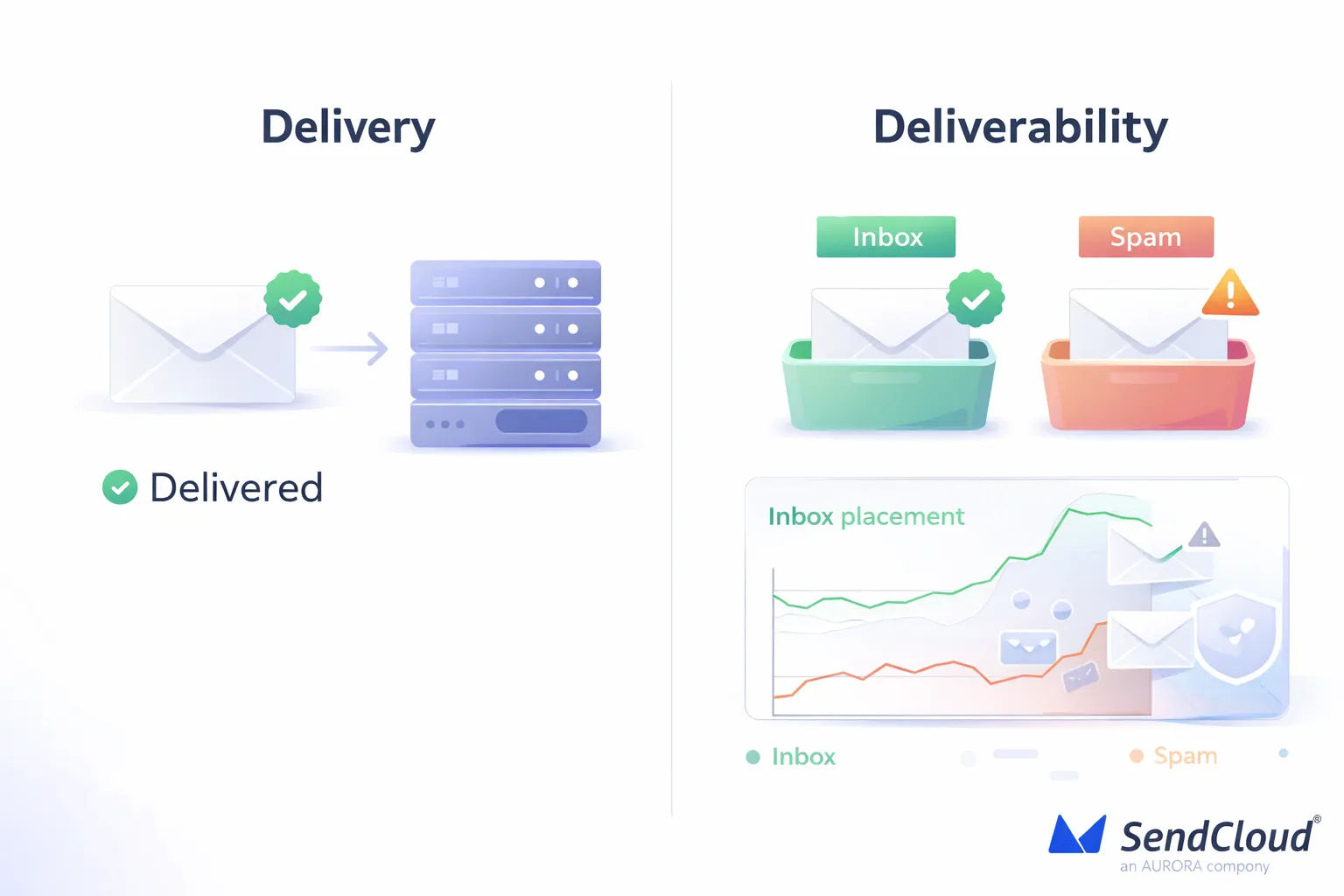
A good way to remember it:
- Delivery = “Did it arrive?”
- Deliverability = “Did it arrive in the inbox?”
Quality signals
Mailbox providers judge your sending based on patterns. List quality shows up in those patterns fast— especially right after you add new subscribers. Google’s own guidance is blunt about one key metric: keep spam rates in Postmaster Tools below 0.1% and avoid ever reaching 0.3% or higher.
Put that into real numbers: if you send 10,000 emails, 30 “mark as spam” clicks = 0.3%. That’s enough to put you in the danger zone.
Here are the list-quality signals that tend to move together (in good and bad ways):
- Spam complaints (people hitting “Report spam”)
- Low engagement (few opens/clicks over time, lots of ignores)
-
Delivery errors
(bounces, rate limits, “suspected spam” deferrals)
A useful reality check: Validity’s deliverability benchmark notes that only 25% of respondents reported keeping spam complaint rates below the recommended 0.1%. So “small” complaint rates are still a common problem.
Hidden costs
Low-quality signups don’t just hurt one campaign. They create long-term drag.
First, they damage trust. When your list includes bots, typos, or individuals who never intended to join, your spam rate increases. Google explicitly highlights spam-rate monitoring as a crucial aspect of preventing spam classification. Yahoo also sets a clear expectation: keep spam rates below 0.3%.
Second, they create waste. You pay to store and send to contacts who will never convert. You also lose signal in your reporting, because the “real people” get mixed in with dead weight.
Third, they make fixes harder later. Once your reputation suffers, you often need to slow down, clean up your lists, and rebuild engagement. Google even warns that improvements can take time to translate into better filtering outcomes.
What Does Effective Email List Management Include?
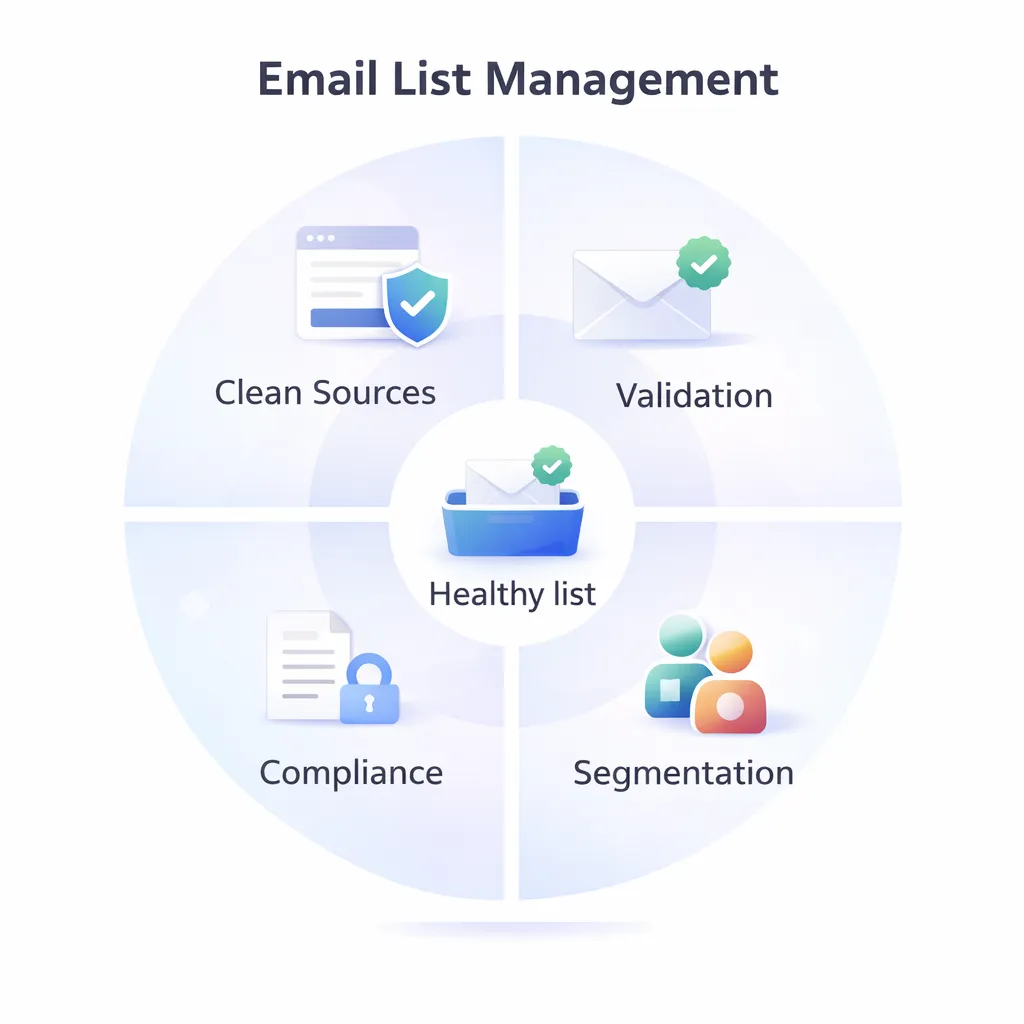
Effective list management is not a single task. It’s a system. You control where signups come from, whether addresses are genuine, who receives what, and whether your program remains compliant. When those four pieces work together, double opt-in becomes much more powerful.
Clean sources
“Clean sources” means people join your list in a way that’s clear, expected, and easy to explain later. That usually means your website, your product, your events, and your own content—not random third-party lists.
A simple rule: if you can’t point to exactly where the person opted in, it’s not a clean source.
Practical ways to keep sources clean:
- Use signup forms with a clear value promise (what they’ll get and how often)
- Avoid gated content that feels like a trick (“download” that secretly means “daily promos”)
- Don’t buy, rent, or scrape lists (even if they look “targeted”)
This matters even more if you send at scale. Gmail defines a “bulk sender” as someone who sends 5,000+ messages in a single day to Gmail addresses—and that group faces tighter requirements.
Validation
Validation is how you stop bad data from entering (or staying in) your list. It’s not just about catching typos. It’s about reducing bounces, blocking risky addresses, and keeping your sending reputation steady.
Core validation habits:
- Confirm ownerships (double opt-in is the cleanest version of this)
- Check format + domain (basic email verification at signup helps)
- Auto-remove hard bounces (don’t keep retrying dead addresses)
- Suppress risky patterns (obvious typos, disposable domains, role accounts when appropriate)
Think of validation like quality control. If you only clean later, you’ve already paid the cost in bounces, low engagement, and reputation damage.
Segmentation
Segmentation is where list management turns into revenue. When you send more relevant emails to smaller groups, you usually get better clicks, fewer complaints, and better long-term deliverability.
A concrete example of why targeting matters: Klaviyo’s 2024 benchmark data shows automated flows like abandoned cart can generate up to 30x more revenue per recipient than one-time campaigns—based on $3.65 RPR for abandoned cart flows vs $0.11 RPR for campaigns. That gap is mostly about timing and intent, not “better copy.”
High-value segments most teams should keep:
- New subscribers (welcome series vs promos)
- Highly engaged (clicked/opened recently)
- Cooling off (no opens/clicks in X days)
- By interest (category, topic, use case)
- By lifecycle (trial, active customer, churn risk)
Compliance
Compliance is not just “avoid fines.” It’s also how you lower spam complaints. When people can leave easily, they’re less likely to hit “spam.”
Two practical standards to bake into your list program:
- Easy unsubscribe (visible and works every time)
- Fast processing (don’t keep mailing people after they opt out)
Yahoo’s Sender Hub spells this out clearly for bulk senders: support one-click unsubscribe and honor unsubscribes within 2 days.
When you combine compliance + clean acquisition + validation + segmentation, your list stays smaller—but stronger. And double opt-in becomes the “front door lock” that keeps the whole system from getting polluted.
Single Opt-In Vs Double Opt-In: What’s The Difference?
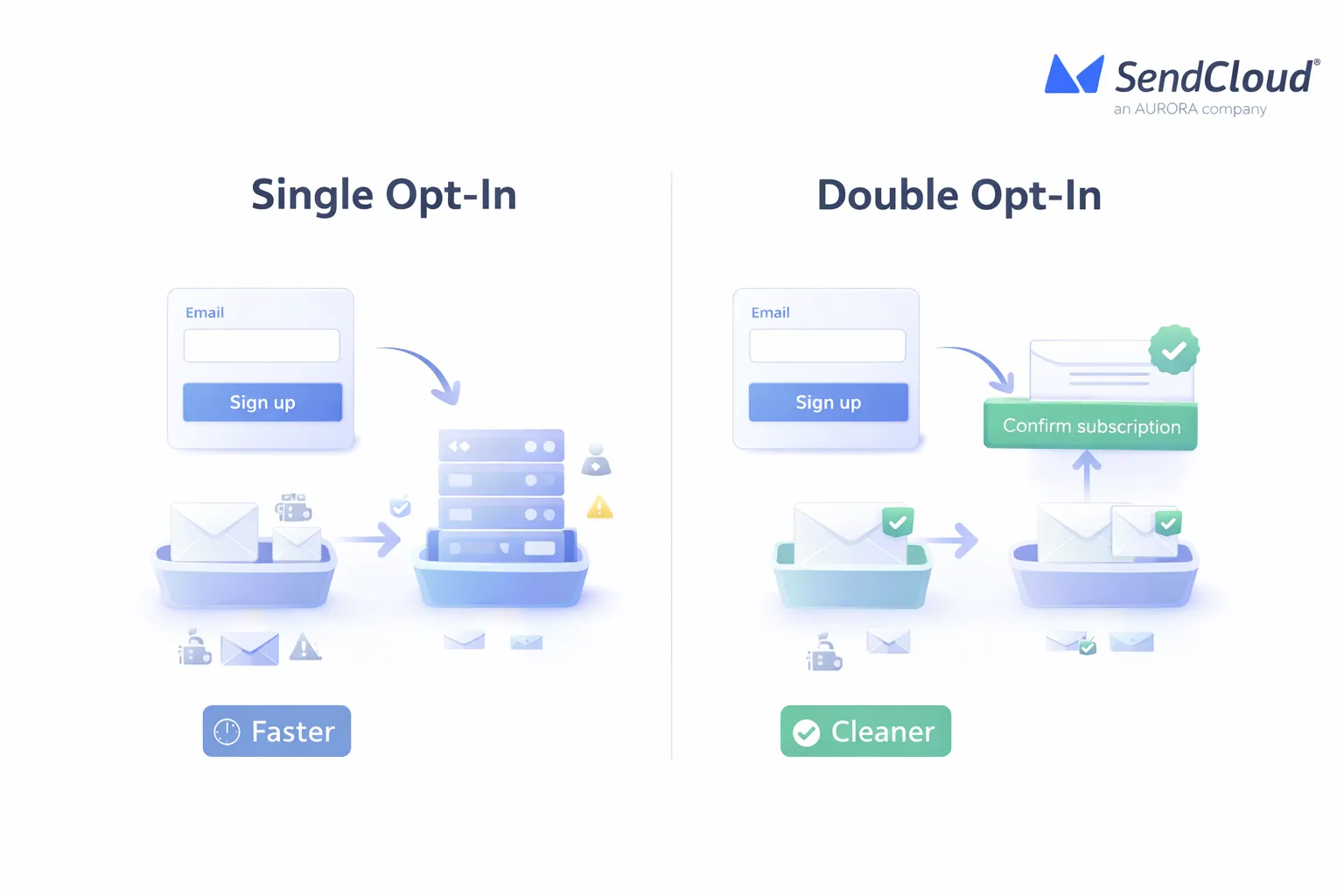
Single opt-in and double opt-in are two ways to get permission to email someone. The difference is simple: single opt-in adds the address right away, while double opt-in adds a confirmation step to prove the person really controls that inbox.
Single opt-in
With single opt-in, a person enters an email in your form and hits submit. That address is saved to your list right away. Mailchimp notes that, behind the scenes, platforms often capture details like the signup IP address plus the date and time.
This method is fast. But it is also easier to pollute:
- Typos (“gmial.com”) still get added
- People can sign up someone else’s email.
- Bots can hit your forms at scale.
That bot risk is not theoretical. Imperva’s 2024 Bad Bot Report found that 49.6% of all internet traffic in 2023 came from bots, and 32% was bad bot traffic. If your signup form is public, you should assume automated traffic will try it.
Double opt-in
With double opt-in, the person submits their email first. Then they receive a confirmation email and must click to confirm. Only after that are they added as a subscribed contact.
The biggest benefit is clean intent. You are not just collecting an address. You are confirming the person can access that inbox and chose to join. Mailchimp also points out that double opt-in can help when you’ve had low open rates or abuse complaints, and it can support consent needs in different markets.
Best fit
There is no “one right” opt-in method for every brand. But there is a right choice for your signup risk level.
Single opt-in tends to fit best when:
- You have a low-risk signup path (like logged-in users or customers).
- Your form already has strong protections (rate limits, CAPTCHA, validation).
- You need the lowest friction possible (for example, fast mobile signup).
Double opt-in tends to fit best when:
- Your form is public and promoted widely (ads, partnerships, giveaways).
- You have seen fake signups, low engagement, or abuse complaints.
- You want stronger proof that the subscriber really asked for the emails.
The tradeoff is real: double opt-in can slow list growth a bit. But it usually raises the quality of the list you do build—which is what protects deliverability long term.
How Does Double Opt-In Stop Low-Quality Signups?
Double opt-in works like a quick “proof check” at the door. Someone enters an email. Then they must click a link in a confirmation email before they are added to your list. That one extra step filters out a lot of junk before it can hurt your list health.
Real inboxes
Double opt-in helps you collect reachable, owned addresses.
Here’s what it prevents right away:
- Typos (the person never sees the confirmation email, so they never join)
- Wrong-person signups (someone else’s email added “by mistake”)
- Fake addresses (they can’t confirm what they can’t access)
Mailchimp describes the core benefit clearly: the double opt-in step helps ensure the address is valid because the subscriber must confirm before they’re added.
Bot filter
Bots love open signup forms. If your form is public, it will get automated hits sooner or later.
Imperva’s 2025 Bad Bot Report says bad bots make up 37% of all internet traffic, and automated traffic overall is 51% of web traffic. That’s a lot of “non-human” behavior trying forms, carts, and login boxes.
Double opt-in helps because most bots do not complete the second step (clicking from a real inbox). Pair it with basic protections like:
- reCAPTCHA or similar checks (especially on high-traffic forms)
- rate limits (stop repeated submits from one IP)
- a “honeypot” field (bots fill it, humans don’t)
Mailchimp also uses reCAPTCHA as part of its signup flow to help filter fake signups.
Fewer complaints
A big cause of spam complaints is simple: “I don’t remember signing up.”
Double opt-in reduces that because:
- the subscriber takes a clear second action
- expectations are set twice (form + confirmation email)
- it’s easier for the person to recognize your brand later
Mailchimp highlights double opt-in as a strong option if you’ve had abuse complaints or low engagement, because it helps confirm intent and clean up acquisition.
Strong reputation
Mailbox providers reward senders who look trustworthy over time. Double opt-in supports that by pushing your list toward people who are more likely to open, click, and stay subscribed.
It also matches the direction inbox providers are going. For example, Google’s Gmail guidance (updated over time since the February 2024 changes) focuses on authenticated mail, avoiding unwanted mail, and easier unsubscribes for high-volume senders. Google also says it began ramping up enforcement on non‑compliant traffic starting November 2025.
Yahoo’s Sender Hub guidance also emphasizes authentication, low complaint rates, and easy unsubscribe behavior for bulk senders.
How Do You Implement Double Opt-In Effectively (Step By Step)?
A good double opt-in flow feels fast and obvious. The user never wonders, “What happened?” They know they signed up. They see the confirm email. They click once. Then they get what you promised.
This part matters because first emails often get strong attention. Campaign Monitor notes welcome emails have around a 50% average open rate, and they can be 86% more effective than standard campaigns. So your confirm + welcome experience is a rare moment where people are highly alert.
Signup form
Keep the form simple and clear. Your goal is “high intent,” not “more fields.”
Best-practice checklist:
- Ask for the minimum (usually just email)
- Say what they’ll get (example: “weekly product tips”)
- Set frequency (example: “1–2 emails per week”)
- Add trust cues (privacy note, unsubscribe anytime)
- Block obvious garbage (reCAPTCHA, rate limits, honeypot)
If the form promise is vague, your confirm rate will be vague too.
Confirm email
Send the confirmation email immediately after the form submit. The job of this email is not to sell. It’s to confirm.
Make it hard to miss:
- Clear subject line (example: “Confirm your subscription to Aurora updates”)
- One main message (1 idea)
- One strong button (one-click confirm)
- Short reminder of what they signed up for
Mailchimp’s double opt-in flow is built around this exact step: submit form → receive confirmation message → click link to verify → then become subscribed.
Thank-you page
After the form submit, show a page that tells them exactly what to do next:
- “Check your inbox for a confirmation email.”
- “Click the button to confirm.
After they click confirm, send them to a second page that closes the loop:
- “You’re confirmed.”
- “Here’s what to expect next.”
- (Optional) deliver the promised asset now (guide, coupon, invite)
Mailchimp uses both a signup thank-you page and a confirmation thank-you page as part of the double opt-in journey.
Reminder
A reminder is how you recover the “good” people who got distracted.
A simple approach:
- Send 1 reminder to unconfirmed signups within 24–48 hours
- Keep the same goal: one click to confirm
- Consider stopping after 1–2 reminders (don’t nag)
If someone still does not confirm, treat it as low intent. That’s the whole point of double opt-in.
Track rates
Track each step so you know where the leak is
Metrics that help you improve fast:
- Form views → form submits (form clarity)
- Submits → confirmations (email deliverability + clarity)
- Time to confirm (friction)
- Confirmed → engaged (welcome series performance)
If confirmations are low, it is often one of these issues:
- the form promise is not clear
- the confirmation email is landing in spam/promotions
- the confirm button is easy to miss
- the “from” name is not recognizable
Mailchimp’s troubleshooting guidance also notes that delivery times can vary and recommends checking for setup issues if people report missing confirmation emails.
Why Is Your Double Opt-In Confirmation Rate Low (And How Do You Fix It)?
A low confirmation rate usually means one of three things: people did not want it enough, they did not see the email, or it was too hard to finish. The good news is that most fixes are small. But they have a big effect on email list quality over time.
Weak promise
If your signup message is vague, people hesitate. Then they ignore the confirm email.
Tighten the “value promise” in two places: the form and the confirmation email.
- Say what the emails are (examples: product tips, new posts, deals)
- Say how often you’ll send
- Use the same wording in both steps, so it feels familiar
Also avoid bait-and-switch offers. If someone thinks they’re getting one PDF, but your confirm email looks like a promo list, they will not click. That hurts your list growth and your trust.
Spam placement
Sometimes the subscriber did want your emails, but the confirmation email lands in the wrong place (Promotions or Spam) or arrives late.
Mailchimp notes a few real-world causes:
- delivery can vary based on server traffic, so it’s worth waiting a bit before assuming it failed
- some webmail providers may delay bulk mail up to 24 hours
- Gmail users may see the confirmation email in the Promotions tab
- corporate email filters and firewalls can block or delay mail more than consumer inboxes
Fix the basics that affect inbox placement:
- Use a real domain email address (not a free mailbox “from” address)
- Authenticate your sending domain and set up DMARC (Mailchimp explicitly recommends this to prevent bounces)
- Keep the confirm email very simple (one job, one button)
Friction
Even interested people drop off when the flow feels slow or confusing.
Reduce friction with a few practical tweaks:
- Send the confirmation email immediately after signup (no delay)
- Use one clear button (no extra links competing for clicks)
- Make the button big and easy to tap on mobile
- Don’t ask for a login to “confirm” (confirmation should be one click)
If you host your own form, double-check the embed code and field mapping. Mailchimp notes that form code issues, conflicts, or incorrect setup can stop confirmation emails from behaving as expected.
How Aurora Sendcloud Helps With Double Opt-In And Email List Quality?
Double opt-in is a process. You need fast sending, clean templates, reliable tracking, and clear reporting. Aurora SendCloud is built around those deliverability basics, so your list stays clean from the start.
Fast sends
Confirmation emails are time-sensitive.Aurora SendCloud’s sending queue tools are designed to monitor and manage delivery by receiving domain (like gmail.com), with live charts and status views so you can spot delays quickly.
Two concrete features that help in real life:
- Queue analytics can be viewed in intervals like 5s, 15s, and 30s, with charts updating every 5 seconds
- The platform also highlights frequent sampling and visibility across major providers (useful when you’re troubleshooting “where did my confirm email go?”)
Templates
Double opt-in works best when the confirmation email is consistent and hard to misunderstand
Aurora SendCloud supports reusable email templates , including templates for verification codes and other repeatable sends, with variable substitution for personalization. That’s a clean fit for confirmation links and welcome emails.
Tracking
If you can’t track confirmation clicks, you can’t improve the flow.
Aurora SendCloud supports open, click, and unsubscribe tracking, and explains how it works (tracking pixel for opens, tracked links for clicks, and unsubscribe tracking).
For double opt-in, that helps you:
- see how many people open the confirm email
- see how many click the confirm link
- spot provider-specific problems (example: opens but no clicks, or no opens at all)
Warm-up
If you are sending from a new domain or you just increased volume, warming up matters. It helps you avoid sudden spikes that trigger filtering.
Aurora SendCloud describes a warm-up approach that increases volume in staged steps. One example shown: if delivery stays above 85%, the platform can raise the send rate every 24 hours, and it references a ramp from about 1,000/day up to 250,000/day.
That kind of controlled pacing can protect your confirmation emails too, since those emails are often the first ones a new subscriber sees.
Reports
List quality is not just “did it send.” It’s what happened next.
Aurora SendCloud includes analytics that track performance across the email lifecycle, helping you identify delivery time issues by domain. It also offers engagement tracking (opens, clicks, unsubscribes, and complaints) so you can directly tie list quality to outcomes.
If you want event-level signals for your own systems, Aurora SendCloud also supports webhooks that can push delivery and engagement events (such as opens, clicks, and bounces) back to your server.
Conclusion
Double opt-in is not about making signup harder. It’s about making your list cleaner. When only real, interested people get in, everything gets easier after that. You see better engagement. You get fewer complaints. And your deliverability stays steady because mailbox providers see positive signals over time.
Single opt-in can grow your list faster. But double opt-in helps you build a list you can trust, month after month. That’s the difference between “more contacts” and a real audience.
You can manage this more easily with AuroraSendCloud.