Email is still one of the best marketing channels, but many campaigns look and feel the same. Static layouts, plain calls to action, and predictable content can make it harder to hold attention. That is a real problem when inbox competition is high and every click matters.
This is where interactiveemail marketing stands out. Interactive emails give people something to do inside the message, not just something to read. That can improve email engagement, support better user experience, and increase clicks when the design is done well. The goal is not to add flashy effects. It is to make emails more useful, more relevant, and easier to act on.
Introduction to Interactive Email Marketing
Interactive emails are designed to let users engage with content inside the email itself. Instead of only reading text and clicking one link, subscribers may be able to swipe through images, answer a poll, reveal content, or interact with product choices
This makes interactive emails different from static emails. A static email shows information. An interactive email invites action within the design.
Why Interactive Emails Matter
Interactivity matters because attention is limited. If an email can make it easier to browse offers, answer a question, or explore products without leaving the inbox right away, the experience feels smoother. That can help brands in three ways:
- Increase time spent with the email
- Improve email click-through
- Make the message feel more relevant and engaging
For marketers, this means stronger performance without relying only on longer copy or bigger discounts.
Benefits of Interactive Emails
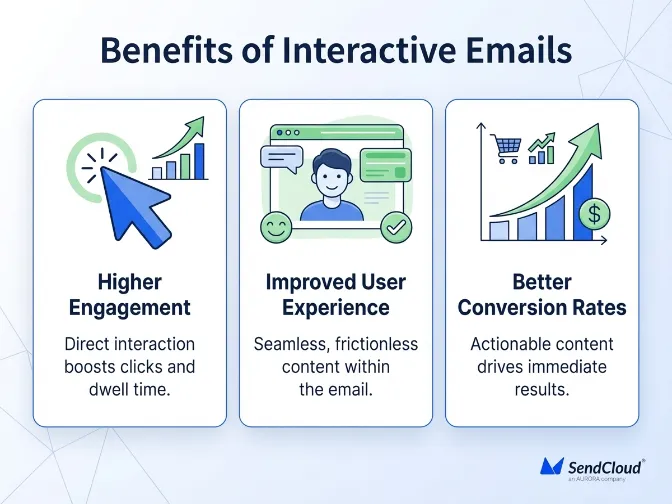
Interactive email design is not just about making campaigns look modern. It serves a clear performance goal. When subscribers can engage directly inside the message, they are more likely to notice the content, explore it, and act on it. The best results come when interactivity supports the message instead of distracting from it.
1 Higher Engagement
One of the biggest benefits is better email engagement. Interactive features naturally invite action. A carousel can encourage browsing. A poll can trigger a quick response. A reveal effect can make users curious. This kind of participation can make the email feel less like a broadcast and more like an experience.
2 Improved User Experience
Interactive design can also improve usability. Instead of sending readers to another page right away, you let them explore options within the email first. That can feel faster and easier. A better user experience often comes from:
- Cleaner content flow
- Easier navigation inside the email
- More relevant content blocks
- Stronger email personalization
When done well, interactivity makes the email feel more useful, not more complicated.
3 Better Conversion Rates
Interactive emails can also support stronger conversion performance. They help shorten the path between interest and action. If users can preview products, browse offers, or respond to a prompt directly in the message, they may be more likely to click through with intent. This is especially useful in e-commerce, event marketing, product launches, and lead nurturing.
How to Design Interactive Emails
Good interactive email design starts with clarity. It is easy to add too many moving parts and make the message harder to use. The goal is to keep the experience simple, helpful, and aligned with what the subscriber wants to do.
A strong interactive email should still work as an email first. Interactivity should support the message, not take over the message.
1 Keep It Simple and Clear
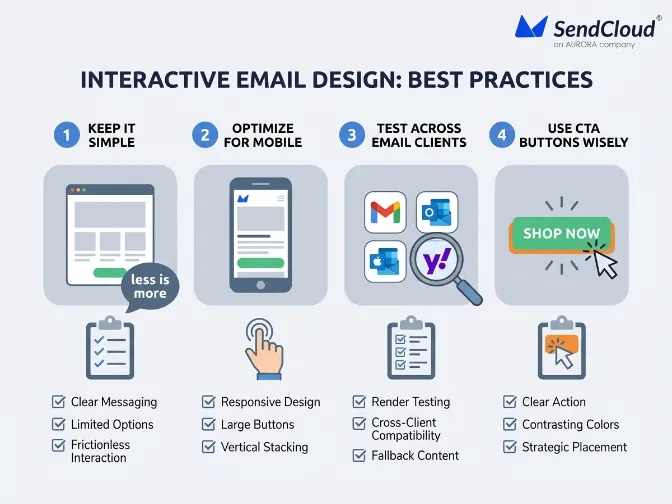
The best interactive emails are easy to scan and easy to use. If the design is cluttered, people will miss the point. Focus on one main goal for the message and use only the interactive features that support that goal.A few simple rules help:
- Use one main action per section
- Avoid too many competing features
- Keep the layout clean
- Make buttons and clickable areas obvious
Good email design is usually clear before it is clever.
2 Optimize for Mobile
A large share of email opens now happen on mobile devices, so interactive features need to work well on smaller screens. That means touch-friendly layouts, readable text, fast loading visuals, and clear spacing. Mobile-friendly design should include:
- Large tap targets
- Single-column layouts where needed
- Lightweight assets
- Clear fallback behavior
If an interactive element feels hard to use on a phone, it will hurt performance instead of helping it.
3 Test Your Interactive Elements
Not all email clients support the same level of interactivity. Gmail, Apple Mail, and Outlook can behave very differently. That means testing is essential. Before you send, check:
- Whether the feature works in major inboxes
- Whether fallback content appears correctly
- Whether the message still makes sense without the interaction
- Whether load time stays reasonable
This is one of the most important steps in interactive email marketing.
4 Use Call-to-Action Buttons Wisely
Interactive features should lead users toward a clear next step. That is why CTA placement matters. If users engage with the content but do not know what to do next, the design loses value.
Place CTA buttons near the most relevant interactive sections. Keep the wording simple and action-focused. The best CTA often feels like the natural next move after the interaction.
Key Elements to Include in Interactive Emails
Not every campaign needs the same type of interactivity. The right email elements depend on your goal, audience, and message type. A product launch may benefit from a carousel. A feedback email may work better with a quick poll.
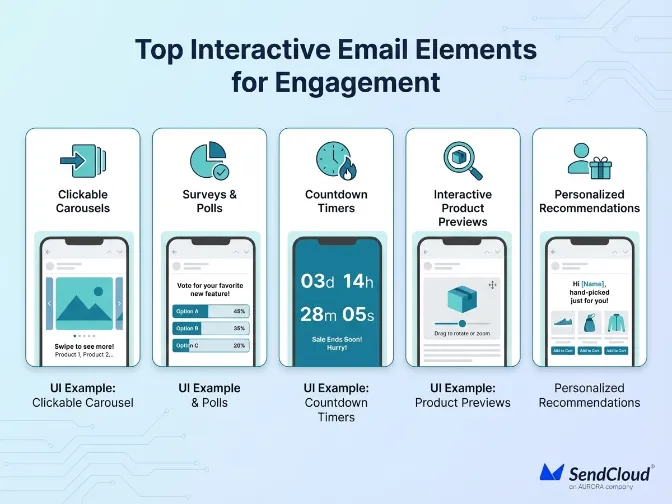
Choose features that make the message easier to explore and easier to act on.
1 Clickable Carousels and Sliders
Carousels and sliders let users move through multiple images, offers, or products inside one email. This is useful when you want to show variety without making the layout too long. They work well for:
- Product collections
- Featured articles
- Event sessions
- Seasonal offers
For e-commerce brands, this can improve browsing behavior and support stronger email click-through.
2 Surveys and Polls
Surveys and polls are a simple way to increase interaction and collect feedback. They can help brands learn more about subscriber preferences while giving recipients an easy way to engage. Short formats work best. One question is often enough to increase participation without creating friction.
3 Countdown Timers
Countdown timers create urgency for promotions, registrations, and deadlines. They help make time- sensitive offers feel more immediate. Use them carefully. If every campaign uses urgency, the effect gets weaker. They work best when the deadline is real and the message clearly explains why it matters.
4 Interactive Product Previews
Interactive product previews help users explore products before clicking through. That might include image swaps, quick feature highlights, or product cards that guide attention. This is especially useful when buyers want a faster look at options without leaving the inbox too soon.
5 Personalized Recommendations
Personalized Recommendations combine interactivity with relevance. Instead of showing the same content to every subscriber, you can highlight products, offers, or content based on behavior, interests, or past actions. This supports both email personalization and stronger performance. Relevant emails are easier to engage with because they feel tailored to the reader.
Challenges with Interactive Emails
Interactive emails can be powerful, but they also come with trade-offs. If the design is too complex or not fully supported across inboxes, it can create a worse experience instead of a better one. That is why successful interactivity depends on balancing creativity with reliability.
1 Email Client Limitations
Not all inboxes render interactive content the same way. Some clients support advanced features well, while others strip them down or ignore them. This means every interactive email needs a fallback version that still communicates the message clearly. The email should remain useful even when the full interaction does not load.
2 Complexity of Design
More interactivity does not always mean better results. If too many features compete for attention, the email can become confusing. That weakens the message and can lower clicks. A better approach is to use one or two interactive features that serve a clear purpose.
3 Performance Issues
Heavy visuals or complex code can affect load time, especially on mobile devices. Slow emails create friction, and friction hurts engagement. To avoid this, keep assets lightweight, reduce unnecessary effects, and test performance before launch. Good interactivity should feel smooth, not slow.
Conclusion
Interactive emails can make your campaigns more useful, more engaging, and more effective. They help subscribers do more inside the message, which can improve the user experience and support better click and conversion results. But the best interactive email marketing is not built on novelty alone. It works because the design stays clear, mobile-friendly, and focused on value.
Start small. Test one interactive feature at a time, measure the response, and learn what your audience actually likes. Strong performance usually comes from simple ideas executed well. If the experience feels easy and relevant, engagement follows.