


Every modern app sends transactional emails, from password resets and login codes to invoices, receipts, alerts, and account updates. The email service behind those messages affects delivery speed, reliability, developer effort, and your monthly bill.
Choosing an email service provider can become difficult because many comparison pages focus on selling one service. This guide takes a practical approach instead. It compares Aurora SendCloud, SendGrid, Mailgun, Amazon SES, Postmark, Resend, and Brevo by pricing, API features, scaling options, and common developer needs. You will also see the same sending pattern in cURL, Python, and Node.js, plus cost examples from 50K to 10M emails per month. Finally, we cover the mistakes that can cause failed sends, duplicate emails, poor deliverability, and unexpected costs.
What Is a Transactional Email API?
A transactional email API lets your application send automated, event-based emails by making HTTPS requests to an email delivery service.
The basic flow is simple: POST request with email data → provider accepts the message → provider delivers it → events report delivery, bounce, complaint, or other status.
An API works well when your backend needs direct control over sending. SMTP can be easier for older applications because it works like a traditional mail server connection, while an API usually gives developers cleaner control over templates, events, metadata, retries, and application logic.
For new applications, an API is usually the better starting point.
7 Transactional Email API Providers Compared in 2026
The right provider depends on volume, deliverability needs, developer experience, support, and how much control your engineering team wants.
| Provider | Free Tier | Approx. Price/10K | Key Strength | Best For |
|---|---|---|---|---|
| Aurora SendCloud | 50 emails/day for free users | Contact provider | Regional API, templates, tracking, SMTP/API | Businesses needing regional delivery options |
| SendGrid | 100/day for 60 days | From $19.95 plan | Mature API and analytics | Established SaaS teams |
| Mailgun | 100/day | From $15/mo | API, webhooks, developer tools | Developer‑focused applications |
| Amazon SES | Free tier available | About $1 at $0.10/1K | Very low pay‑as‑you‑go cost | High‑volume AWS workloads |
| Postmark | 100/month | From $15 | Transactional email focus | Apps where delivery matters most |
| Resend | 3,000/month | $20 plan covers 50K | Simple developer experience | Modern SaaS and product teams |
| Brevo | 300/day | Varies by tier | Email plus other channels | Teams needing broader messaging |
Prices can change, and some providers calculate plans differently. Amazon SES currently lists $0.10 per 1,000 emails for its a-la-carte outbound pricing, while its new Essentials plan starts at $0.16 per 1,000. SendGrid currently starts its paid Email API plans at $19.95/month, while Mailgun starts at $15/month for 10,000 included emails.
Postmark starts at $15/month for 10,000 emails, Resend offers 50,000 emails for $20/month, and Brevo's free plan allows up to 300 emails per day.
Aurora SendCloud
Aurora SendCloud supports REST API and SMTP integration, with regional API endpoints for Singapore, the US, and China. Its API uses an API user and API key, and its documentation provides sending, templates, status checking, tracking, and webhook workflows.
Aurora has a useful advantage for teams that want regional endpoint choices. It also supports reusable templates and request IDs, which can help prevent duplicate processing.
The main limitation for this comparison is pricing transparency. Aurora's public documentation explains usage-based billing but does not publish a simple public price table for 50K, 1M, or 10M emails. Therefore, do not assume Aurora is always the cheapest option. Ask for a volume quote before making a final decision.
SendGrid
SendGrid remains a strong option for teams that want a mature API, libraries, event webhooks, analytics, domain authentication, and dedicated IP options. Its current Email API pricing starts at $19.95/month, with higher plans based on volume and features.
Its main advantage is breadth. Its main downside is that pricing becomes harder to compare at high volumes because plans, overages, testing credits, and dedicated IP features can all affect the final bill.

Mailgun
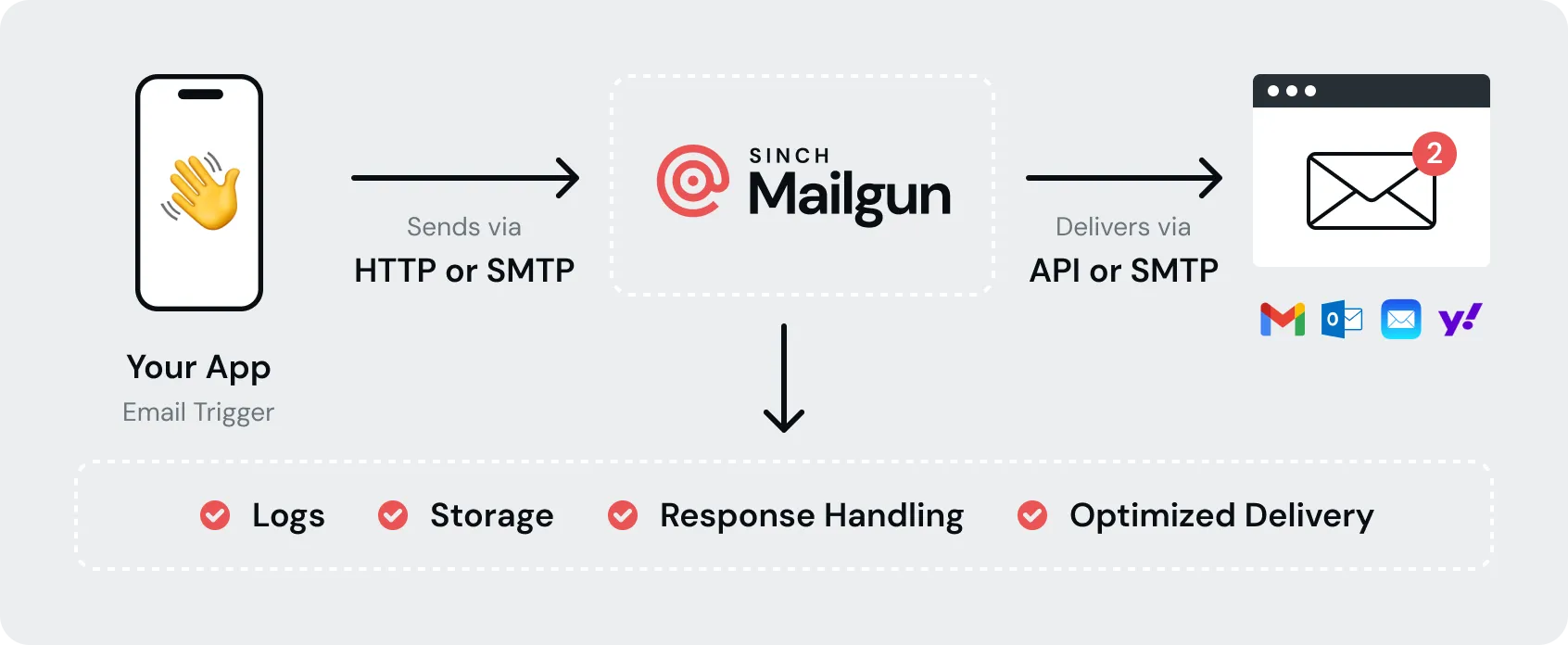
Mailgun focuses heavily on developers. Its paid Basic plan starts at $15/month with 10,000 emails, while Foundation starts at $35/month with 50,000 emails. Scale starts at $90/month with 100,000 emails and includes dedicated IP access. Mailgun also provides event logs, webhooks, suppression management, bounce classification, and REST APIs. This makes it a good choice when your engineering team wants detailed control over email events.
Amazon SES
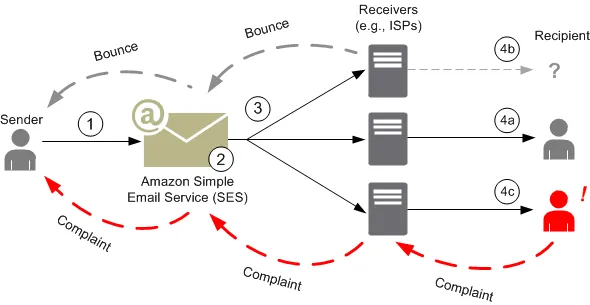
Amazon SES is often the price leader for high-volume sending. Its current a-la-carte outbound rate is $0.10 per 1,000 emails, before applicable data or add-on charges. A 50K workload therefore starts around $5, 1M around $100, and 10M around $1,000 for basic outbound sending.
SES works especially well for teams already using AWS. The tradeoff is that you may need more engineering work around configuration, monitoring, reputation, and deliverability than with a more specialized provider.
Postmark
Postmark focuses strongly on transactional messages. Its current 10K Basic plan costs $15/month, with overage starting at $1.80 per 1,000 emails. Its Pro and Platform plans at the same volume add features such as inbound processing and broader team support.
Postmark also offers dedicated IPs starting at $50/month for customers sending at least 300,000 emails per month.

Resend
Resend targets developers who want a simple API and modern workflow. Its free plan includes 3,000 emails/month, while the $20 Pro plan includes 50,000 emails. Its Scale pricing reaches $650/month for 1 million emails, with overage pricing available on paid plans.
Resend is a good fit for newer SaaS products and teams that value simple setup. Its dedicated IP option costs $30/month on the Scale plan under the stated eligibility rules.
Brevo
Brevo takes a broader approach by combining transactional email with marketing, SMS, WhatsApp, chat, and other tools. Its free plan includes transactional email and 300 daily email sends, while paid plans increase the monthly sending limits.
Brevo can make sense when one team needs both application emails and broader customer messaging. However, developers who only need an API may prefer a provider with a narrower transactional focus.

Best Provider by Use Case
| Use Case | Recommended Provider |
|---|---|
| Lowest basic sending cost | Amazon SES |
| Simple developer‑first API | Resend |
| Strong transactional focus | Postmark |
| Advanced developer controls | Mailgun |
| Mature all‑round API | SendGrid |
| Regional API options | Aurora SendCloud |
| Email plus other channels | Brevo |
This transactional email API comparison shows why there is no single winner. SES can win on raw sending cost, Postmark can win for transactional focus, Resend can win for simple development, and Aurora SendCloud can be worth considering when regional infrastructure and its API/SMTP setup match your requirements.
ESP Switch Signs: If your current provider has repeated delivery problems, rising costs, weak webhook support, poor logs, or limits that slow development, it may be time to review your ESP.
How to Send Email Through an API: cURL, Python, and Node.js
The exact request changes between providers, but the how to send transactional email api pattern stays similar: authenticate, provide the sender and recipient, add a subject and body, send the request, then handle the response.
cURL
curl -X POST "`https://api.example.com/v1/email`" \
-H "Authorization: Bearer YOUR_API_KEY" \
-H "Content-Type: application/json" \
-d '{
"from": "[email protected]",
"to": "[email protected]",
"subject": "Your order is confirmed",
"html": "<p>Thanks for your order.</p>"
}'
Python
import requests

url = "`https://api.example.com/v1/email`"
headers = {
"Authorization": "Bearer YOUR_API_KEY",
"Content-Type": "application/json"
}
data = {
"from": "[email protected]",
"to": "[email protected]",
"subject": "Your order is confirmed",
"html": "<p>Thanks for your order.</p>"
}
response = requests.post(url, headers=headers, json=data)
print(response.json())
Node.js
const response = await fetch("`https://api.example.com/v1/email`", {
method: "POST",
headers: {
"Authorization": "Bearer YOUR_API_KEY",
"Content-Type": "application/json"
},
body: JSON.stringify({
from: "[email protected]",
to: "[email protected]",
subject: "Your order is confirmed",
html: "<p>Thanks for your order.</p>"
})
});
console.log(await response.json());
Aurora SendCloud uses a different authentication format from the generic Bearer example above. Its API requires apiUser and apiKey request parameters, and its regional endpoint must match the account region.
The important point is that the sending pattern stays consistent. When you switch providers, you normally change the base URL, authentication method, request fields, and event format. Your application should hide those differences behind one internal email service so the rest of your code does not depend on one vendor.
Real Transactional Email API Cost at 10K, 50K, and 100K Emails
Most providers bill monthly, which makes annual costs easy to underestimate. Aurora SendCloud takes a different approach: prepaid annual packages with credits valid for two years, and the per-1K rate drops as volume increases — from $2.99/1K at 10K to $2.10/1K at 500K. The table below converts all seven providers to annual cost for a fair apples-to-apples comparison.
| Provider | 10K/yr | 50K/yr | 100K/yr | Dedicated IP |
|---|---|---|---|---|
| Aurora SendCloud | $29.90 | $130.00 | $250.00 | $70/mo ($840/yr, min. 3 mo) |
| Amazon SES | ~$12 | ~$60 | ~$120 | $24.95/mo ($299/yr) |
| Brevo | $108 | Contact sales | Contact sales | Enterprise‑only |
| SendGrid | $239.40 | $239.40 | $239.40† | Included on Pro |
| Mailgun | $180 | $420 | $1,080 | Included on Scale |
| Postmark | $180 | ~$792 | ~$1,512 | $50/mo ($600/yr, requires 300K+) |
| Resend | $240 | $240 | $1,080 | $30/mo ($360/yr, Scale only) |
When viewed annually, the cost gap widens dramatically. At 50K emails per year, Aurora SendCloud costs $130 — less than a third of Mailgun's $420 and a sixth of Postmark's $792. Even SendGrid's $239.40 Essentials plan, which looks competitive at the monthly level, costs nearly double Aurora's annual rate.
The picture shifts at 100K: SendGrid Essentials at $239.40/yr is marginally cheaper than Aurora's $250/yr — but only up to exactly 100,000 emails. One email over that limit forces an upgrade to Pro at $1,079.40/yr. Aurora's $250 annual package includes templates, tracking, webhooks, and multi-region routing with no sudden tier cliff.
Amazon SES remains the raw price leader at $120/yr for 100K — but factor in a dedicated IP ($299/yr), SNS notifications, configuration labor, and the absence of built-in templates, and the real annual cost approaches or exceeds Aurora's all-in price.
Hidden Costs to Check
Before choosing the best transactional email api, check more than the headline email price:
- Dedicated IP charges
- IP warm-up services
- Email validation
- Extra domains
- Log and message retention
- Webhook limits
- Overage rates
- Premium support
- Data storage or attachment charges
- Inbound email processing
The cheapest option at 50K may not remain the cheapest at 1M or 10M. Calculate your expected monthly volume, add the required features, and then compare the complete monthly bill.
For example, SES can look extremely cheap on basic sending alone, but a team may add dedicated IPs, deliverability tools, global endpoints, or other AWS services.
For a deeper pricing decision, compare your expected volume with the features you actually need rather than choosing based on the first advertised number.
Common Integration Mistakes to Avoid
Most email failures do not start with the API call itself. They start with weak application design around the API.
1. No Error or Rate-Limit Handling
Your application should treat a failed API request as a normal possibility. Check HTTP status codes, store useful error details, and distinguish temporary failures from permanent failures.
If the provider returns a rate-limit response, slow your request rate instead of sending the same request repeatedly. Also set reasonable timeouts so a slow provider does not block your application worker.
2. Hardcoding HTML in Application Logic
Do not place large HTML email bodies directly inside business logic. Store reusable templates separately and pass variables such as names, order numbers, links, and verification codes.
Aurora SendCloud supports reusable templates and template-based sending, which can reduce repeated HTML in application code. You can also read more about email templates through the Aurora SendCloud blog.
3. Skipping Domain Authentication
Never treat domain authentication as optional. Configure SPF, DKIM, and DMARC before sending production traffic.
Authentication helps mailbox providers verify that your application has permission to send mail for your domain. Aurora SendCloud requires an authenticated sending domain for its API user setup.
4. No Bounce Webhooks
Your application needs to know when an address bounces or when a recipient reports a complaint. Without event handling, your database can continue treating bad addresses as valid.
Use webhooks to update email status automatically. Mailgun, SendGrid, and Aurora SendCloud all provide event or webhook functionality for this type of workflow.
5. No Retry or Idempotency Logic
Temporary network errors can cause duplicate requests. A simple retry system helps, but blindly retrying every request can create duplicate emails.
Use an idempotency key or provider-supported request ID when available. Aurora SendCloud, for example, supports sendRequestId; duplicate values within one hour are processed only once.
A good backend design should therefore include:
- Request timeout
- Limited retries
- Exponential backoff
- Unique message ID
- Event webhook
- Delivery status storage
- Suppression handling
- Structured logs
These steps make your how to send transactional email api implementation much safer in production.
FAQ
What is the best transactional email API for developers?
There is no universal winner. Resend works well for simple developer workflows, Mailgun offers strong developer controls, Postmark focuses on transactional delivery, and SES often wins on basic high-volume cost.
How much does a transactional email API cost?
Pricing ranges from free plans to usage-based charges and monthly subscriptions. SES can cost about $5 for 50K basic outbound emails, while other providers may charge a fixed monthly plan with included volume.
Is API better than SMTP for transactional email?
For new applications, an API usually gives better control over events, templates, metadata, errors, and application logic. SMTP can still make sense when an existing system already depends on traditional mail-server connections.
What should I check before choosing an email API?
Check delivery performance, pricing at your expected volume, API quality, webhooks, domain authentication, templates, logs, support, rate limits, and dedicated IP costs. Test the service with real application traffic before moving everything.
Can I switch providers later?
Yes, if you separate your email logic from your application code. Create an internal email service layer so your application calls one function while the provider-specific code handles API URLs, authentication, payloads, and webhooks.
Should I use a dedicated IP?
Not always. A dedicated IP gives you more control over sending reputation, but it also creates warm-up and reputation management work. Consider one when your volume and delivery requirements justify the extra cost.
Conclusion
Choosing a transactional email api should start with your actual sending volume and delivery requirements, not just the lowest advertised price. Compare providers at 50K, 1M, and 10M emails, then add the cost of IPs, support, validation, retention, and other features you need.
SES can be a strong choice for low-cost high-volume sending, Postmark suits transactional-focused teams, Resend keeps development simple, and SendGrid or Mailgun offer broad developer features. Aurora SendCloud is worth testing when its regional API options, templates, tracking, and delivery setup match your needs.
If you want to test another option, consider Aurora SendCloud and compare its quote against your current ESP before switching.