Have you ever had marketing emails sorted into spam folders or failed to receive password reset emails Have your important system notifications disappeared without notice These problems are not usually due to lack of quality or tools. Often, vulnerable mail domains and IP settings are the root cause.
Many companies send transaction emails, marketing emails, and internal emails from the same domain and IP address. This method looks simple at first glance, but quietly damages the sender's reputation. Low marketing email engagement or high spam reporting can affect all other emails sent from the same domain. Solve this problem with a clear outgoing domain strategy. This guide explains how domain and IP separation works and shows how Aurora SendCloud can apply this strategy correctly.
Why You Must Segregate Domains and Ips
Sending all emails from the same domain and IP can harm deliverability, security, and reporting. Marketing, transactional, and corporate emails behave differently, and mixing them creates risks. Segregating domains and IPs keeps reputations separate, protects important messages, and provides clear performance data. This section explains the main reasons businesses should separate email streams for reliable delivery.
Reputation Pool Contamination
The receiving provider evaluates the email based on the sender's behavior. When you send a marketing email, some users ignore it or mark it as spam. These actions reduce sender reputation.
Using the same domain and IP for transaction emails will cause this adverse effect. Even users' desired emails such as password resets, invoices, and alerts are affected. By using a dedicated sending domain, you can keep each mail type in a separate reputation pool.
Resource Competition and Blocking Risks
Marketing campaigns are mass transmitted in a short time. This surge may exceed the transmission limit or cause mailbox provider filters to operate.
If the transaction email shares the same IP, there is a risk of delays and delivery failures during the campaign. By separating IP, important emails are always delivered in priority and stable.
Security Policy Conflicts
Corporate emails require strict security rules. We strictly apply SPF, DKIM and DMARC policies to protect internal communications. Flexibility is essential for marketing emails for tracking, third-party tools, and campaign testing. When both are operated on the same domain, collisions occur and the risk of failure increases. Domain separation allows appropriate security levels for each email type.
Distorted Analytics and Reporting
When all mail types use the same domain, performance data becomes unclear. Open rate, bounce rate, spam complaint are mixed.
In this configuration, it is difficult to figure out what works and what fails. Separating transaction and marketing emails keeps analytical data clear and useful. You can improve each stream based on actual data.
How to Choose a Sending Domain with Aurora SendCloud
This section describes the most important part of your email settings. Appropriate domain selection enhances the foundation of email delivery rates.
The Strategic Choice: Primary Domain or Subdomain
Primary domain and subdomain selection directly affect email delivery possibilities, security and long-term management. Many companies rush to make this decision and later face problems with email blocking and DNS. By selecting the right option from the start, we protect the brand domain, avoid technical conflicts, and keep sender reputation in good condition. This section explains how to make the right decisions and why most growing companies should prioritize subdomains in sending emails.
Check for Corporate Email Conflicts
First, check the main domain usage.
If the primary domain (e.g. yourbrand.com) is already running as a corporate email in Google Workspace or Microsoft 365, do not use it for bulk transmission. There is a risk of DNS conflict or mail failure. In this case, you need to use subdomains such as notify.yourbrand.com and news.yourbrand.com. This method ensures safe business communication.
Match Domain Choice with Email Type
If you send only a small amount of transaction emails, it may also work in the primary domain. However, this option is still at risk.
Always select a subdomain if you want to send marketing emails or mixed email types. Subdomains separate reputations and reduce damage from spam complaints and reduced engagement.
Consider Your Email Volume
The amount of mail sent greatly affects the delivery rate.
- Up to 10,000 subdomains per day
- Over 100,000 per day: Subdomain required
Mass transmission leads to enhanced monitoring of incoming providers. Using a separate domain enables healthy growth of reputation and secure warm-up management.
Core Setup Steps in the Aurora SendCloud Platform
Aurora SendCloud simplifies domain settings while complying with email delivery best practices.
Step 1: Add and Verify Your Domain
Log into the Aurora SendCloud dashboard and add the domain or subdomain you selected. The platform provides DNS records such as TXT and CNAME. Publish these records in the domain registrar and verify ownership. This procedure proves the management rights of the domain and prevents unauthorized use.
Step 2: Configure SPF and DKIM Authentication
Email authentication is required for inbox delivery.
Aurora SendCloud supports the following settings:
- SPF to authenticate the outgoing server
- DKIM to sign email and prevent tampering
Email providers such as Gmail and Yahoo require both. If these are not set, emails are often sorted into spam folders or failed to deliver.
Step 3: Implement DMARC for Control and Monitoring
DMARC instructs the receiving provider how to handle emails that fail to authenticate.
Start with a monitoring policy:
p=none
This setting collects reports without blocking emails. Check the data and identify the problem. Once stable, we will move to stricter policies such as quarantine and refusal. Aurora SendCloud centrally manages DMARC results.
Best Practices and Final Recommendation
A strong email setup follows clear rules and avoids shortcuts. When businesses use the right domain structure, clear naming, and proper separation for each email type, they reduce delivery risks and protect their main brand domain. Best practices focus on consistency, safety, and easy tracking. This section outlines practical rules you can apply immediately and explains why using dedicated subdomains remains the safest and most reliable choice for long-term email deliverability.
Default subdomain for safety
The safest method is to use separate subdomains for each email type:
- notify.yourbrand.com: for transaction mail
- news.yourbrand.com: for marketing campaigns
- corp.yourbrand.com: For internal communication
This structure can limit reputational damage.
Follow Clear Naming Rules
Use a concise and clear prefix like this:
- send.
- notify.
- news.
mail. or smtp. Avoid names such as to cause confusion or technical problems.
Key Takeaway for Domain Selection
The subdomain protects the main brand domain. Enables clear analysis, growth of controlled reputation and easy expansion. This approach supports long-term email delivery possibilities and security.
IP Strategy: Shared IP vs Dedicated IP
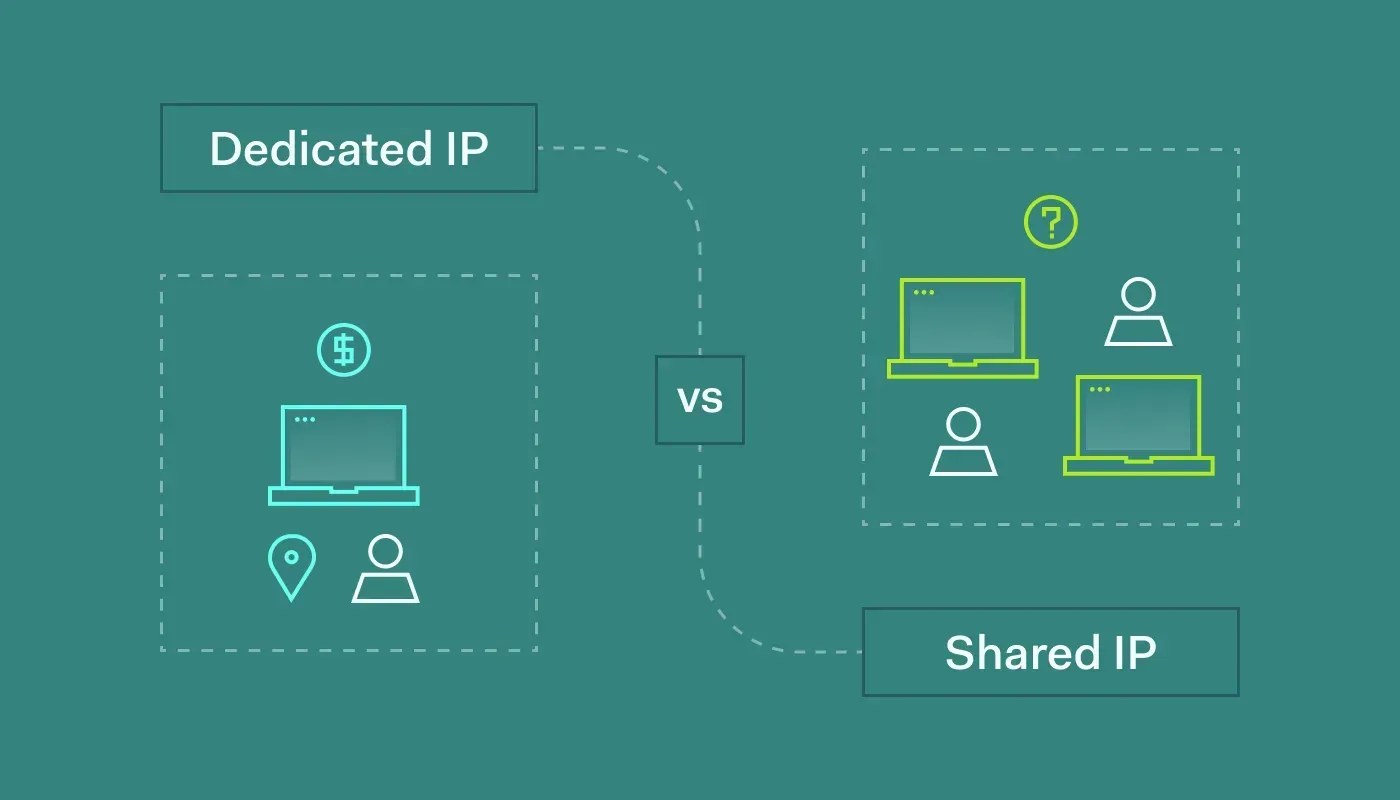
Your IP choice plays a major role in how inbox providers judge your emails. A shared IP groups your sending reputation with other senders, while a dedicated IP gives you full control over your own reputation. Each option fits different sending volumes and business stages. When you understand the difference, you avoid delivery problems, manage growth safely, and choose an IP setup that supports stable email deliverability over time.
Case where shared IP is valid
Valid for small senders with low transmissions. Aurora SendCloud manages reputation among trusted senders.
Suitable for startups and early stage products.
When You Need a Dedicated IP
Select a dedicated IP if it falls under the following conditions:
- If you send more than 100,000 emails per day
- When the reputation needs to be fully controlled
- Conducting large-scale marketing campaigns
Dedicated IPs are best combined with a strong transmission domain strategy and proper warm-up.
Transactional vs Marketing Emails: Why Separation Matters
Transaction emails and marketing emails vary greatly in purpose, and email providers treat them differently. While transaction emails deliver important information that users expect, marketing emails focus on promotions and updates. When a company sends both emails from the same domain or IP, marketing email behavior can negatively affect the delivery of important messages. By separating these email streams, you can protect important emails, stabilize the sender's reputation, and improve the entire email delivery rate.
Transaction Email
Transaction emails include:
- Password reset
- Order confirmation
- Account Alerts
Users expect these emails. Indicates high engagement and low complaint rate.
Marketing Email
Marketing emails include:
- Promotion
- Newsletter
- Product updates
These emails are engaging and have a higher spam reporting rate.
Why Mixing Them Causes Problems
Sending both types from one domain affects the delivery of transaction emails. Separation ensures the safety and reliability of important emails.
Email Authentication: The Backbone of Deliverability
Email authentication ensures that mailbox providers trust the sender's message. If there is no proper SPF, DKIM, or DMARC settings, emails may be sorted into spam folders or may fail to deliver. Authentication ensures that the email comes from a legitimate source, protects the user from tampering and enhances the sender's reliability. This section explains how authentication works and why authentication is essential in all types of emails.
SPF: Who Can Send for Your Domain
SPF lists authorized outgoing servers. Without this, the receiving provider will not trust the email.
DKIM: Message Integrity
DKIM confirms that the email content is not tampered with during delivery. Protect users from fraudulent operations.
DMARC: Policy and Reporting
DMARC integrates SPF and DKIM results. Provides control and visibility.
Aurora SendCloud manages these three without manual errors.
Common Beginner Mistakes to Avoid
Many businesses make simple mistakes that harm email deliverability and reputation. Using one domain for all emails, skipping DNS updates, or ignoring authentication are common errors that create long-term problems. This section highlights frequent beginner mistakes and explains how to prevent them, helping you maintain clean sending practices and reliable inbox placement.
Using One “No-Reply” Domain for Everything
This setting confuses reputation and covers up performance issues. Always separate by purpose.
Forgetting DNS Updates
Many users omit DNS validation when adding domains. Then the mail fails silently. Always check your DNS status in your dashboard.
Mixing Email Streams on One IP
Sending all emails with one IP reduces delivery rate during a campaign. Separate IPs to protect critical traffic.
Skipping the Subdomain Strategy
Some companies delay the introduction of subdomains to "maintain simplicity," but this choice often causes spam problems afterwards.
Ignoring Authentication and Reputation Monitoring
Email settings are not a single task. Items to be monitored with Aurora SendCloud analytics:
- SPF and DKIM passage rates
- Bounce trends
- Indicators of sender reputation
Early fixes prevent serious problems.
Conclusion: Build Email Infrastructure the Right Way
Domain and IP separation is not an advanced technique. Basic requirements for modern mail systems. This strategy protects sender reputation, improves email delivery and stabilizes business communication. Aurora SendCloud provides a tool to apply this setting without guessing. From domain verification to authentication to reporting, the platform clearly supports each step.
Now is the right time to review the current email structure. Audit domains, split mail streams, and build settings that support growth and trust. The right outgoing domain strategy enables all types of emails to reach the inbox they should have.