

Email lists go bad faster than most people think. A 2025 ZeroBounce report found that email databases degrade by at least 28% each year. That’s why you can do everything “right” and still open your campaign report and see a painful number of Bounced emails dragging down your email delivery.
Among all email bounce rate signals, your hard bounce rate is the one that screams “bad data” the loudest. Hard bounces tell mailbox providers you’re sending to addresses that don’t exist anymore. That’s a classic spam pattern. And it’s not just theoretical—Campaign Monitor warns that regularly exceeding the 2% industry standard can even lead to account suspension.
Getting back under 2% once is not the hard part. The hard part is staying there. The goal is to control the email bounce rate in the long term with a simple system: prevent bad emails at the source, identify problems early, and keep your list clean as it naturally decays. Hard bounces are also weighed more heavily than soft bounces, so keeping them low protects your sender's reputation over time.
Why Are Hard Bounces A Big Deal For Email Delivery And Deliverability?
Hard bounces are not just a “reporting issue.” They are a trust issue. They inform mailbox providers that your list contains invalid addresses or that your sending setup is potentially risky. That can hurt both email delivery (getting accepted by the server) and email deliverability (landing in the inbox).
Quick defs
Email delivery means the receiving mail server accepted your message. If it did not bounce, most tools count it as delivered.
Email deliverability means where the delivered email ends up. Inbox is the goal. Spam or junk is the loss. Deliverability is heavily tied to the sender's reputation and how recipients react to your mail over time.
Here’s the simple way to remember it: delivery is “did the server take it?” and deliverability is “did a human see it?”
Hard vs soft
A hard bounce is a permanent failure. Common causes include a mailbox that does not exist or a server that blocks delivery for good. These addresses should be removed quickly.
A soft bounce is a temporary failure. Think “mailbox full,” “server down,” or “try again later.” Many systems will retry soft bounces for a specified period before stopping.
If you want a clean technical shortcut, many bounce messages map to SMTP status classes:
- “4.x.x” = temporary problem
- “5.x.x” = permanent problem
That’s why hard bounces are the bigger red flag. They usually point to invalid email addresses, not timing issues.
ISP signals
Mailbox providers look at hard bounces as a “list quality” signal. If you continue sending to addresses that don’t exist, recipients can assume you don’t really know your intended recipients. That can reduce overall deliverability, even for valid subscribers.
It can also trigger enforcement by your sending provider. For example, Amazon SES says higher bounce rates can hurt delivery, recommends keeping bounce rates low, and notes that at 5% bounce rate an account can be placed under review, and at 10% bounce rate sending can be paused until you fix the root cause.
What Is A “Good” Hard Bounce Rate—And Why Does 2% Get Used So Often?
A “good” hard bounce rate is boring. It stays low, week after week. That usually means your email list management is working and your sender trust is stable.
The tricky part is that many tools show one blended email bounce rate (hard + soft). So you need a practical line in the sand. That’s where the “2%” rule shows up.
The 2% line
In most email programs, 2% is treated like an alarm bell. Not because 2.01% is “evil,” but because it often signals a list-quality problem that will grow if you ignore it.
For example, Klaviyo’s deliverability monitoring guidance labels bounce rate as Healthy: <1.0%, Room for improvement: 1%–2%, and Needs attention: >2%.
A simple way to use this in real life:
- Hard bounce rate should be as close to 0% as you can get.
- If your total bounce rate is moving toward 2%, assume you have a data or acquisition issue until proven otherwise.
Why it hurts
Hard bounces damage trust because they look like “careless sending.” Mailbox providers see repeated sends to dead addresses as a sign you might be scraping, buying lists, or not maintaining your database.
SendGrid shared internal findings that make the 2% line feel very real:
- They estimate 8.4% of emails captured on websites are misspelled, fake, or invalid.
- In their research, a bounce rate of 5% or above had mean deliverability of 71%, while a bounce rate of 2% or below increased mean deliverability to 91%.
Even if those numbers vary by brand and audience, the direction is clear: fewer bounces usually means better email delivery and better inbox placement.
When it’s “not the list”
Sometimes your report shows “hard bounces,” but the real issue is not bad addresses. It’s your setup or sending behavior.
A few common “not the list” causes:
- Authentication or policy rejections. Some receivers will hard-bounce messages when your domain fails checks (or when your “From” setup triggers policy rules). Mailchimp notes that using a free email service (like Gmail or Yahoo) as your “From” address can fail DMARC checks and cause bounces with providers that enforce DMARC.
- Import / formatting mistakes. A messy CSV import can create broken addresses that hard bounce right away (extra characters, spaces, bad columns).
- A sending reputation problem. Some servers will reject mail (sometimes with 5xx codes) because they don’t trust your domain or IP yet, even if the address is real. This can look like a list problem until you read the bounce reason text closely.
The fix here is different. You don’t just “clean the list.” You check your bounce reasons, your From domain, and your auth settings first.
What Happens When Your Hard Bounce Rate Is Too High?
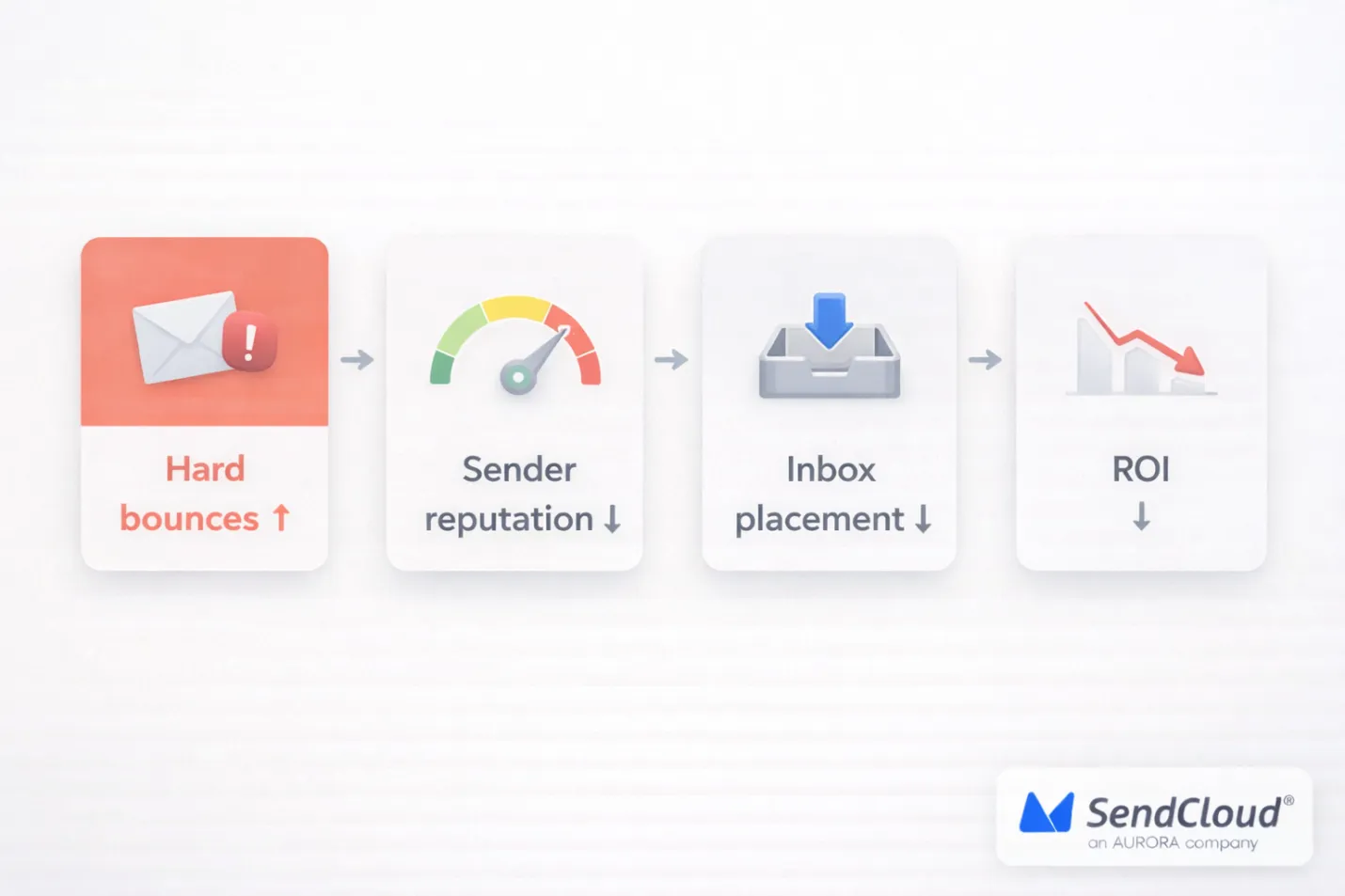
A high hard bounce rate is not “just a list problem.” It’s a credibility problem. It tells mailbox providers you keep emailing addresses that do not exist. Once that pattern shows up, it can drag down delivery for everything you send—even to real, engaged subscribers.
Reputation hit
Hard bounces are a direct signal of poor list quality. Amazon SES puts it plainly: when receivers detect a high rate of hard bounces, they assume you don’t know your recipients well, and that can hurt deliverability.
What this looks like in real life:
- Your domain or IP gets “less trusted” over time.
- New campaigns start slower, get deferred more, or fail more.
- Your future sends pay the price for past list mistakes.
Inbox drop
Even when an email is technically delivered, it may stop landing in the inbox. That’s the painful chain reaction: hard bounces hurt reputation, then reputation hurts inbox placement.
This is also why hard bounces can make other rules harder to meet. For example, Yahoo’s Sender Hub says you should keep your spam complaint rate below 0.3%. If your sender trust is already shaky, it’s easier for your mail to get filtered, ignored, or marked as spam—pushing you closer to strict thresholds like that.
Blocklists
Hard bounces can also put you on a path toward blocklist trouble—especially if your list issues overlap with spam traps.
Spamhaus notes that sending to outdated lists increases the chance of hitting non-existent domains, and that can be dangerous because non-existent domains can be spam traps. Their guidance is simple: if you get a hard bounce, don’t keep sending to that contact.
And once an IP or domain is on a blocklist, you may see bounce messages that reference it (Spamhaus even provides an example of “found in the Spamhaus blocklist” style errors).
Budget waste
Hard bounces waste more than sends. They waste the value of email as a channel.
Litmus reports that, on average, email drives $36 in ROI for every $1 spent. When your hard bounce rate is high, you’re burning part of that ROI on people who can’t even receive your message, while also lowering performance for the subscribers who can.
Where Do Hard Bounces Come From? (Root Causes You Can Actually Fix)
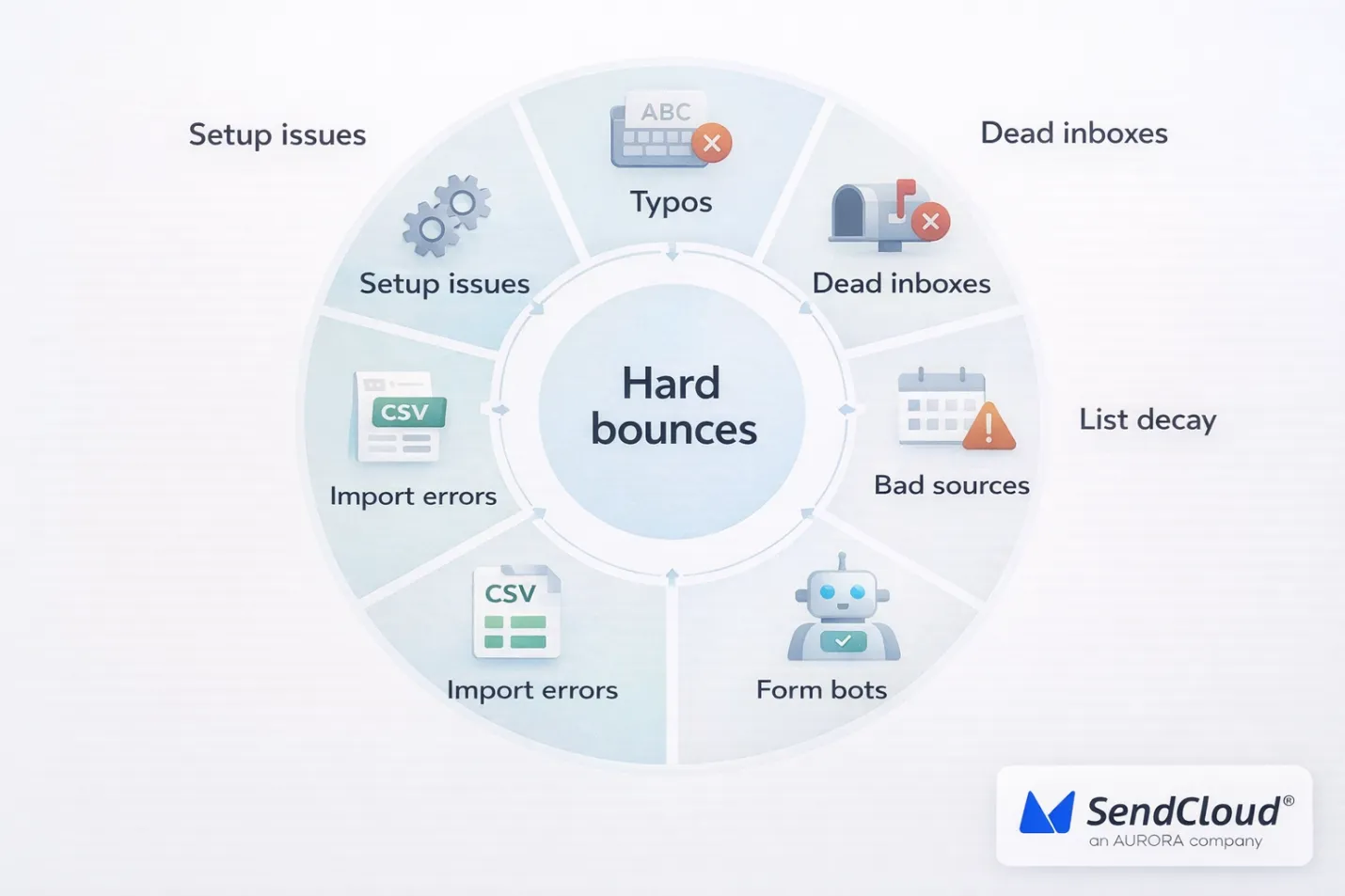
Hard bounces are almost never “random.” They usually come from one of two places: bad emails getting into your list, or good emails going bad over time. Keap notes that about 30% of subscribers change their email address every year, which is why even a clean list can drift into hard-bounce territory if it is not regularly maintained.
Typos
Typos create instant hard bounces because the address is not real. Mailchimp identifies this as a common cause of hard bounces, particularly when someone mistypes their email address or uses a fake one.
What it looks like:
- Misspelled domains (example: gamil.com)
- Missing characters (john@company.co vs john@company.com)
- Extra spaces from copy/paste (john@company.com)
What to fix:
- Add an “email confirmation” field on your forms.
- Use real-time validation at signup (syntax + domain + mailbox checks).
- Use double opt-in so the address must receive and click a confirmation email.
Dead inboxes
Some addresses are real when people sign up, then later get deleted or disabled. When you send again, the mailbox provider returns a permanent failure (often shown as “user unknown” style errors).
What to fix:
- Remove hard-bounced contacts right away (don’t “try again next campaign”).
- Before you email an older segment, validate it first or ramp back up slowly.
- Be careful with “cold” segments you have not mailed in months.
List decay
Even if you never buy lists and your forms are clean, lists still decay. People change jobs. They drop old inboxes. Companies shut down domains. That’s why “set it and forget it” list building always turns into hard bounces later.
Bad sources
Hard bounces spike when contacts come from sources that do not prove permission or quality. Keap warns that purchased or scraped lists often contain invalid, stale, or risky addresses, and accounts using them may face compliance action or suspension.
What to fix:
- Don’t use purchased lists (even if they claim they are “verified”).
- Track list source (form A, webinar B, partner C) so you can see where bounces start.
- If you must import a partner list, only mail people who clearly opted in—and validate before the first send.
Form bots
Sometimes the issue is not humans at all. Keap describes “list bombing,” where bots hit your forms and submit lots of random or malicious addresses. That can create a sudden wall of hard bounces.
What to fix:
- Add a honeypot field and basic bot filtering.
- Add CAPTCHA/reCAPTCHA or a modern alternative (especially if you see signup spikes).
- Rate-limit form submissions and block suspicious traffic.
- Use double opt-in so bot signups never become “active” subscribers.
Import errors
Sometimes the “bad emails” are created by your own import process. Mailchimp specifically calls out CSV formatting mistakes as a cause of hard bounces—like extra text in the email field.
What to fix before you import:
- Trim spaces and remove hidden characters.
- Remove duplicates.
- Make sure the email column contains only emails (no names, tags, or notes).
- Validate the file before you send your first campaign to it.
Setup issues
Not every hard bounce is a fake address. Some are “policy” bounces caused by your sending setup. Mailchimp notes that email authentication failures (SPF, DKIM, DMARC) can cause hard bounces. They also warn that using a free email service (like Gmail/Yahoo) as your From address can fail DMARC checks and lead to bounces with providers that enforce DMARC.
This matters because misconfig is common at scale. A 2025 large-scale study on SPF found 56.5% of domains had SPF records, and 2.9% of SPF records had errors or ineffective rules.
What to fix:
- Set up and align SPF, DKIM, and DMARC for your sending domain.
- Use a real domain-based From address (not a free mailbox domain).
- If “valid” customers are bouncing, read the SMTP bounce reason text to spot auth/policy blocks.
How Do You Control Email Bounce Rate Long-Term? A 3-Step Plan
Hard bounces feel like a small metric. But they can drag down your whole program. In Validity’s 2025 Email Deliverability Benchmark Report, the global inbox placement rate in 2024 was 83.5%. That means a noticeable share of marketing emails never make it to the inbox in the first place. When you add hard bounces on top, you’re shrinking your results before anyone even sees your offer.
The fix is not “clean the list once.” It’s a simple loop you run every week: prevent, monitor, and maintain.
1 Prevent
Prevention is the highest-ROI move. One bad signup source can keep feeding invalid email addresses into your list for months.
Do this at the source:
-
1
Use double opt-in.
It forces the address to receive a real email and click to confirm. That filters out typos and fake signups fast. -
2
Use real-time email validation at signup.
You want at least: format checks, domain checks, and “can this mailbox receive mail?” checks. If you’re comparing tools, this Aurora SendCloud guide is a helpful starting point: https://www.aurorasendcloud.com/blog/email-verification -
3
Add basic bot protection.
This is not optional anymore. The 2024 Imperva Bad Bot Report found 49.6% of all internet traffic in 2023 came from bots. Bots hit signup forms too. -
4
Tighten your forms.
Small UX changes prevent a lot of junk.
- Add an “confirm email” field for high-value lists (demo requests, waitlists).
- Show a clear error when the address format is wrong.
- Block copy/paste spaces (many bad emails are just whitespace).
Use:
- CAPTCHA or a modern alternative
- a hidden “honeypot” field
- rate limits (example: max 3 signups per minute per IP)
2 Monitor
You cannot “set and forget” bounce control. You need an alert system so a problem gets caught in days, not after your reputation takes a hit.
Weekly bounce review (20 minutes):
- Check hard bounce rate for the last 7 days.
- Read the top bounce reasons (not just the percent).
- Compare week-over-week so spikes stand out.
Set simple alerts:
- 1% hard bounce rate: warning. Investigate sources.
- 2% hard bounce rate: pause risky segments and fix the cause before the next big send.
Track bounces like a growth channel:
- By source: signup form, import, partner list, webinar, in-app, etc.
- By mailbox domain: Gmail, Yahoo, Microsoft (Outlook/Hotmail), corporate domains.
- By campaign/segment: new leads vs older leads vs re-engagement.
Fast triage rule:
If hard bounces are clustered in one source (like one form), fix the source first. If they’re spread across everything, you likely need maintenance (Step 3).
3 Maintain
Maintenance is how you keep bounce rate low without constantly “putting out fires.”
Build a cleaning schedule:
- After every send: suppress hard bounces immediately (don’t mail them again).
- Monthly or quarterly: re-check older segments before you use them again.
- Stop blasting people who never open or click.
- Use a re-engagement flow, then suppress if they stay inactive.
- This protects reputation and keeps your list “real.”
- If a segment is old and you’re not sure it’s still permission-based, run a re-permission campaign or don’t mail it.
Many ESPs already suppress hard bounces for you. For example, Mailchimp says hard-bounced addresses are typically cleaned from your audience automatically and excluded from future sends. HubSpot also says it automatically does not send to contacts that bounced for a permanent reason to protect sender reputation. Still, you should also remove or tag them in your CRM. That keeps bad data from coming back through exports.
Sunset inactive contacts (don’t keep emailing ghosts):
Re-permission when needed:
Never use purchased lists:
AWS SES explicitly warns: never rent or buy email lists because they can contain invalid addresses (and even spam traps), which can spike bounces and damage reputation.
One extra detail that surprises teams:
Even if your ESP suppresses some bouncing addresses automatically, your bounce metrics can still suffer if you keep attempting to send to them. For example, Amazon SES notes that sending to addresses on its global suppression list can still count toward your bounce rate. So removal is still the safer habit.
How Aurora Sendcloud Helps Keep Hard Bounce Rate Under 2%?
If your goal is to control hard bounces long-term (not just “clean up once”), you need two things: fast visibility and strict suppression. Aurora SendCloud is built around that kind of sending discipline. On its deliverability page, Aurora SendCloud claims an average delivery rate of 99.61% in 2024, with systems designed to reduce bounces and protect sender reputation.
Real-time validation
Aurora SendCloud publishes a practical email verification guide that explains what strong validation looks like (syntax checks, MX records, SMTP mailbox checks, plus disposable and spam-trap detection).
Important detail: that guide is about email verification services (not a built-in “Aurora verifier”). The clean way to use it is to validate emails before you import or add them to your list, then send through Aurora SendCloud once your list is already low-risk.
Bounce tracking
You can’t fix what you can’t see. Aurora SendCloud supports webhooks that push key delivery events (including bounces) to your server, so you can route “invalid email” events back into your CRM or list tool in near real time.
Aurora SendCloud also documents an email data layer that tracks the full lifecycle, including delivery status plus events like bounces and spam reports. That gives you a clean way to spot “which source is leaking bad emails” without waiting for a monthly cleanup.
Auto suppression
This is where hard bounce control becomes “automatic.” Aurora SendCloud documents suppression lists that include a Bounce List. When a mailbox provider returns an “address does not exist” style failure, the address can be added to the Bounce List and blocked from future sends.
Aurora’s suppression docs also show a practical upside: blocked attempts can return a “Bounce list” style error and can avoid charges for those blocked attempts (based on their example). That makes it easier to be strict without worrying you’re “wasting sends” during cleanup.
Deliverability insights
Hard bounces often spike by destination domain (e.g., Gmail vs. Outlook vs. corporate). Aurora SendCloud’s queue dashboard is designed to display delivery by receiving domain, along with real-time sending rate and queue status, allowing you to identify issues quickly and prevent pushing volume into the wrong place.
For a deeper diagnosis, Aurora SendCloud’s documentation describes analytics and monitoring across delivery and engagement events (deliveries, bounces, opens, clicks, unsubscribes, and spam reports), with historical retention (6 months by default). This is what you need to connect “bounce spikes” back to a real root cause.
Conclusion: Keeping hard bounces under 2% is list health, not busywork
Hard bounces are not a “nice to have” metric. They are a clear trust signal. If you continue to mail to dead addresses, inbox placement becomes increasingly difficult for every subsequent campaign. The brands that stay under 2% treat bounce control like a system. They prevent bad emails at signup, monitor bounce patterns weekly, and clean on a schedule to prevent list decay. That is how you protect your sender reputation without panic fixes and random swings in deliverability.
You can manage this more reliably with Aurora SendCloud.