More than 361.6 billion emails are sent worldwide every day. That much traffic only works because mail systems are built to “smooth out” spikes, slowdowns, and policy limits. That’s where an email queue comes in.
An email queue is the behind-the-scenes waiting line your mail server (or email service) uses when it cannot send every message right now. It helps you keep sending without crashing your system or triggering mailbox provider defenses. A queue also helps you recover from temporary errors without losing messages.
If you send password resets, receipts, product alerts, or large campaigns, your queue is not a minor detail. It is part of your delivery engine. If you ignore it, you usually find out too late—when users complain, sign-ups fail, or a launch email lands hours late.
What Is An Email Queue (And Where Does It Live)?
An email queue is a temporary holding area where outgoing emails wait before the system sends them to recipient mail servers. Many platforms describe queued mail as messages stored briefly until they can be processed and delivered in a controlled way.
Simple meaning
Think: “Your message is ready, but it’s waiting its turn.”
A queued email is usually still healthy. It is not the same as a bounced email. According to industry practices, queued emails are often held for a short time, typically seconds or minutes, before sending continues.
Server vs client
People use “queued email” to mean two different things:
- Client-side queue (Outbox): Your email app cannot submit the message yet (bad network, huge attachment, app glitch). This is email stuck in your Outbox or internal app queue.
- Server-side queue ( SMTP /ESP): Your sending system accepted the message, but it is waiting to deliver it to the next hop (often because the receiver is pushing back).
This post focuses on the server-side email queue, because that is what affects production email delivery and deliverability at scale.
Not a failure
A key SMTP idea is: temporary problems should not cause permanent loss.
RFC 5321, the official email standard, says mail that cannot be transmitted immediately must be queued and retried by the sender. You can learn more about email standards in our guide to email headers and how they work.
How Does An Email Queue Work In Real Email Infrastructure?
At a high level, the queue is the buffer between “messages created” and “messages accepted by recipients.”
Message flow
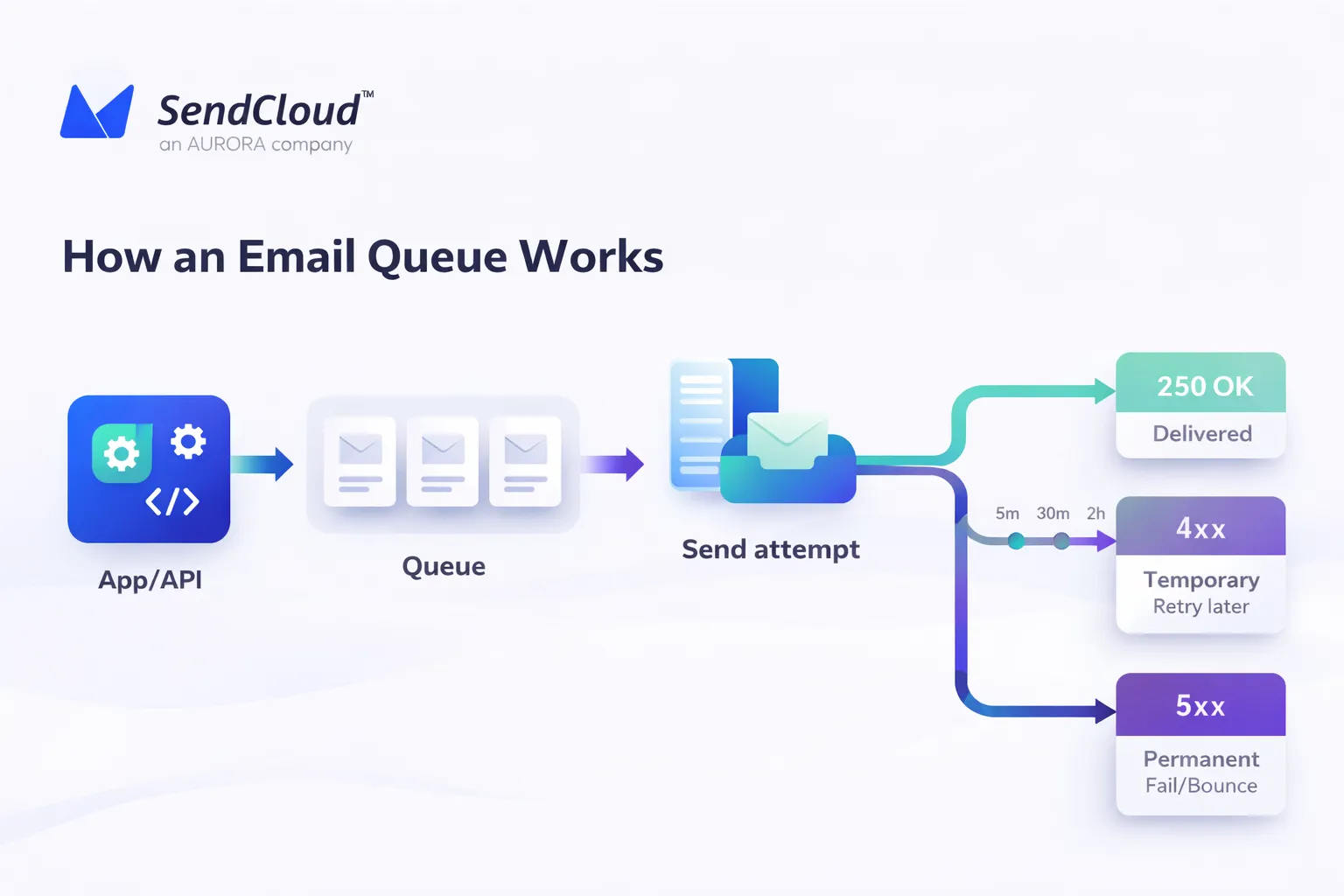
A common flow looks like this:
- Your app creates a message (API call, SMTP submit, background job)
- Your mail system writes it to a queue with metadata (recipient domain, retry state, priority).
- A sender process pulls messages from the queue and attempts delivery.
- Success removes it from the queue. Temporary failure keeps it queued for retry.
Retry logic
Retries are not random. SMTP guidance expects gradual retry behavior. RFC 5321’s retry strategies discussion includes the idea that senders should keep trying for days, not minutes, before giving up. It also notes the “give-up” time generally needs to be at least 4–5 days.
A common pattern is:
- retry after a short delay
- then back off more each time (exponential backoff)
- then finally bounce if the issue does not clear.
A summarized schedule (based on RFC 5321 discussion) is often shown as: retry after ~30 minutes, then exponential backoff (1h, 2h, 4h…), with a max retry period of 4–5 days, plus optional delay warnings after 4–6 hours. For more on managing bounces, check our email delivery issues guide.
4xx vs 5xx
This is the fastest way to read what’s happening:
- 4xx (temporary / retryable): “Not now.” The message should stay queued and retry later.
- 5xx (permanent): “No.” The message should fail and generate a bounce (or be marked failed).
RFC 5321 is explicit that when the receiver returns a temporary error after accepting DATA, the client still owns delivery responsibility and may requeue for later.
Queue order
Queues are rarely pure FIFO in real systems. Most production senders pick work by:
- recipient domain (gmail.com vs outlook.com)
- recent deferrals for that domain
- priority class (transactional vs bulk)
- concurrency limits.
This is how systems protect throughput without annoying major mailbox providers.
Why Are Emails Queued In The First Place?
Emails get queued when immediate sending is risky or impossible
Volume spikes
If you suddenly send 200k messages, your sender may accept them fast, but the receiver side will not. Queuing smooths the spike so you do not slam providers. Understanding blast vs bulk email can help you manage expectations.
Provider limits
Mailbox providers actively push back when traffic looks unsafe or too fast. Google defines “bulk senders” as those sending more than 5,000 messages to Gmail addresses in one day, and introduced stricter requirements and enforcement starting in 2024. You can learn more about these requirements in our compliant email delivery guide.
This matters because once you cross provider thresholds, your mail is more likely to be throttled or deferred. That shows up as queue growth.
Reputation guard
Queues can also be protective. A good sending system does not just “send harder” when it gets deferrals. It slows down to avoid turning a temporary slowdown into a long-term reputation hit. Your sender reputation is critical—see our sender reputation first aid to learn how to protect it.
Shared sending
If multiple apps, tenants, or API users share the same sending infrastructure, one burst can cause queueing for everyone unless you segment or rate-cap.
Receiver slow
Sometimes the receiving mail server is simply slow or busy. In that case, your queue is doing its job: holding mail until the receiver can accept it.
Queue Vs Throttling Vs Delivery Delay: What’s The Difference?
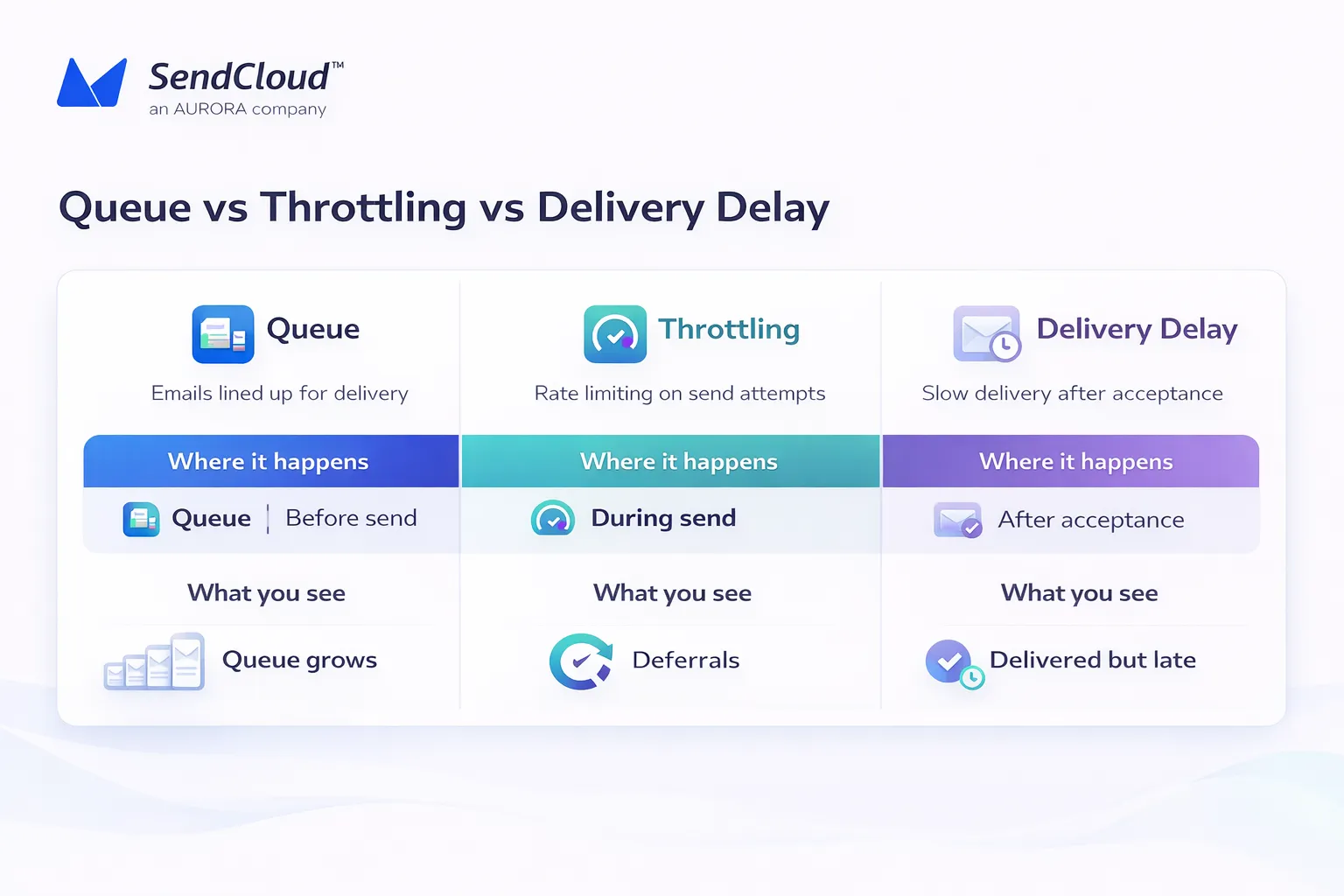
These three get mixed up constantly. Here is the clean separation.
Queue
Queue = where messages wait before a send attempt.
Queued does not mean failed. It means “pending work.”
Throttling
Throttling = intentional slowing of sending speed.
It can be:
- External throttling: receiver pushes back with 4xx
- Internal throttling: your own rate limits to protect IP/domain reputation.
Microsoft gives a clear example of receiver-side throttling: Exchange Online can return a retriable SMTP 450 error that causes the sender to queue and retry later, resulting in delayed delivery. Microsoft even describes a case where throttling is applied for 5 minutes per hour for certain conditions.
Delivery delays
Delivery delay = the user experiences “late email.”
That delay can come from:
- queue backlog (pre-send)
- throttling (reduced send rate)
- downstream filtering and processing after acceptance (post-send)
Quick diagnosis
Use this mental model:
- Queue is growing: you are producing faster than you can deliver.
- 4xx errors rising: receiver is pushing back (throttling/deferrals).
- “Delivered” but users do not see it: deliverability/inbox placement or internal mailbox scanning is slowing things down. Learn more in our improve email deliverability guide.
Why Does Queue Visibility Matter For Deliverability And SLAs?
Queue monitoring is not just ops hygiene. It is risk control.
Delivery vs deliverability
These words sound similar, but they are not the same
Industry definitions are simple:
- Delivery: whether the message “landed” (got accepted)
- Deliverability: how likely it is to land well, influenced by engagement and other signals.
A queue is mostly a delivery concern at first. But queue patterns can be an early warning that deliverability signals are trending the wrong way.
Early warning
Mailbox providers are aggressive about defense.
Google says Gmail blocks nearly 15 billion unwanted emails every day and stops more than 99.9% of spam, phishing, and malware from reaching inboxes. You can learn more about Google’s defenses in our why Gmail blocks email guide.
When defenses tighten, you often see it first as:
- more deferrals
- slower acceptance
- domain-specific backlog
- longer retry cycles
User impact
Queues hit the emails that matter most:
- password resets arrive late
- verification codes expire (see our OTP guide for tips)
- “magic link” login flows break
- time-sensitive promotions miss the window (check our sending calendar guide)
Capacity planning
If you cannot see queue growth early, you cannot plan:
- per-domain rate limits
- burst capacity
- separate streams for transactional vs marketing
What Should You Monitor In An Email Queue?
You do not need 50 metrics. You need the few that tell you “are we falling behind, and why?
Queue size
Track:
- total queued messages
- queued messages by recipient domain
- queued messages by stream (transactional vs bulk)
A queue that drains steadily is usually fine. A queue that grows faster than it drains is a problem.
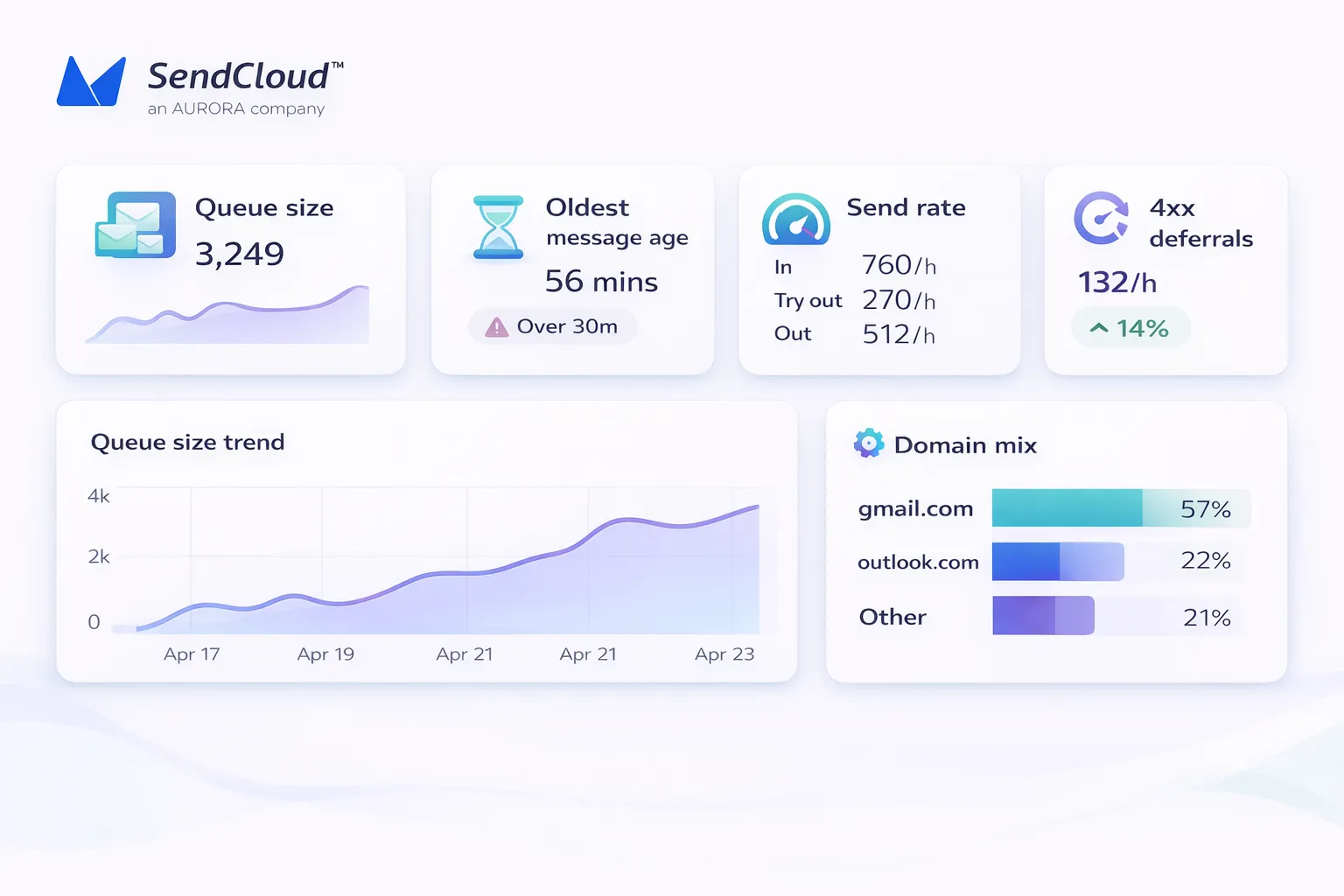
Message age
Queue size can lie. A queue of 30k might be fine if nothing is older than 2 minutes. A queue of 2k might be awful if the oldest message is 6 hours old. Use:
- oldest message age
- p95 age (how bad it is for most messages)
Send rate
You want to see:
- attempted sends per minute
- successes per minute
- deferrals per minute
When your attempted send rate stays high but success rate drops, the receiver is likely pushing back.
Domain mix
If only one domain is stuck (gmail.com, outlook.com), that screams “provider-specific throttling” or reputation signals.
If all domains slow down, suspect your own infrastructure, DNS, or upstream provider—check our MX records guide.
Error signals
Watch SMTP response patterns:
- rising 4xx deferrals = queue growth risk
- rising 5xx hard failures = list quality/auth/config problems
Also watch complaint signals closely. A 2025 deliverability report summarizes Google/Yahoo requirements as a 0.3% spam complaint threshold, and warns that even 0.1% (1 complaint per 1,000 messages) can be a “danger zone.”
When Is An Email Queue “Normal” Vs A Real Problem?
Queues are normal. Backlogs are not.
Healthy signs
- Queue grows during a send, then drains soon after.
- Most queued messages are young (seconds/minutes).
- The slowdown is limited to one provider domain and clears after backoff.
- Retries succeed without turning into multi-day deferrals.
Red flags
- Queue size grows for hours with no sign of draining.
- Oldest message age keeps rising.
- “Deferred” responses cluster around one domain for a long time.
- You see repeating 4xx patterns that look like policy or reputation pushback.
What to do first
Before you change anything big:
- Split by domain. Is it only Gmail? Only Microsoft? Or everything?
- Split by stream. Is it marketing only, or also password resets?
- Check your recent changes. New IP? New domain? New template? New list source?
- Reduce pressure. Slow sending to the affected domain before you make it worse.
How Do You Manage An Email Queue Without Hurting Deliverability?
Managing an email queue is mostly about being predictable and trustworthy.
Segmenting
Separate streams. Do not let marketing bursts delay transactional mail. Practical options:
- separate IPs (or at least separate pools)
- separate subdomains (e.g., notify. vs news.)
- separate queues per stream
If you introduce a new domain or IP and hit providers hard, you will get deferrals. Gradual warm-up builds a stable pattern. Keep it boring:
- small volumes first
- consistent cadence
- watch complaints and bounces
Check our complete email warm-up guide for best practices.
Rate caps
Set per-domain sending caps. Gmail and Microsoft behave differently. Your system should treat them differently. A simple rule:
- if a domain defers, reduce concurrency and rate
- only ramp back up after sustained acceptance
Backoff
Do not retry “as fast as possible.” That often turns a temporary deferral into a longer block. SMTP guidance expects queued mail to be retried over time, and that systems should be willing to keep retrying for days when the issue is temporary.
Scheduling
If you have predictable peaks (daily digests, weekly newsletters), schedule them so you do not collide with critical traffic. Our email sending calendar can help.
Also keep compliance in mind. For bulk senders, Google’s requirements include “easy unsubscription,” and Google says unsubscribe requests should be processed within two days. That is not directly a queue metric, but it affects the downstream signals (complaints) that often lead to throttling and queue growth. Learn about list unsubscribe headers for better compliance.
Troubleshooting Checklist For Stuck Queues And Email Delivery Delays
Start simple. Then go deeper.
Provider blocks
Look for patterns like:
- Gmail “unusual rate” / 421-style deferrals
- Microsoft “server busy” / 45x or 451-style deferrals
Microsoft explicitly describes scenarios where Exchange Online returns retriable errors that cause queued retries and delayed delivery. Actions:
- slow sending to the affected domain
- reduce concurrency
- verify your authentication alignment (SPF/DKIM/DMARC)
- check complaint rate and list quality for that stream
Auth checks
If authentication is broken, you can see:
- more deferrals
- more filtering
- more rejections
At minimum, confirm:
- SPF passes (aligned)
- DKIM passes (aligned)
- DMARC exists and aligns
For bulk senders, Google and Yahoo tightened requirements starting in 2024. Check our DMARC records guide and domain and IP guide to get this right.
Bounce review
Do not just count bounces. Read them. Bucket them:
- bad mailbox (5.1.1 type issues)
- policy/reputation blocks
- content-related blocks
- temporary server busy
Content risk
If throttling rises right after a new template:
- check link domains
- check URL shorteners (avoid them!)
- check “spammy” patterns (too many links, odd tracking domains)
- check if you changed From-name or From-domain
Our fix email spam guide has more tips.
Infra issues
If all domains are slow:
- DNS issues (MX lookups, timeouts)
- network egress problems
- TLS handshake failures
- outbound MTA saturation (CPU, disk, IO)
If you run Postfix, tools like qshape can help you spot bottlenecks. Postfix documentation explains how messages can leave the “active” queue and end up in the “deferred” queue when deliveries fail and retries are scheduled.
How Do You View Email Queue Status In Aurora Sendcloud?
Aurora SendCloud gives you a queue dashboard so you can see whether delays are expected, which domains are affected, and what your sending rate looks like right now. Below is the practical way to read it.
Queue status
Aurora’s queue dashboard surfaces Queue Status (the current state of the queue). Use it to answer:
- Are we actively sending?
- Are we paused?
- Is this isolated to one recipient domain?
API user
Aurora shows API_USER tied to the queue. This is helpful when multiple apps or teams send through the same account. It lets you find the source of the spike fast.
Receiving domain
Aurora breaks queues down by Receiving Domain (like gmail.com or outlook.com). This is the quickest way to see “provider pushback” vs “our system issue.”
Email count
You can see Email Count (total emails pending delivery).
If one domain’s count climbs while others drain, treat it as a domain-specific throttle signal and reduce pressure to that domain.
Sending rate
Aurora shows Sending Rate as In / Try out / Out.
A simple way to interpret it:
- In: messages entering the queue (new load)
- Try out: delivery attempts in progress
- Out: messages successfully leaving the queue (throughput)
If “In” keeps beating “Out,” the backlog grows.
Live charts
Aurora includes real-time analytics with selectable intervals (5s, 15s, 30s) and charts that update every 5 seconds. That makes it easier to answer: “Did my change help within the last minute?” Check our analytics report to learn more.
Pauses, reasons, and recovery
When a queue is paused, Aurora can show:
- Pause reason
- Next send time
- a Recovery option to resume immediately
Aurora also documents common pause reasons such as domain limits, IP reputation restrictions, and connection frequency limits.
Controlling queues (pause or drop)
If you need to actively manage pressure, Aurora documents queue controls under Send → Queues, including the ability to pause sending by receiving domain or drop emails for a domain/time period.
Two operational details matter:
- You can set a recovery time up to 15 days. If you do not set one, the queue can remain suspended; after 15 days, emails in the suspended queue may be deleted automatically.
- That makes queue control a real “safety valve,” not just a dashboard.
FAQs
1. How long can an email stay in the queue?
It depends on the error type and your retry strategy. SMTP guidance expects retries over time, and RFC 5321 notes the give-up time generally needs to be at least 4–5 days for normal mail before failing permanently.
2. Will a queued email eventually send?
Often, yes—especially with 4xx temporary deferrals. But if the root cause is persistent (bad auth, very high complaints, blocked IP), the queue can keep retrying until the give-up time, then bounce.
3. Can I cancel queued emails?
In many systems, yes. Aurora SendCloud documents queue deletion (dropping emails) by receiving domain and time period, plus pausing by domain.
4. Is “queued” the same as “delivered”?
No. “Queued” means waiting for delivery attempts. “Delivered” usually means accepted by the recipient’s mail system, not “in the inbox.” Learn more about this difference in our delivery issues guide.
Conclusion: Queues Are A Safeguard, Not A Setback
An email queue is not a flaw in your system. It is one of the main ways email stays reliable when the internet is messy. Queues protect you from volume spikes, receiver slowdowns, and mailbox-provider pushback. They also give you space to back off instead of getting blocked.
The best teams treat queue monitoring like a first-class signal. They watch queue size, message age, per-domain patterns, and SMTP errors. They keep lists clean with email scrubbing, send with steady patterns, and authenticate properly. That is how you keep delivery predictable and protect long-term deliverability.
You can manage this more easily with Aurora SendCloud. Start your journey with our email queue fix guide.