In our previous post, we pulled back the curtain on the Feedback Loop (FBL), identifying it as the ultimate "lifeline" for maintaining email sender reputation. However, for most enterprises, there remains a massive gap between theory and execution. How do you extract actionable value from thousands of cryptic ARF reports? How do you monitor your standing across major Mailbox Providers (MBPs) in real-time?
Today, we're diving into the solution: MP Monitor by Aurora SendCloud. This is the tool that transforms complex FBL data into high-impact sending strategies.
1. The Shift: From Reactive Cleanup to Proactive Monitoring
In a traditional email setup, handling FBLs is a reactive, "after-the-fact" chore. Technical teams typically log into various MBP backends to manually download reports, then write custom scripts to parse machine-readable ARF files. This process isn't just inefficient—it's dangerous. By the time you realize your complaint rate has spiked, your IP has likely already been blacklisted.
Modern email marketing demands a more sophisticated approach. You need to transition from simply receiving scattered complaints to proactively monitoring reputation trends via a centralized digital dashboard. For global brands and high-volume senders, this visibility isn't a luxury; it's a requirement.
2. MP Monitor: The "Command Center" for Your Sender Reputation
MP Monitor (Mailbox Provider Monitor) is Aurora SendCloud's specialized hub for deliverability intelligence. Think of it not just as a data aggregator, but as a "health check" system for your domain.
Supported Providers
MP Monitor connects three major feedback sources for comprehensive mailbox provider monitoring:
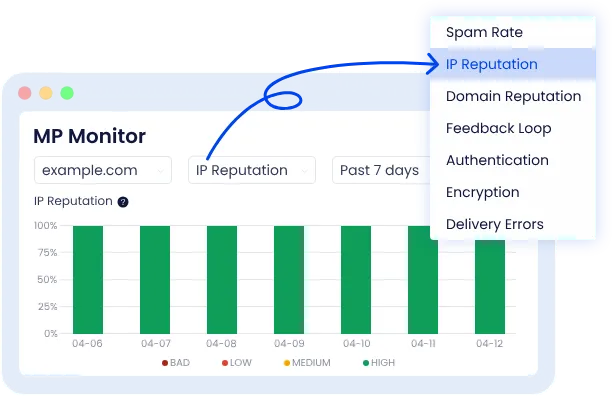
- Google Postmaster: Gmail monitoring for spam rate, domain reputation, IP reputation, authentication status, and delivery errors.
- Yahoo CFL: Yahoo Complaint Feedback Loop monitoring for spam complaints from Yahoo Mail recipients.
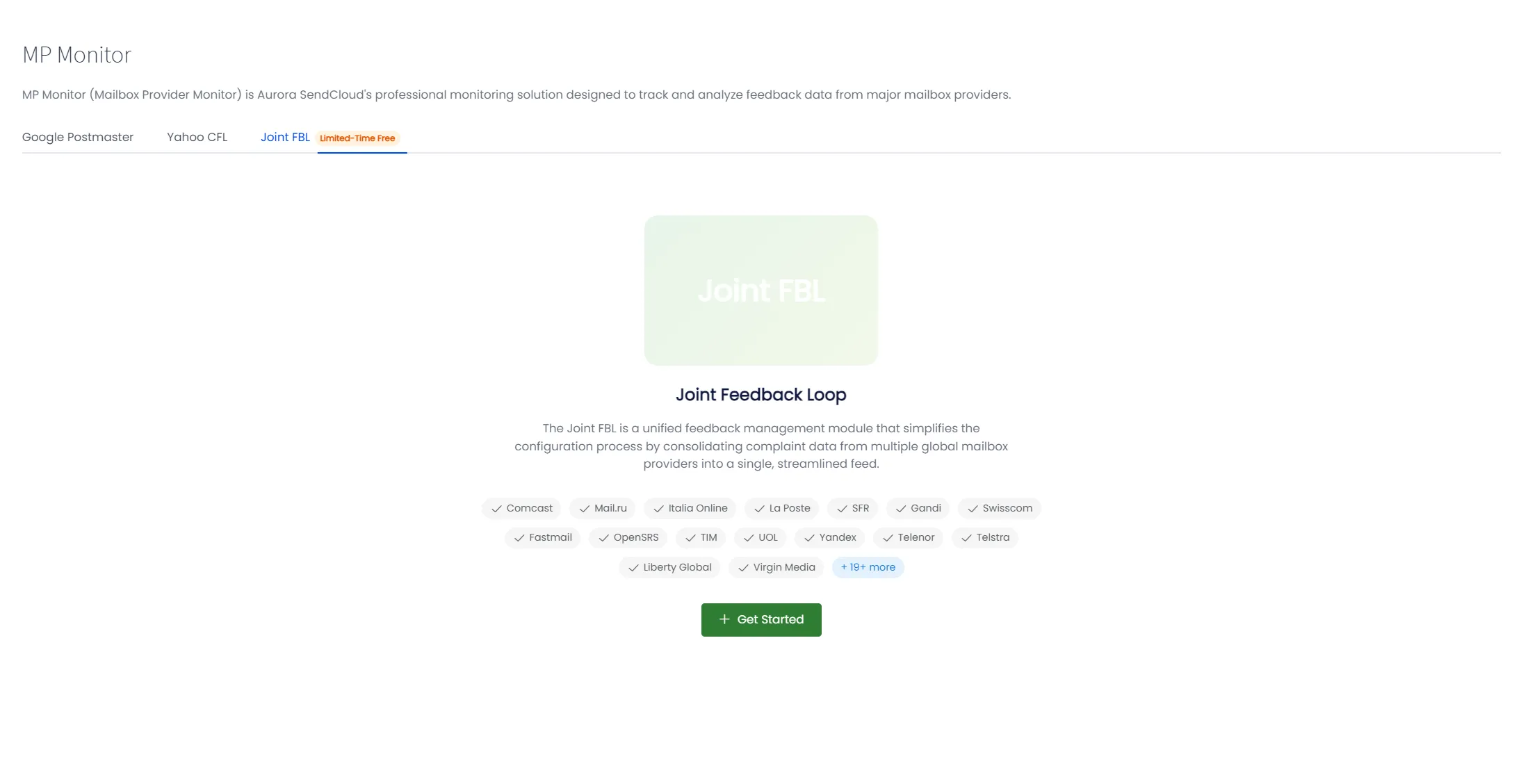
- Joint FBL: Universal Feedback Loop that aggregates complaint data from 20+ mailbox providers worldwide, including Comcast, Mail.Ru, Italia Online, La Poste, SFR, Gandi, Swisscom, Fastmail, OpenSRS, TIM, UOL, Yandex, Telenor, Telstra, Liberty Global, Virgin Media, and more.
Real-Time Dashboard Overview
Upon logging into MP Monitor, users are greeted with a comprehensive dashboard that displays:
- Real-time dashboards: For current reputation and complaint indicators
- Historical trends: To track changes over time (7, 30, 60, and 90 days)
- Alert notifications: For reputation or delivery issues
- Detailed reports: To support campaign and deliverability analysis
This consolidated view eliminates the need to maintain multiple spreadsheets or manually aggregate data from different sources.
Key Features
- Universal Platform Integration: You no longer need to jump between Gmail Postmaster, Yahoo CFL, or Microsoft JMRP. MP Monitor integrates feedback protocols from all major global providers into a single, unified interface.
- Visual Trend Analytics: Raw numbers are static; trends tell the story. MP Monitor converts dry FBL data into intuitive, visual charts. By tracking your complaint rate curves, you can instantly pinpoint which specific campaign or creative triggered a spike in reports, allowing for immediate root-cause analysis.
3. Core Use Cases: How MP Monitor Protects Your ROI
With MP Monitor, your email operations move from guesswork to "God Mode":
- Use Case A: The "Red Line" Alert System
In the world of deliverability, 0.1% is the universal "danger zone." MP Monitor allows you to set custom thresholds for different domains. If the system detects a complaint rate approaching this limit, you can intervene immediately—pausing the campaign or refining your segments—before your IP reputation takes a permanent hit. With real-time complaint alerts, you can catch problems before they escalate into blacklist incidents that could impact your entire sender reputation. - Use Case B: Decoding the Gmail Black Box
Gmail's feedback is notoriously difficult to interpret. MP Monitor optimizes the display of Gmail's aggregate data, visualizing complex domain reputation levels (High, Medium, Low) so you can finally see what the world's largest mailbox provider thinks of your mail. - Use Case C: Joint FBL Global Monitoring
Joint FBL collects complaint feedback from 20+ mailbox providers through a single integration. With MP Monitor, you can view the total number of complaints within the selected time range, use the donut chart to see complaint distribution by mailbox provider, track complaint trends with stacked bar charts, and review individual complaint records in detail.
4. Advanced Strategy: Finding the Truth in the Post-MPP Era
Since the launch of Apple's MPP (Mail Privacy Protection), "Open Rates" have become a vanity metric. Because Apple pre-loads images, open rates are often artificially inflated, masking the true engagement of your audience.
In this "dehydrated" data environment, FBL complaint rates have become the most vital "hard" metric available. When you can't be certain if a user loves your mail, MP Monitor can at least tell you if they hate it. In the MPP era, monitoring your real-time complaint rate via MP Monitor is the only reliable "thermometer" for measuring the quality of your content and the health of your list.
5. Setup Guide: Get Started in 3 Steps
Before You Start
- Add at least one active sending domain in Aurora SendCloud.
- Make sure you can create TXT records in your DNS provider.
- Sign in to a Google account before you connect Google Postmaster.
- Use a paid Aurora SendCloud account if you want to activate the limited-time Joint FBL trial.
Step 1: Connect Google Postmaster
Google Postmaster setup takes about 5-10 minutes. Data collection usually begins within a few hours after verification.
- Open the Google Postmaster Tool.
- Sign in with your Google account.
- Click the "+" button in the bottom-right corner.
- Enter your sending domain name and click "Next".
- Copy the generated TXT record value.
- Add the TXT record to your domain's DNS configuration.
- Return to Google Postmaster and click "Verify".
- After verification, hover over your domain on the homepage.
- Click the "More ⋮" button and select "Manage Users".
- Click the "+" button, add
noreply-dashboard@aurorasendcloud.com, and set permissions to "Read Only".
DNS propagation: DNS changes can take up to 24 hours to propagate. Aurora SendCloud only needs read-only access and will not modify your Google Postmaster settings.
Step 2: Connect Yahoo CFL
Yahoo CFL sends spam complaint feedback when a recipient marks your message as spam. You can use that feedback to suppress complaining users and protect sender reputation.
- In Aurora SendCloud, go to Analytics > MP Monitor.
- Open the Yahoo CFL tab.
- Click "+ Get Started".
- Choose one of your existing sending domains from the dropdown.
- Copy the generated TXT record value.
- Open your domain's DNS management panel.
- Create a new TXT record with the provided value and save the change.
- Return to MP Monitor and click "Verify".
Verification timing: DNS changes may take 5-15 minutes to be recognized by Yahoo's systems. If verification fails, wait a few minutes and try again.
Step 3: Activate Joint FBL
Joint FBL collects complaint feedback from 20+ mailbox providers through a single integration.
- In Aurora SendCloud, go to Analytics > MP Monitor.
- Open the Joint FBL tab.
- Click "+ Get Started".
- Wait for activation to complete. No additional configuration is required.
- Review the redirected dashboard to view complaint statistics, trends, and detailed records.
Availability: Joint FBL is currently available as a limited-time free trial for paid accounts. Free accounts will be prompted to upgrade when attempting to activate.
Most users complete setup within 15 minutes, with data aggregation beginning immediately after domain verification.
6. Frequently Asked Questions
- Q1: Is MP Monitor really free?
A: Yes, Google Postmaster and Yahoo CFL are available to all Aurora SendCloud users at no additional cost. Joint FBL is currently available as a limited-time free trial for paid accounts. - Q2: Which mailbox providers does MP Monitor support?
A: MP Monitor integrates with Gmail (Google Postmaster), Yahoo Mail (Yahoo CFL), and 20+ global providers via Joint FBL, including Comcast, Mail.Ru, Yandex, Virgin Media, and more. - Q3: How quickly does MP Monitor start showing data?
A: Data aggregation begins immediately after domain verification. Google Postmaster typically takes 24-48 hours to start displaying data. - Q4: Can I set different alert thresholds for different domains?
A: Yes, MP Monitor allows custom threshold configuration per domain, giving you granular control over your alerting system. - Q5: Which providers are included in Joint FBL?
A: Joint FBL aggregates data from Comcast, Mail.Ru, Italia Online, La Poste, SFR, Gandi, Swisscom, Fastmail, OpenSRS, TIM, UOL, Yandex, Telenor, Telstra, Liberty Global, Virgin Media, and more.
7. Conclusion: Transparency in Every Send
Email delivery shouldn't be a game of chance; it should be a data-driven science. At Aurora SendCloud, we are committed to bridging the information gap between senders and receivers, ensuring that every email you send creates value rather than noise.
Trusted by over 200,000+ senders worldwide, Aurora SendCloud provides enterprise-grade deliverability tools accessible to businesses of all sizes.
The most important takeaway: To empower global brands and support healthy cross-border growth, MP Monitor's Google Postmaster and Yahoo CFL features are currently available to all Aurora SendCloud users entirely free of charge. Joint FBL is available as a limited-time free trial for paid accounts.
Why fly blind when you can navigate with precision? Start using MP Monitor today and take control of your email deliverability with real-time FBL monitoring.