People may open your emails, but clicks are harder to earn. That is the real challenge with every announcement email. Your message has to do more than share news. It must make the reader care, understand the value, and take action.
Announcement emails are used for product launches, company updates, event invites, policy changes, milestones, and email newsletters. Each type has a different goal, but the same rule applies: be clear, useful, and easy to act on.
A strong announcement email turns business news into customer value. It helps you drive traffic, increase product adoption, build trust, and keep your audience engaged without sounding boring or pushy.
What Is an Announcement Email and Why Is It Important?
An announcement email is a message sent to a specific audience to share important news. It may inform, explain, invite, warn, or promote.
The best announcement emails answer three questions fast:
- What changed?
- Why does it matter?
- What should the reader do next?
Email remains a strong business channel because it reaches people directly. According to Brevo’s 2025 email marketing benchmarks , the average click-through rate was 3.64%, while the unsubscribe rate was only 0.4%. This shows that relevant emails can still drive meaningful action when the message is clear.
Core Characteristics
A good announcement email is clear, timely, focused, and action-driven.
- It should not read like a press release.
- It should not bury the main point.
- It should not ask the reader to do five things at once.
The message should focus on one update, one audience need, and one main CTA.
“View the new dashboard” is stronger than “Learn more” because it tells the reader exactly what to expect.
Business Value
Announcement emails support sales, marketing, customer success, and brand trust.
- Sales teams can use product announcements to restart conversations with leads.
- Marketers can use events and launch emails to drive registrations, clicks, and demos.
- Account managers can use policy or feature updates to reduce confusion and keep customers informed.
For business owners, announcement emails help turn company activity into customer engagement.
6 Common Types of Announcement Emails
Different announcements need different angles. A product launch should focus on value. A policy update should focus on clarity. An event announcement should focus on urgency and relevance.
Here are the six most common types.
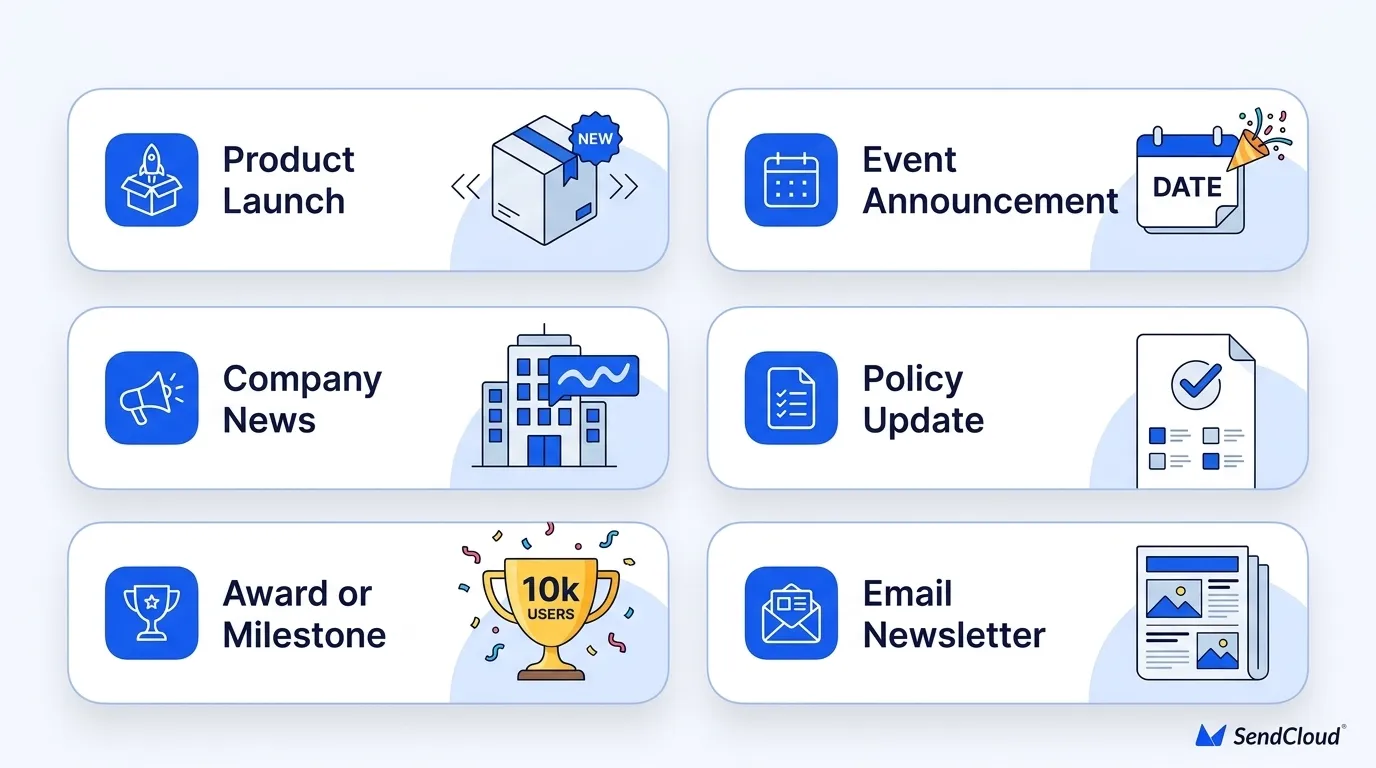
1. Product Launch Email
A product launch email announces a new product, feature, plan, service, or upgrade. Its goal is to create interest and drive action.That action may be starting a trial, booking a demo, joining a waitlist, or visiting a product page.
The key is to lead with the benefit, not the feature list.
- Weak: “We launched a new analytics module."
- Stronger: “You can now see which campaigns drive the most revenue in one dashboard.”
Example:Subject: Meet the new campaign dashboard Preheader: Track opens, clicks, and conversions in one place. CTA: View the dashboard
2. Company Announcement Email
A company announcement email shares business news such as a new office, funding, partnership, rebrand, leadership change, or expansion. Its goal is to build trust and keep stakeholders informed.The mistake many companies make is focusing only on themselves. Readers need to know why the update matters to them.
If you open a new regional office, do not just say, “We are expanding.” Say how it improves service, support hours, delivery speed, or local access.
Example:Subject: We’re expanding support for APAC customers Preheader: Get faster help with new regional support hours. CTA: See what’s changing
3. Event Announcement Email
An event announcement email promotes a webinar, live demo, workshop, conference, or customer session. Its goal is to drive registrations or attendance.The email should make the value clear immediately. People do not register because you are hosting an event. They register because the event helps them solve a problem.
Include the topic, date, time, speaker, audience, benefit, and registration CTA.
Example:Subject: Live webinar: Cut email bounce rates before launch Preheader: Learn how to protect sender trust before your next campaign. CTA: Save my seat
4. Policy or Terms Update Email
A policy update email explains changes to pricing, billing, privacy, terms of service, compliance, service access, or product rules. Its goal is to reduce confusion and protect trust.This email should be direct. Do not hide bad news in soft language. If prices are changing, say so. If terms are changing, explain the real impact.
Example:Subject: Updates to our billing terms start June 1 Preheader: Here’s what changes and what stays the same. CTA: Review the update.
5. Award or Milestone Email
An award or milestone email shares achievements such as an anniversary, user milestone, award, funding milestone, or delivery milestone. Its goal is to build credibility and deepen customer trust.Avoid bragging. Make the reader part of the story.
- Weak: “We won a major award.”
- Stronger: “Your trust helped us reach this milestone.”
This tone makes the email feel grateful, not self-centered.
Example:Subject: Aurora SendCloud reached a new delivery milestone Preheader: Thank you for trusting us with your customer emails. CTA: Explore our delivery solutions
6. Email Newsletter
An email newsletter is a recurring email that shares updates, tips, content, resources, or product news. Its goal is long-term engagement.A newsletter can include announcements, but it should not feel crowded. Each issue needs a clear theme. Readers should know what value they will get every time it arrives.
A good newsletter may include one product update, one useful tip, one customer story, and one event reminder. Keep it useful and easy to scan.
Example:Subject: 3 email updates worth knowing this month Preheader: Deliverability tips, product news, and one quick checklist. CTA: Read the update
How to Write a High-Impact Announcement Email
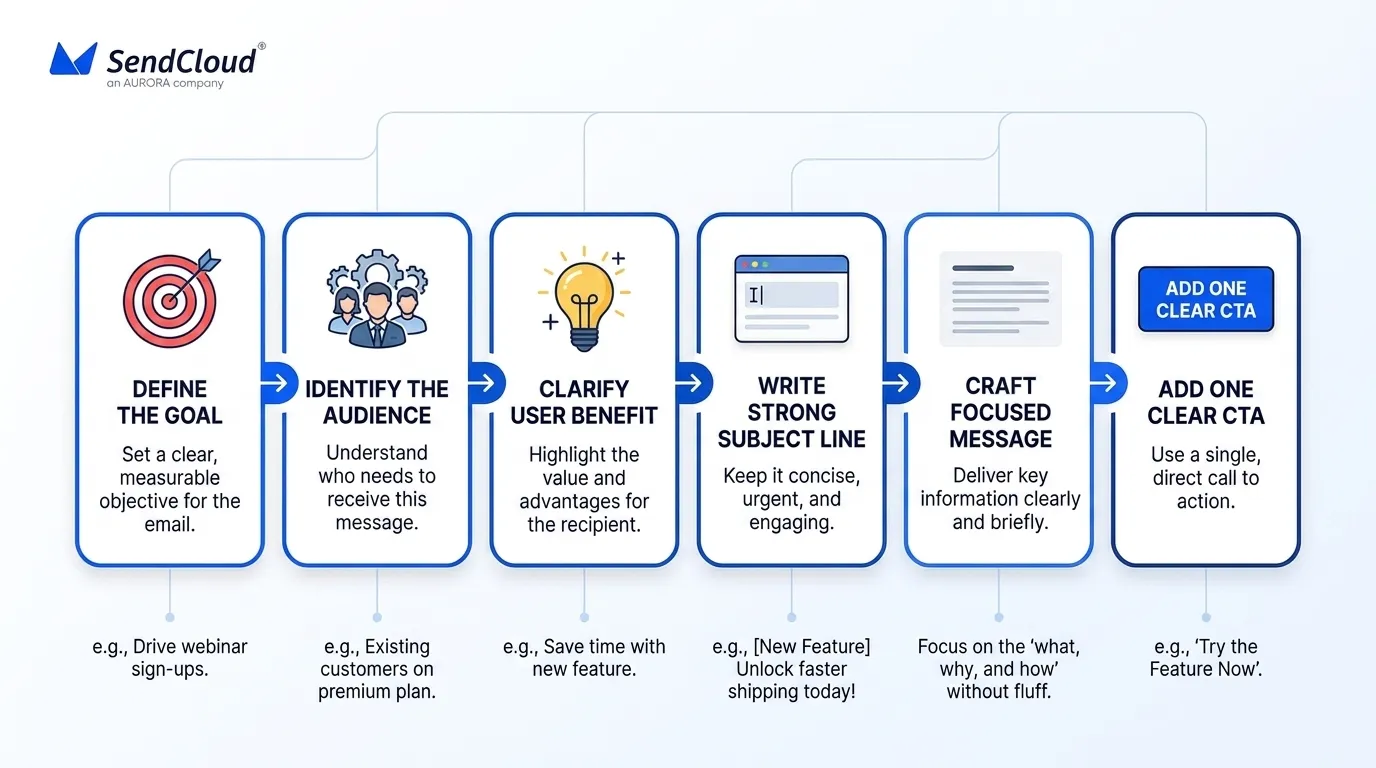
A strong announcement email starts with strategy, not copy. Before writing, define the purpose, audience, value, and next step.
Weak emails try to do too much. Keep it focused: one update, one reader benefit, one CTA.
Plan Before You Write
Start with one sentence that explains the announcement.
- Bad: “We launched a new dashboard.”
- Better: “Active users can now track opens, clicks, bounces, and delivery status in one dashboard.”
The second version gives you the message, audience, and benefit. Then define the goal. Do you want clicks, registrations, demos, upgrades, replies, or awareness? The goal should shape the CTA and layout.
Define One Core Message
Your core message is the one idea the reader should remember.
- For a product launch email, it may be: “You can now manage campaign performance in one place.”
- For an event announcement email, it may be: “Join a 30-minute session to learn how to reduce email bounces before launch.”
- For a company announcement email, it may be: “We are expanding support hours so global customers can get faster help.”
If the core message is not clear in one sentence, the email will feel scattered.
Match the Email to the Audience
Do not send every announcement to everyone.
A feature update may matter only to active users. A pricing update may matter only to paying customers. A webinar may matter only to leads in a certain role, region, or industry. Segmentation improves relevance and protects engagement. It also lets you adjust the message.
A founder may care about business impact. A marketer may care about campaign results. A developer may care about setup and control. Same update, different angle.
Focus on User Benefit
The reader does not care that your company has news. They care about what the news helps them do.
Company-first: “We released a new automation feature.” User-first: “You can now send customer updates faster with less manual work.”For every announcement, ask: “So what?”
The answer should appear early in the email.
Use One Main CTA
Every announcement email needs one main call to action. Good CTAs are specific:
Register for the webinar Try the new feature Review the update Book a demo Read the announcement Avoid vague CTAs like “Click here” or “Learn more” when a clearer action is possible.
You can repeat the same CTA in the email, but do not add multiple competing actions.
Choose the Right Send Time
Send time depends on your audience, region, and message.
Business updates usually work better during work hours. Event reminders should be close enough to the event to feel urgent. Major B2B announcements should not be buried late on Friday.
For global lists, time zones matter. If possible, send by local time and compare results across campaigns.
Writing Techniques That Improve Opens and Clicks
Announcement emails must be easy to scan. Most readers look at the subject line, preheader, opening line, CTA, and visuals before deciding what to do.
Write for that behavior.
Subject Line
The subject line should be clear before it is clever.
Strong subject lines show the update, benefit, or deadline.
Examples:
- New: Campaign reports are now live
- Track every launch email in one dashboard
- Register by Friday for our deliverability webinar
Avoid fake urgency. “Final notice” should only be used when it is truly final. “Important update” should only be used when the update is actually important.
Trust matters more than short-term opens.
Preheader Text
The preheader should support the subject line, not repeat it.
Example:
Subject: New: Campaign reports are now live
Preheader: See opens, clicks, bounces, and delivery status in one place.
The subject announces the news. The preheader explains the value.
Opening
Get to the point in the first line.
Avoid slow openings like, “We are excited to announce…” The reader does not need your excitement first. They need the update.
Better:
“Your campaign dashboard now shows opens, clicks, bounces, and delivery status in one view.”
This line is clear, useful, and direct.
Body
The body should explain the announcement in a logical order.
Start with what changed. Then explain why it matters. Then show who it affects and what happens next.
For a product launch email, explain what the product does and how the reader can use it. For a policy update, explain the change, date, impact, and support path.
Keep paragraphs short. Use plain language. Remove anything that does not help the reader decide or act.
CTA and Closing
The CTA should match the email goal.
A product launch email can use “Try the new feature.” An event announcement email can use “Register for the webinar.” A policy update can use “Review the changes.”
The closing should be brief. Thank the reader, restate the value, or offer support. Do not add a second sales pitch unless it directly supports the announcement.
Design and Technical Optimization
Design should guide attention. It should not compete with the message.
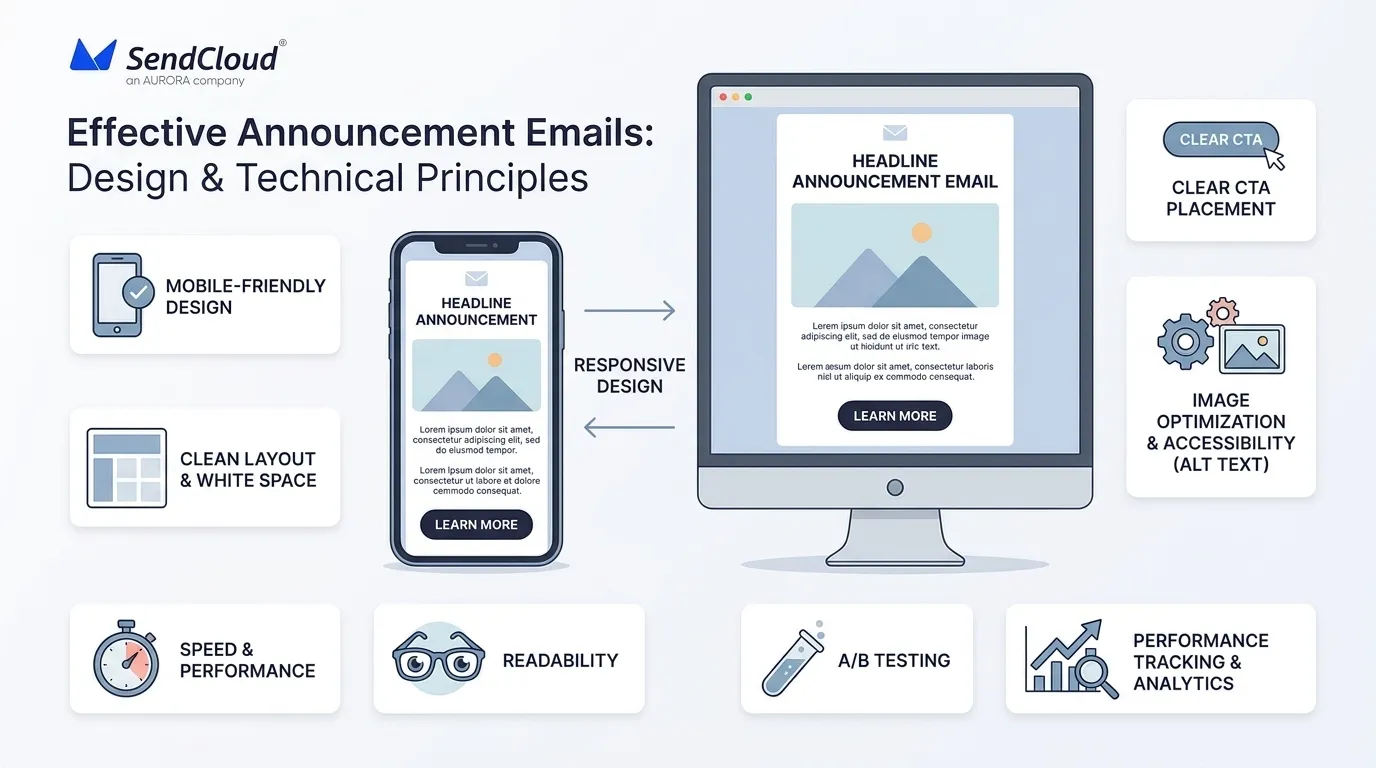
A good announcement email makes the main point visible, the CTA easy to find, and the content easy to read on any device.
Mobile Display
Design for mobile first.
Use a single-column layout, readable text, clear spacing, and large buttons. Keep the message short enough to scan on a small screen.
Test your email in major inboxes before sending. A broken layout can make even a strong message look careless.
Visuals
Use visuals only when they support the message.
A product screenshot can show what changed. A GIF can show how a feature works. A speaker image can support a webinar invite. A simple graphic can make a milestone more memorable.
Do not overload the email with large images. Some inboxes block images. The message should still make sense without them.
Load Speed and Accessibility
Keep image files light. Use clean HTML . Make sure buttons are real, clickable elements and not only part of an image.
Add alt text to important visuals. Use readable fonts and strong contrast. Do not rely only on color to explain meaning.
Accessibility is not just a design issue. It helps more readers understand and act on your message.
Testing and Tracking
Test one variable at a time. Start with the subject line, preheader, CTA copy, send time, or hero image.
Do not test too many changes at once. If everything changes, you will not know what caused the result.
According to Litmus email marketing statistics , testing, automation, and personalization are common ways email teams improve campaign results.
Track performance based on the email goal. A product launch email should track clicks, demos, trials, upgrades, and feature usage. An event email should track registrations and attendance. A policy update should track views, support tickets, and complaint rate.
Open rate is useful, but clicks, conversions, replies, and business outcomes give a clearer view of real engagement.
How Aurora SendCloud Helps You Send Better Announcement Emails
Announcement emails need more than good writing. They also need reliable delivery, clean templates, sender trust, and clear tracking. Aurora SendCloud’s email marketing platform helps teams manage these parts in one place, from campaign setup to delivery support.
Its sending infrastructure supports time-sensitive emails such as product launches, event reminders, newsletters, and policy updates. Templates help teams keep emails consistent, while domain setup and warm-up support help build trust before larger sends.
After sending, analytics help teams review delivery, opens, clicks, engagement, and campaign results. For campaign testing and performance review, teams can also use Aurora SendCloud’s campaign management tools to improve future announcement emails.
FAQs
1. How long should an announcement email be?
Most announcement emails should be 150–300 words. Keep it focused on one message and one action.
2. How formal should an announcement email sound?
Match the tone to the topic and audience. Use a clear, respectful, and human voice.
3. Should you send a follow-up email?
Yes, if the email needs action. Segment follow-ups by opens, clicks, registrations, or completed actions.
4. How do you announce bad news?
Be direct, calm, and honest. Explain what is changing, when it starts, who is affected, and what to do next.
5. What metrics matter most?
Track the metric tied to the goal. Use clicks, registrations, demos, upgrades, replies, complaints, or support tickets instead of relying only on opens.
Conclusion: Turn Every Announcement Into a Brand Moment
A successful announcement email is not just an update. It is a focused message built around timing, relevance, and action. The best emails explain what changed, why it matters, and what the reader should do next. They use clear copy, simple design, strong deliverability, and useful tracking.
Start with one clear message and one real user benefit. Aurora SendCloud can help you send announcement emails more reliably with delivery tools, warm-up support, templates, and performance tracking.