

Email remains one of the most reliable ways to connect with customers, generate sales, and build long-term relationships. While new marketing channels appear every year, email continues to deliver consistent results because it allows businesses to communicate directly with people who have already shown interest in their products or services. Whether you own a small business, run an online store, manage a SaaS company, or work as a digital marketer, learning email marketing can help you attract more customers, increase repeat purchases, and keep your audience engaged. Unlike social media platforms, where algorithms decide who sees your content, email gives you direct access to your subscribers whenever you send a campaign.
This guide explains everything you need to know about email marketing, from understanding the basics to planning a successful strategy.
What Is Email Marketing?
Email marketing is the practice of sending emails to a group of people to build relationships, promote products or services, share valuable information, and encourage customers to take action. Businesses use it to communicate with subscribers who have voluntarily shared their email addresses.
Many people think email is only for sales promotions, but that is only one part of it. Good email marketing focuses on building trust over time. When businesses consistently send helpful content, useful updates, educational resources, and relevant offers, subscribers become more likely to purchase when they need a product or service.
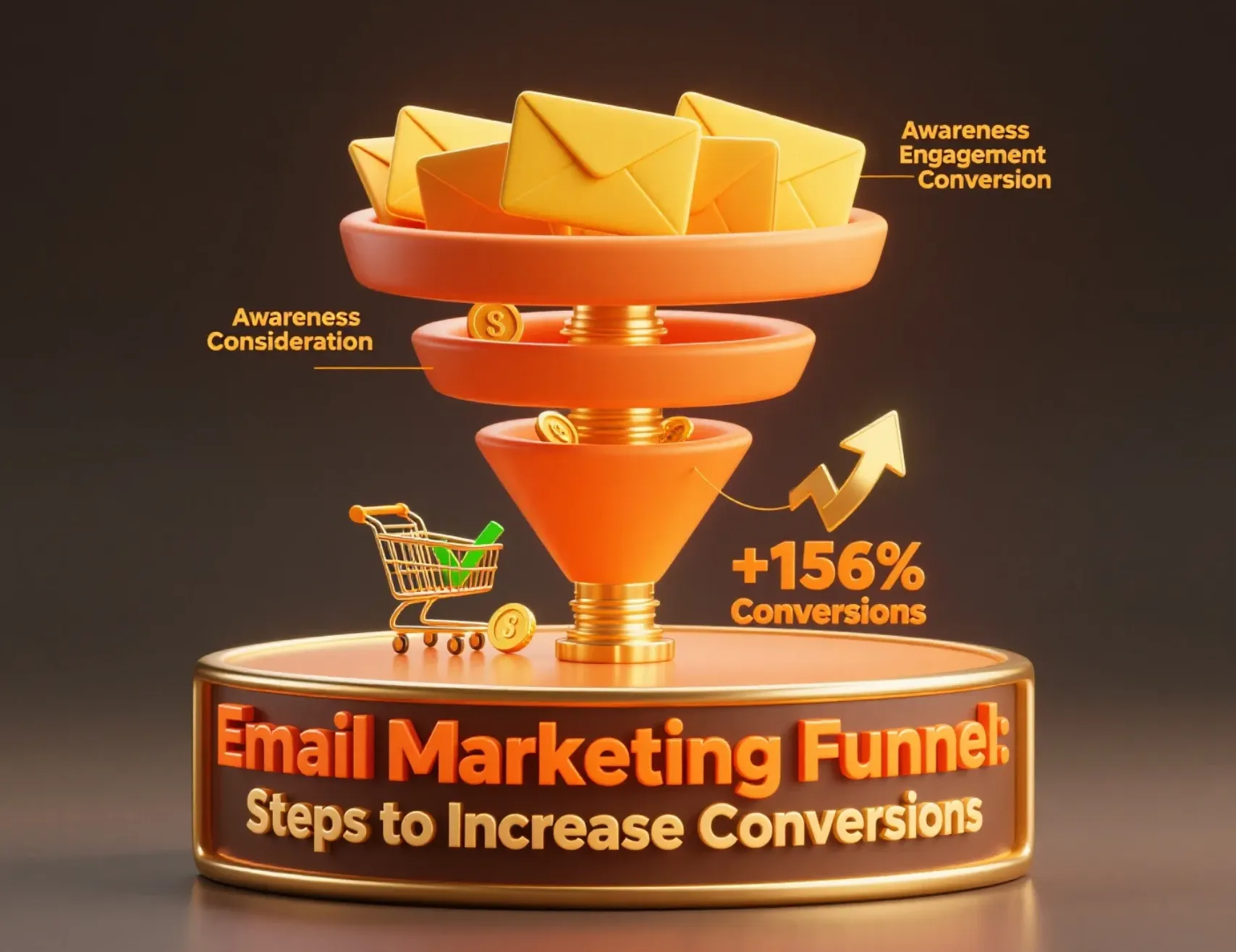
Email also supports every stage of the marketing funnel.
| Funnel Stage | Purpose | Example Emails |
|---|---|---|
| Top of Funnel | Create awareness | Educational newsletters, blog updates, welcome emails |
| Middle of Funnel | Build trust | Product guides, case studies, testimonials |
| Bottom of Funnel | Drive conversions | Discounts, free trials, limited-time offers |
| After Purchase | Increase loyalty | Order updates, onboarding emails, review requests |
For example, a visitor may download a free guide from your website and receive a welcome email. Over the next few weeks, they receive educational content that answers common questions. Later, they receive a discount offer, make a purchase, and then receive follow-up emails with product tips and support. This entire customer journey happens through carefully planned email campaigns.
What Are the Benefits of Email Marketing?
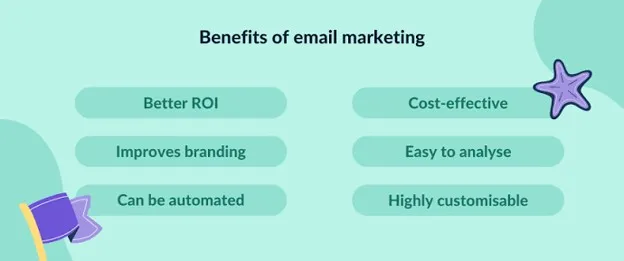
Businesses of every size use email because it produces measurable results without requiring a large marketing budget. Whether your goal is generating leads, increasing online sales, or improving customer retention, email can support every stage of business growth. Below are some of the biggest advantages.
Excellent Return on Investment
One of the biggest reasons businesses invest in email is its high return on investment (ROI). Industry research has consistently shown that email generates more revenue than many other digital marketing channels.
Unlike paid advertising, where costs continue increasing as campaigns grow, email allows you to communicate with existing subscribers repeatedly at a relatively low cost. Once your subscriber list grows, every campaign becomes more cost-effective.
Businesses often use email to:
- Promote new products
- Recover abandoned carts
- Announce seasonal sales
- Share educational content
- Encourage repeat purchases
Because subscribers already know your brand, they usually respond better than completely new audiences.
Direct Access to Your Audience
Social media platforms constantly change their algorithms. A large percentage of your followers may never see your latest post. Email works differently. When someone subscribes to your mailing list, they give you permission to contact them directly. Your messages arrive in their inbox instead of competing with thousands of social media posts.
This makes your subscriber list one of your business's most valuable marketing assets because you own the relationship instead of depending entirely on another platform.
As your business grows, your email list becomes a reliable communication channel for announcements, promotions, educational content, and customer support. Discover how email builds brand trust over time.
Personalization at Scale
Customers expect businesses to understand their interests. Fortunately, modern email platforms make personalization simple. Instead of sending identical emails to every subscriber, businesses can personalize content using information such as:
- Customer name
- Location
- Previous purchases
- Browsing history
- Product interests
- Subscription preferences
For example, an online clothing store can recommend winter jackets to customers living in colder regions while showing summer collections to customers in warmer areas.
Automation Saves Time
One of the biggest advantages of email marketing is automation. Instead of manually sending emails every day, businesses can create automated workflows that send messages based on customer actions.
Common automation examples include:
- Welcome emails after signup
- Password reset emails
- Birthday greetings
- Purchase confirmations
- Shipping updates
- Cart recovery reminders
- Product review requests
Once these workflows are created, they continue working automatically while your team focuses on other business tasks. Automation also helps businesses maintain consistent communication without increasing workload.
Higher Conversion Rates Than Many Social Channels
People who subscribe to your emails already have some interest in your business. They may have downloaded a guide, joined your newsletter, purchased a product, or requested information.
Because these subscribers have already interacted with your brand, they often convert better than completely new visitors.
Email campaigns also allow businesses to guide subscribers through a structured buying journey using educational content, customer stories, product demonstrations, and special offers.
This gradual approach helps customers make informed decisions instead of feeling pressured to buy immediately.
Suitable for Almost Every Business
Almost every industry can benefit from email communication.
Examples include:
| Industry | Common Email Campaigns |
|---|---|
| E-commerce | Promotions, abandoned cart reminders, product launches |
| SaaS | User onboarding, feature updates, free trial reminders |
| Healthcare | Appointment reminders, wellness tips |
| Education | Course updates, newsletters |
| Real Estate | Property listings, market reports |
| Travel | Booking confirmations, travel offers |
| Local Businesses | Events, discounts, customer loyalty campaigns |
| Nonprofits | Donations, volunteer updates, fundraising campaigns |
No matter your business size, email provides an affordable way to maintain regular communication with customers. For SaaS businesses, see our onboarding email best practices.
Planning Your Email Marketing Strategy
Before sending your first campaign, spend time creating a clear strategy. Businesses that plan ahead usually achieve better results because every email supports a specific goal.
A good strategy answers four important questions:
- Why are you sending emails?
- Who are you sending them to?
- What content will you share?
- How will you measure success?
Let's look at each part.
Know Your Audience
Understanding your audience makes every campaign more effective. Instead of asking, "What do I want to send?" ask, "What does my audience need?"
Start by collecting information such as:
- Age
- Location
- Interests
- Industry
- Purchase history
- Common problems
- Goals
Next, divide subscribers into different groups. This process is called segmentation.
| Segment | Content Ideas |
|---|---|
| New subscribers | Welcome series |
| Existing customers | Product recommendations |
| Frequent buyers | Loyalty rewards |
| Inactive subscribers | Re-engagement campaigns |
| Free trial users | Upgrade reminders |
Sending relevant content to smaller groups usually produces better results than sending identical emails to everyone.
Understand Compliance Basics
Following email regulations protects both your business and your subscribers. Always collect email addresses with permission. Never add people to your mailing list without their consent.
Your emails should also include:
- Clear sender information
- Honest subject lines
- Company contact details
- Easy unsubscribe option
- Privacy policy where appropriate
Businesses serving international customers should also understand regulations such as GDPR, CAN-SPAM, and other local privacy laws. Building your list legally improves trust and protects your sender reputation. Read our complete email etiquette guide.
Plan Your Budget and Resources
You do not need a large budget to begin. Many businesses start with free email platforms before upgrading as their subscriber lists grow.
Consider the following costs:
| Resource | Typical Expense |
|---|---|
| Email marketing platform | Free to monthly subscription |
| Email templates | Free or paid |
| Graphic design | Optional |
| Copywriting | In-house or freelance |
| Analytics tools | Often included |
| Email verification | Optional but recommended |
Also decide who will handle each task.
For example:
- Someone writes the content.
- Someone designs the email.
- Someone reviews the campaign.
- Someone analyzes performance after sending.
Even if one person manages everything, following a simple process helps avoid mistakes. Planning before launching makes future campaigns easier to manage and produces more consistent results.
Welcome Emails
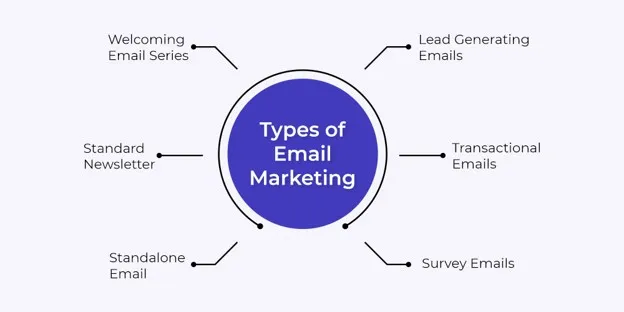
A welcome email is the first message a subscriber receives after joining your email list. It creates the first impression of your business and introduces new subscribers to your products, services, or content. A good welcome email should thank subscribers for joining, explain what they can expect from future emails, and encourage them to take the next step, such as visiting your website or exploring your products.
Advantages
- Creates a positive first impression
- Builds trust from the beginning
- Introduces your brand values
- Encourages early engagement
- Helps subscribers understand your business
Best Audience
- New subscribers
- New customers
- Free trial users
- New community members
Example
Suppose someone signs up for your online course newsletter. Your welcome email can thank them for subscribing, provide a free learning resource, introduce your most popular courses, and invite them to follow your social media pages. For SaaS businesses, see our onboarding email best practices.
Email Newsletters
Newsletters help businesses stay connected with subscribers by sharing useful content on a regular schedule. Instead of focusing only on sales, newsletters educate, inform, and keep your audience engaged. Many companies send newsletters weekly, every two weeks, or once a month depending on their content schedule.
A newsletter may include:
- New blog articles
- Industry updates
- Company news
- Product tips
- Customer success stories
- Upcoming events
Advantages
- Builds long-term relationships
- Keeps your brand visible
- Drives repeat website visits
- Shows your expertise
- Increases customer loyalty
Best Audience
- Existing subscribers
- Blog readers
- Customers
- Industry professionals
Example
A software company may send a monthly newsletter featuring new product updates, helpful tutorials, customer stories, and answers to common questions. Learn how to create effective newsletters.
Promotional Emails
Promotional emails encourage subscribers to purchase a product or service. Businesses often use them to announce discounts, limited-time offers, product launches, or special events. Although promotional emails focus on sales, they should still provide value. Clearly explain why the offer matters and what problem it solves instead of simply asking customers to buy.
Advantages
- Generates immediate sales
- Promotes new products
- Creates urgency
- Encourages repeat purchases
- Supports seasonal campaigns
Best Audience
- Existing customers
- Interested prospects
- Loyal subscribers
- Previous buyers
Example
An online clothing store may send a weekend promotion offering 25% off selected products with free shipping for orders placed before Sunday night.
See how top brands run promotional campaigns: Black Friday Email Marketing Growth Strategy Guide
Improve your promotional subject lines: 10 High-Converting Black Friday Email Subject Lines
Abandoned Cart Emails
Many online shoppers add products to their cart but leave without completing the purchase. Abandoned cart emails remind customers about those products and encourage them to return.
These emails usually include product images, prices, and a direct link back to the shopping cart.
Some businesses also offer free shipping or a small discount to encourage customers to complete their purchase.
Advantages
- Recovers lost sales
- Increases revenue
- Reminds customers before they forget
- Improves shopping experience
- Works automatically through automation
Best Audience
- Online shoppers
- E-commerce customers
- Customers who left items in their cart
Example
A customer adds running shoes to their cart but leaves the website. Two hours later, they receive an email reminding them that their cart is waiting, along with customer reviews and a checkout button. Follow our complete guide to abandoned cart recovery best practices.
Re-engagement (Win-Back) Emails
Some subscribers stop opening emails after a few months. Instead of removing them immediately, businesses often send re-engagement emails to rebuild interest. These emails remind subscribers about the benefits of staying connected and may include special offers, useful content, or a request to update their preferences. If subscribers remain inactive after several attempts, removing them helps maintain a healthier email list.
Advantages
- Reactivates inactive subscribers
- Improves list quality
- Increases customer retention
- Reduces subscriber loss
- Improves engagement rates
Best Audience
- Inactive subscribers
- Previous customers
- Long-term subscribers with low activity
Example
A fitness app notices that a subscriber has not opened emails for three months. The company sends a message with new workout plans and a limited-time membership discount to encourage them to return. Learn our 4-step customer win-back framework.
Transactional Emails
Transactional emails are triggered by customer actions rather than marketing schedules. These emails provide important information related to a transaction or account activity.
Examples include:
- Order confirmations
- Shipping notifications
- Password reset emails
- Invoice emails
- Account verification
- Payment receipts
Customers expect these emails to arrive quickly because they contain essential information.
Advantages
- Improves customer experience
- Builds trust
- Provides important updates
- Reduces support requests
- Keeps customers informed
Best Audience
- Customers
- Registered users
- Online shoppers
Example
After completing an online purchase, a customer immediately receives an order confirmation with payment details, estimated delivery time, and tracking information. Learn how to classify and stay compliant with transactional emails.
Survey and Feedback Emails
Customer feedback helps businesses improve products, services, and customer experiences. Survey emails invite subscribers to share their opinions after making a purchase or using a service.
Keep surveys short and explain why customer feedback matters. Longer surveys often receive fewer responses.
Advantages
- Collects valuable customer feedback
- Identifies improvement areas
- Increases customer satisfaction
- Shows customers that their opinions matter
- Supports product development
Best Audience
- Recent customers
- Service users
- Event attendees
- Long-term customers
Example
A restaurant sends a short survey after an online order asking customers to rate food quality, delivery speed, and overall satisfaction. Design survey emails that get higher response rates.
Seasonal and Holiday Campaigns
Seasonal campaigns help businesses connect with customers during holidays, shopping events, and special occasions throughout the year.
Common examples include:
- Black Friday
- Cyber Monday
- Christmas
- New Year
- Valentine's Day
- Mother's Day
- Back-to-School
- Summer Sales
These campaigns often generate higher engagement because customers actively look for special offers during these periods.
Advantages
- Increases seasonal sales
- Creates excitement
- Matches customer buying behavior
- Encourages limited-time purchases
- Improves campaign relevance
Best Audience
- Existing customers
- Subscribers
- Holiday shoppers
Example
An electronics retailer launches a Black Friday campaign featuring exclusive discounts, countdown timers, and early access for newsletter subscribers.
Behavioral Trigger Emails
Behavioral trigger emails are automatically sent after specific customer actions. These campaigns deliver highly relevant messages because they respond to real customer behavior.
Common triggers include:
- Visiting a pricing page
- Downloading a guide
- Watching a webinar
- Completing a purchase
- Viewing a product several times
- Leaving items in a wishlist
Since these emails relate directly to customer actions, they often achieve higher engagement than general campaigns.
Advantages
- Sends highly relevant messages
- Improves customer experience
- Increases conversions
- Supports automation
- Saves marketing time
Best Audience
- Active website visitors
- Existing customers
- Leads
- Free trial users
Example
A visitor downloads an SEO checklist from your website. The system automatically sends additional learning resources followed by an invitation to schedule a product demonstration.
Announcement Emails
Announcement emails share important business updates with subscribers. These updates may include product launches, company news, feature releases, office openings, policy updates, partnerships, or upcoming events. These emails should clearly explain what has changed and why it matters to the reader.
Advantages
- Keeps customers informed
- Builds transparency
- Generates interest
- Supports product launches
- Increases customer engagement
Best Audience
- Existing customers
- Subscribers
- Business partners
- Community members
Example
A software company launches a new reporting dashboard. The announcement email explains the new features, includes screenshots, highlights customer benefits, and links to a detailed product guide.
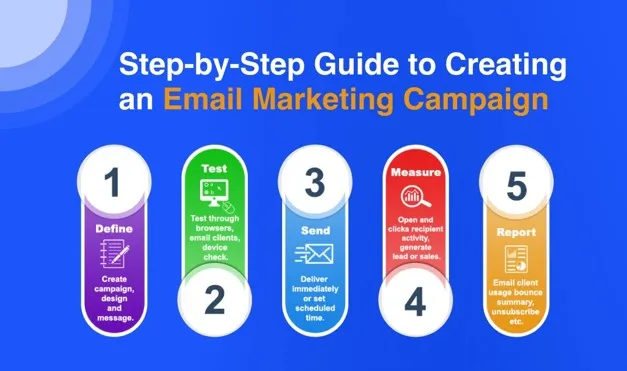
How to Do Email Marketing (What are the 5 steps of email marketing)
Starting your first email campaign may seem difficult, but the process becomes much easier when you break it into simple steps. You do not need a large team or years of experience to begin. With the right planning, the right tools, and a clear understanding of your audience, you can launch campaigns that help you build relationships and achieve your business goals. The four steps below explain how to start from scratch and continue improving your campaigns over time.
Step 1: Define Your Goals
Every successful campaign begins with a clear objective. Without a goal, it becomes difficult to measure whether your campaigns are successful. Your goals should match your overall business objectives.
Common goals include:
| Goal | Example KPI |
|---|---|
| Increase sales | Revenue generated |
| Generate leads | New subscribers |
| Improve customer retention | Repeat purchases |
| Build brand awareness | Open rate |
| Increase website traffic | Click-through rate |
| Promote new products | Product sales |
Choose one primary goal for each campaign. Trying to achieve multiple unrelated objectives often reduces performance.
For example:
- A welcome email should focus on introducing your business.
- A promotional email should encourage purchases.
- A newsletter should educate and build trust.
Keeping one clear objective helps readers understand what action you expect them to take.
Step 2: Choose an Email Service Provider (ESP)
An Email Service Provider (ESP) is the platform you use to create, send, automate, and measure your email campaigns. While it is possible to send emails manually from a regular email account, that approach is not practical for business communication. Some businesses only need simple newsletters, while others require advanced automation, customer segmentation, or e-commerce integrations.
Look for These Features
- Easy drag-and-drop email builder
- Ready-made email templates
- Contact management
- List segmentation
- Marketing automation
- Performance reporting
- Mobile-friendly email previews
- Integration with your website or online store
- Spam and compliance support
As your business grows, these features become more valuable because they save time and improve campaign performance.
Consider Your Budget
Many providers offer free plans for small subscriber lists. These plans usually include basic email templates, subscriber management, and reporting. As your list grows, you can upgrade to access more advanced features.
Instead of choosing the cheapest platform, compare what each plan includes. Sometimes paying slightly more gives you automation and reporting features that save many hours of manual work.
Think About Future Growth
Changing platforms after building a large subscriber list can take time. Choose an ESP that can support your business as it grows.
Ask yourself questions like:
- Can it handle a larger subscriber list?
- Does it support automation?
- Can it connect with my CRM?
- Does it work with Shopify, WooCommerce, or other platforms I use?
- Does it provide reliable customer support?
Taking time to answer these questions now can prevent problems later.
Step 3: Build Your Email List (Legally and Ethically)
Your subscriber list is one of your most valuable business assets. However, the quality of your list matters much more than its size. A small list of interested subscribers usually produces better results than a large list filled with people who never wanted your emails. Always collect email addresses with permission. Subscribers should clearly understand what they are signing up for and what type of emails they will receive.
Ways to Grow Your Email List
Instead of purchasing email addresses, focus on attracting people who are genuinely interested in your business.
Some effective methods include:
- Website signup forms
- Blog subscription boxes
- Free guides or eBooks
- Discount coupons
- Webinar registrations
- Online courses
- Product demos
- Event registrations
- Customer account creation
- Social media signup links
Each signup opportunity should clearly explain the value subscribers will receive.
For example, instead of writing: "Join our newsletter."
You can write: "Receive weekly business tips, marketing ideas, and exclusive offers directly in your inbox."
A clear value proposition encourages more people to subscribe.
Buying an email list may seem like a quick way to grow your audience, but it often creates more problems than benefits.
Purchased lists usually contain people who never requested emails from your business. As a result, they are more likely to ignore your messages, unsubscribe, or mark them as spam.
This can reduce your sender reputation and make future campaigns less successful.
A permission-based list grows more slowly, but it creates stronger engagement and better long-term results.
Use Double Opt-In
Many businesses use double opt-in to confirm subscriptions.
The process works like this:
- A visitor enters their email address.
- They receive a confirmation email.
- They click a confirmation link.
- They join the mailing list.
Although this method may slightly reduce the number of subscribers, it improves list quality because every subscriber confirms that they genuinely want to receive emails.
Keep Your List Organized
As your list grows, organize subscribers into different groups based on useful information such as:
- New subscribers
- Existing customers
- Purchase history
- Location
- Interests
- Website activity
Organized subscriber lists make future campaigns much more relevant.
Step 4: Set Up Your First Campaign
Once your email list is ready, you can create your first campaign. Avoid trying to include everything in one email. A simple, focused message usually performs better than a long email covering several unrelated topics.
Start with One Clear Goal
Every campaign should have one primary objective.
Examples include:
- Introduce your company
- Promote one product
- Share a blog article
- Invite people to an event
- Offer a limited-time discount
- Encourage webinar registration
Having one goal makes your email easier to understand.
Write an Effective Subject Line
The subject line is the first thing subscribers see. If it does not catch their attention, they may never open your email.
Good subject lines are: Clear, Honest, Short, Relevant, Specific
Examples include:
- Welcome to Our Community
- Your Free Marketing Guide Is Ready
- New Features Available Today
- Save 20% This Weekend Only
Avoid misleading subject lines because they reduce trust.
Write Helpful Email Content
Your email should answer an important question: "Why should someone read this?"
Focus on providing useful information before asking readers to take action.
A simple email structure works well:
- Friendly greeting
- Short introduction
- Main message
- Clear call-to-action
- Contact information
Keep paragraphs short because many people read emails on mobile devices.
Include One Call-to-Action (CTA)
Every campaign should guide readers toward one action.
Examples include:
- Read the article
- Download the guide
- Shop now
- Register today
- Start your free trial
- Book a consultation
If you include too many different actions, subscribers may not know what to do.
Design for Mobile Devices
Today, a large percentage of emails are opened on smartphones.
Before sending your campaign, check that:
- Text is easy to read.
- Buttons are large enough to tap.
- Images load correctly.
- Links work properly.
- Layout adjusts to smaller screens.
A mobile-friendly design improves both engagement and user experience.
Test Before Sending
Never send an email without reviewing it first.
Check:
- Grammar
- Spelling
- Personalization fields
- Broken links
- Images
- Button functionality
- Mobile layout
Sending a test email to yourself or your team helps identify mistakes before subscribers see them.
Step 5: Analyze, Optimize, and Repeat
Sending an email is only the beginning. The real improvement happens when you study campaign performance and use those insights to improve future emails.
Most email platforms provide detailed reports after every campaign.
Important Metrics to Track
Focus on metrics that show how subscribers interact with your emails.
| Metric | What It Measures |
|---|---|
| Delivery Rate | Emails successfully delivered |
| Open Rate | Percentage of recipients who opened the email |
| Click-Through Rate (CTR) | Percentage who clicked a link |
| Conversion Rate | Percentage who completed the desired action |
| Bounce Rate | Emails that could not be delivered |
| Unsubscribe Rate | Subscribers who left your list |
| Spam Complaint Rate | Emails reported as spam |
Looking at these metrics together gives you a better understanding of campaign performance.
Learn from Every Campaign
After reviewing your results, ask questions such as:
- Which subject line performed better?
- Which links received the most clicks?
- Did subscribers complete the desired action?
- Which audience segment responded best?
- Was the email sent at the right time?
Small improvements made consistently often produce significant long-term results.
Test Different Ideas
Successful marketers regularly test different versions of their campaigns.
Common A/B tests include:
- Subject lines
- CTA button text
- Images
- Email length
- Send time
- Personalization
- Layout
Test only one element at a time so you know what caused the improvement.
Maintain a Healthy Subscriber List
Review your subscriber list regularly.
Remove:
- Invalid email addresses
- Hard bounces
- Duplicate contacts
- Long-term inactive subscribers
Cleaning your list helps improve deliverability and ensures your reports remain accurate.
Continue Improving Your Strategy
Email marketing is not something you set up once and forget. Customer preferences change, business goals change, and industry trends continue to develop.
Review your strategy every few months by looking at:
- Subscriber growth
- Engagement trends
- Revenue generated
- Automation performance
- Customer feedback
- Campaign consistency
Regular improvements help your campaigns remain useful and relevant over time.
Email Marketing Best Practices
Learning the basics is only the first step. Once your campaigns are running, you should focus on improving them over time. Small changes can make a noticeable difference in open rates, click-through rates, conversions, and customer engagement. The following best practices will help you build stronger relationships with your subscribers while improving the overall performance of your campaigns.
Email List Building Strategies
A healthy subscriber list is the foundation of every successful campaign. Instead of focusing on collecting as many email addresses as possible, concentrate on attracting people who genuinely want to hear from your business. Offer something valuable in exchange for an email address. This encourages visitors to subscribe because they immediately receive a benefit.
Popular lead magnets include:
- Free eBooks
- Checklists
- Templates
- Discount codes
- Free trials
- Webinars
- Product demos
- Exclusive newsletters
Place signup forms where visitors can easily find them. Your homepage, blog posts, landing pages, checkout page, and website footer are all good locations. Keep your forms simple. Asking only for a name and email address usually increases signups. You can collect additional information later as subscribers interact with your business.
It is equally important to explain what subscribers will receive after joining. Setting clear expectations reduces future unsubscribe rates.
Avoid these common mistakes:
- Buying email lists
- Adding customers without permission
- Hiding the unsubscribe option
- Promising content you never deliver
- Collecting unnecessary personal information
Growing your list naturally may take more time, but it attracts subscribers who are far more likely to engage with your emails. Learn more about effective email list growth strategies.
Email List Segmentation
Not every subscriber has the same interests. Sending identical emails to everyone often leads to lower engagement because the content may not match what each subscriber wants. Segmentation divides your audience into smaller groups based on shared characteristics. This allows you to send more relevant content.
You can segment your subscribers using information such as:
- Age
- Location
- Language
- Industry
- Purchase history
- Website activity
- Products viewed
- Customer status
- Subscription source
- Engagement level
For example, imagine an online electronics store.
A first-time visitor may receive educational buying guides, while a repeat customer receives recommendations for accessories that match previous purchases. This targeted approach creates a better customer experience because each subscriber receives information that matches their interests.
Some useful audience segments include:
| Segment | Recommended Content |
|---|---|
| New subscribers | Welcome series and brand introduction |
| Existing customers | Product updates and recommendations |
| VIP customers | Exclusive offers and early access |
| Inactive subscribers | Re-engagement campaigns |
| Cart abandoners | Cart recovery reminders |
| Free trial users | Upgrade offers and tutorials |
Review your segments regularly because customer behavior changes over time.
Personalization Tactics
Personalization goes beyond adding someone's first name to an email. Modern email platforms allow businesses to create messages based on subscriber interests and behavior. The more relevant your content becomes, the more likely subscribers are to engage with it.
You can personalize emails by using:
- Customer name
- Company name
- Location
- Birthday
- Previous purchases
- Products viewed
- Shopping history
- Subscription preferences
- Website activity
For example, instead of sending the same promotion to every subscriber, an online bookstore can recommend books based on previous purchases. A travel company can suggest destinations that match a customer's earlier bookings.
Personalization can also improve automated campaigns.
Examples include:
- Birthday greetings with special offers
- Product recommendations after a purchase
- Follow-up emails after downloading a guide
- Renewal reminders before subscriptions expire
- Location-based event invitations
While personalization improves engagement, avoid using information that feels unnecessary or intrusive. Respect customer privacy and only use data collected with permission. Relevant emails help customers feel understood without becoming overly personal.
Email Design Best Practices
A well-designed email makes it easier for subscribers to read your message and take action. Good design is not about adding more graphics or animations. It is about making your content clear and easy to follow.
Keep the Layout Simple
A clean layout improves readability.
Your email should include:
- A clear headline
- Short paragraphs
- Plenty of white space
- Readable fonts
- Visible buttons
- Consistent branding
Avoid filling every section with images or large blocks of text.
Design for Mobile First
Most subscribers now read emails on smartphones. If your email is difficult to read on a small screen, many readers will leave before finishing it.
Before sending, check that:
- Text is readable without zooming.
- Images resize correctly.
- Buttons are easy to tap.
- Links work properly.
- Columns stack correctly on mobile devices.
Use Images Carefully
Images should support your message rather than replace it.
Always include descriptive alt text because some email clients block images by default.
Compress image sizes to reduce loading time without affecting quality.
Keep Branding Consistent
Your emails should match the look and feel of your website.
Maintain consistency in:
- Logo placement
- Brand colors
- Fonts
- Writing style
- Button styles
Consistent branding helps subscribers recognize your business immediately. Design templates that work across all email clients.
Subject Line Optimization
The subject line often determines whether someone opens your email. Even excellent content cannot produce results if subscribers never open the message.
An effective subject line should be:
- Clear
- Honest
- Relevant
- Short
- Easy to understand
Instead of trying to sound clever, explain what readers will gain by opening the email.
Good Examples
- Welcome to Our Community
- Your Order Has Been Shipped
- New Features Available Today
- Download Your Free Guide
- Summer Sale Starts Now
Avoid These Mistakes
- Writing in ALL CAPITAL LETTERS
- Using too many emojis
- Making unrealistic promises
- Creating misleading curiosity
- Adding excessive punctuation
Examples such as:
"OPEN THIS NOW!!!!!"
or
"You Won't Believe This!!!"
may increase spam complaints and reduce trust.
Test Different Subject Lines
A/B testing allows you to compare two subject lines with a small group of subscribers before sending the winning version to everyone else. Testing helps you understand what your audience responds to instead of relying on assumptions. Read our guide to writing better subject lines.
Send Time Optimization
Even a well-written email may receive fewer opens if it arrives when subscribers are busy or asleep. There is no universal "best" time because every audience behaves differently.
Instead of following general recommendations, study your own campaign data.
Consider factors such as:
- Customer location
- Time zones
- Industry
- Work schedules
- Buying habits
- Previous engagement
For example:
- Business audiences often respond during working hours.
- Online shoppers may engage more during evenings or weekends.
- International audiences may require different sending schedules.
Many email platforms automatically suggest the best delivery times based on previous subscriber activity.
Maintain a Consistent Schedule
Subscribers appreciate consistency. If you usually send a newsletter every Tuesday morning, continue following that schedule whenever possible. Sudden changes can reduce engagement because readers no longer know when to expect your emails.
Avoid Sending Too Frequently
Sending emails too often can lead to:
- Higher unsubscribe rates
- More spam complaints
- Lower engagement
- Subscriber fatigue
At the same time, sending emails too rarely may cause subscribers to forget your business.
The right frequency depends on your audience and the value of your content.
Monitor Performance Regularly
Review your reports after every campaign.
Pay attention to:
- Open rate
- Click-through rate
- Conversion rate
- Unsubscribe rate
- Spam complaints
If engagement begins to decline, adjust your schedule and continue testing.
Professional communication also plays an important role in building customer trust.
Professional email etiquette builds trust: 2026 Complete Guide to Business Email Etiquette
Don't overlook email signatures as a marketing channel: High-Converting Email Signature Marketing Guide
How to Choose the Right Email Marketing Tools
Choosing the right email marketing tool is an important decision because it affects how easily you can create campaigns, manage subscribers, automate emails, and measure results. The best platform is not always the one with the most features. Instead, choose one that matches your business size, budget, and marketing goals. If you are just getting started, look for a tool that is easy to use and offers room to grow. As your business expands, you may need more advanced automation, detailed reporting, or integrations with other software.
Key Criteria for Evaluation
Before selecting a platform, compare several important features instead of focusing only on price.
Ease of Use
A simple interface saves time and reduces the learning curve. Look for drag-and-drop editors, ready-made templates, and an organized dashboard.
Automation Features
Automation helps you send emails based on customer actions instead of sending every message manually.
Useful automation features include:
- Welcome email sequences
- Abandoned cart reminders
- Birthday emails
- Re-engagement campaigns
- Product recommendation emails
List Management
Your platform should make it easy to organize subscribers using tags, groups, and segments.
Good list management allows you to send more relevant campaigns and improve engagement.
Reporting and Analytics
Reports help you understand how your campaigns perform.
Choose a platform that tracks:
- Open rates
- Click-through rates
- Conversion rates
- Bounce rates
- Unsubscribe rates
- Spam complaints
Clear reports help you improve future campaigns.
Integrations
Many businesses already use tools such as Shopify, WooCommerce, WordPress, Salesforce, HubSpot, or Google Analytics.
Choose a platform that connects easily with your existing software.
Deliverability
Deliverability measures how successfully your emails reach subscriber inboxes instead of spam folders.
A reliable provider follows industry best practices and provides tools that help maintain a good sender reputation.
Customer Support
Reliable customer support becomes valuable when you face technical issues or need help setting up automation.
Check whether support is available through:
- Live chat
- Phone
- Help center
- Video tutorials
- Community forums
Brief Comparison of Popular Email Marketing Tools
The table below compares several widely used platforms.
| Tool | Best For | Free Plan | Automation | Ease of Use |
|---|---|---|---|---|
| Aurora SendCloud | Businesses of different sizes | Yes | Advanced | Easy |
| Mailchimp | Beginners and small businesses | Yes | Good | Very Easy |
| Brevo | Small businesses | Yes | Good | Easy |
| Kit (formerly ConvertKit) | Creators and bloggers | Yes | Advanced | Easy |
| ActiveCampaign | Growing businesses | Limited Trial | Advanced | Moderate |
| MailerLite | Beginners | Yes | Good | Very Easy |
Each platform offers different strengths. Compare features carefully before making your decision.
Learn how to compare email marketing platforms.
Frequently Asked Questions
Many beginners face similar challenges when starting email marketing. The answers below cover some of the most common questions and help you avoid mistakes that could affect your campaigns.
Do I really need to set up email authentication (SPF, DKIM, and DMARC)?
Yes. Email authentication helps verify that your emails are actually coming from your domain. It improves deliverability, protects your domain from spoofing, and increases the chances that your emails reach the inbox instead of the spam folder. Most modern email service providers provide documentation for setting up SPF, DKIM, and DMARC records.
Can I buy an email list to get started faster?
No. Buying an email list is not recommended. People on purchased lists have not given your business permission to contact them, which often results in low engagement, high unsubscribe rates, spam complaints, and poor sender reputation. Instead, grow your list through signup forms, newsletters, webinars, downloadable resources, and other permission-based methods.
Why is my email deliverability dropping, and what should I watch?
Several factors can reduce deliverability, including poor list quality, high bounce rates, spam complaints, misleading subject lines, and sending emails to inactive subscribers. Monitor important metrics such as delivery rate, bounce rate, spam complaints, and engagement. Regularly cleaning your email list and following best practices can help maintain a strong sender reputation.
How often should I send marketing emails without causing subscriber fatigue?
There is no single schedule that works for every business. The ideal frequency depends on your audience, industry, and the value of your content. For many businesses, sending one newsletter each week or every two weeks works well. Monitor engagement, unsubscribe rates, and spam complaints to determine whether your audience is comfortable with your current schedule. Consistency is usually more important than sending large numbers of emails.
Why does my email look broken on mobile devices?
Many email layout problems happen because templates are not responsive or images are too large. Before sending any campaign, test your email on different devices and screen sizes. Make sure text remains readable, buttons are easy to tap, and images resize correctly. Most email service providers include mobile preview tools that help identify formatting problems before sending.
How often should I clean my email list?
Review your subscriber list regularly. Many businesses perform list cleaning every three to six months, although businesses with large mailing lists may do it more frequently. Remove invalid email addresses, hard bounces, and subscribers who remain inactive after several re-engagement attempts. Keeping your list clean improves engagement and deliverability.
What should I do if unsubscribe or spam complaint rates suddenly increase?
Start by reviewing your recent campaigns.
Ask yourself:
- Did you send emails too frequently?
- Was your subject line misleading?
- Was the content relevant to your audience?
- Did you send the campaign to the correct segment?
If complaints continue increasing, reduce sending frequency, improve segmentation, and review your signup process to ensure subscribers clearly understand what they are joining.
Do I really need to test my emails before sending?
Yes. Testing helps identify problems before your subscribers see them.
Always check:
- Grammar and spelling
- Personalization fields
- Links
- Images
- Call-to-action buttons
- Email formatting across different email clients
Ready to Start Your Email Marketing Journey?
Starting your first campaign does not have to be complicated. With the right strategy, a quality subscriber list, and a reliable email platform, you can begin building stronger customer relationships from day one. Focus on providing value instead of sending constant sales messages. Learn about your audience, create useful content, monitor your campaign performance, and continue improving over time. Small improvements made consistently often produce much better long-term results than trying to change everything at once. If you're looking for a platform that combines easy campaign creation, automation, subscriber management, and detailed reporting, Aurora SendCloud provides the tools needed to launch and manage your email campaigns with confidence. Whether you're sending your first newsletter or building advanced automated workflows, choosing the right platform makes the entire process easier.